711Proxy & FlashID Setup Guide: How to Quickly Configure Your Proxy
In today’s online environment, more and more businesses rely on stable, high-quality proxy IPs to ensure reliable network connectivity. An excellent proxy service should not only provide a vast pool of IP resources but also deliver stability, flexibility, and cost efficiency.
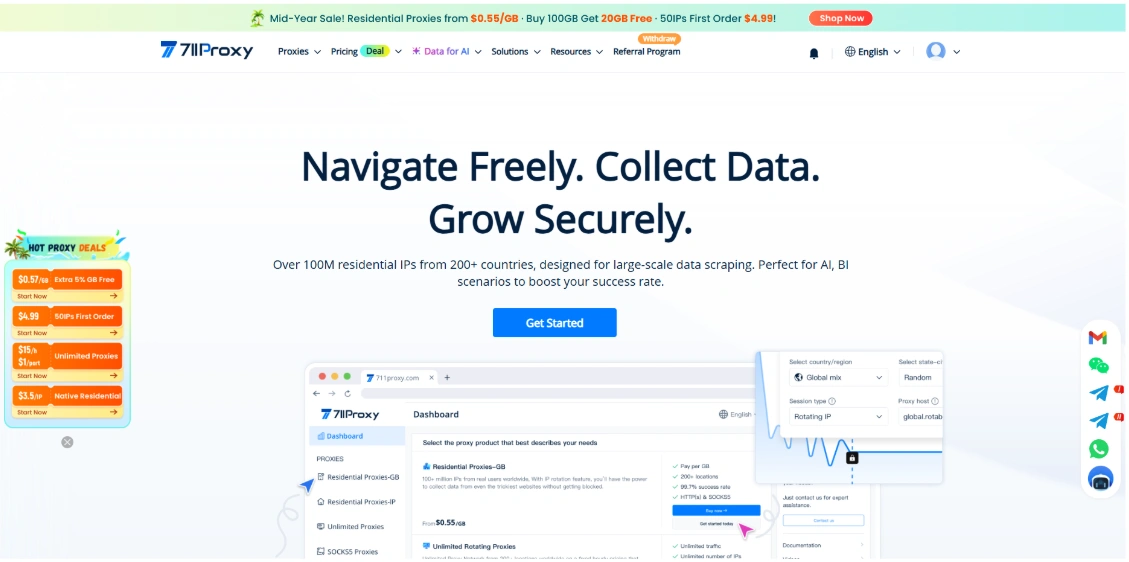
711Proxy is a professional global residential proxy provider offering enterprise-grade proxy services backed by over 100 million real residential IPs across 200+ countries and regions. With high-quality IP resources and exceptional availability, 711Proxy helps businesses maintain reliable and secure network connections worldwide.
To meet different business needs, 711Proxy offers a comprehensive range of proxy solutions, including:
- Rotating Residential Proxies (Traffic-Based): Access real residential IPs worldwide with automatic IP rotation, a 99.7% success rate, and pricing starting at $0.55/GB.
- Dedicated Static Residential Proxies: Enjoy exclusive, long-term residential IPs with unlimited bandwidth, 100% dedicated usage, and unlimited renewal options for stable, long-term operations.
- Unlimited Residential Proxies (Bandwidth Plan): Unlimited traffic, unlimited IP usage, no concurrency limits, and customizable bandwidth—ideal for high-volume workloads.
- Unlimited Residential Proxies (Port Plan): Charged by port, supporting flexible IP rotation every 3–30 minutes with access to proxy nodes in 190+ countries.
- Residential Proxies (IP-Based): Pay only for successfully extracted IPs, with pricing starting at $0.03/IP. Supports country- and state-level targeting, and purchased IP quotas never expire.
- SOCKS5 Proxies: Full SOCKS5 protocol support with daily IP updates, providing both stable connections and flexible IP rotation.
With its diverse proxy products, flexible pricing models, and extensive global residential IP network, 711Proxy serves individuals, teams, and enterprises across a wide range of use cases, including cross-border e-commerce, social media management, online advertising, web scraping, market research, and more.
In this guide, you’ll learn how to configure 711Proxy with FlashID and complete your proxy setup in just a few minutes.
Why Use 711Proxy with FlashID?
FlashID helps users create isolated browser environments, while proxy IPs provide unique network identities. Combining the two enables secure and efficient multi-account management by ensuring both browser fingerprints and network identities remain independent.
711Proxy provides FlashID users with reliable and stable proxy connections. Whether you need a long-term static IP for account management or rotating residential IPs for large-scale tasks, you can choose the proxy solution that best fits your business requirements.
Before You Begin
Before starting, make sure you have:
- A FlashID account
- A 711Proxy account
- An active 711Proxy proxy plan
This tutorial uses **Rotating Residential Proxies **as an example. The setup process is nearly identical for other 711Proxy proxy products.
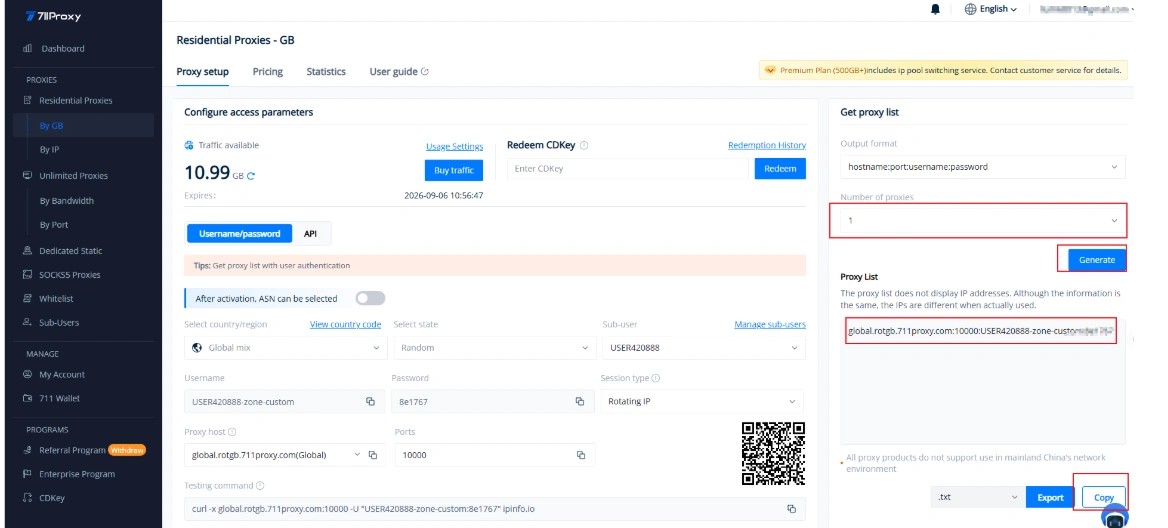
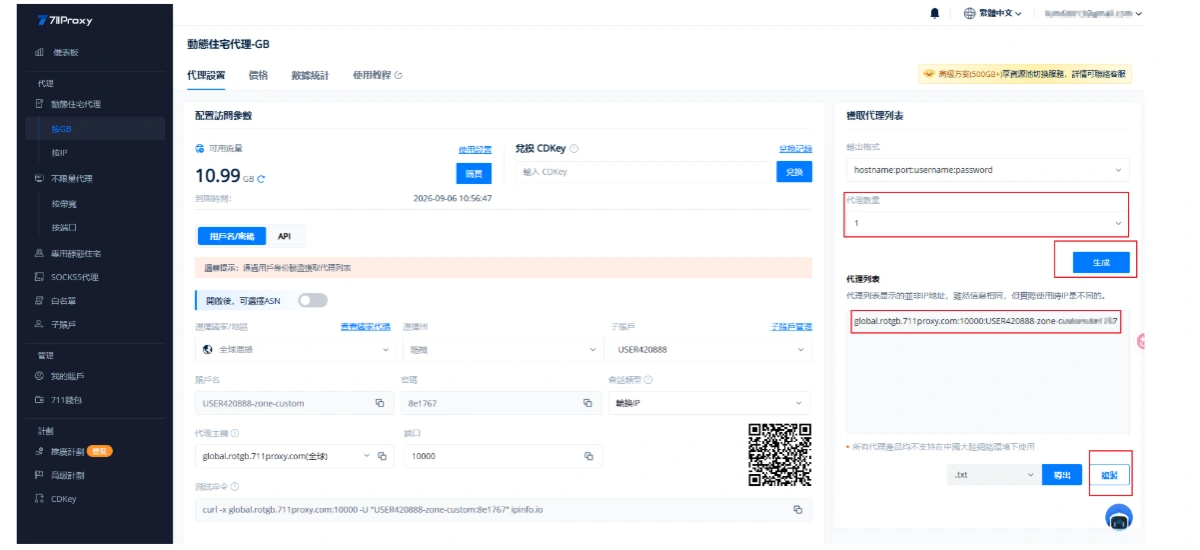
Step 1: Get Your 711Proxy Proxy Credentials
Log in to your 711Proxy dashboard.
Navigate to your purchased proxy product, select the desired country or region based on your business needs, and generate your proxy credentials.
You’ll receive the following information:
- Proxy Host
- Port
- Username
- Password
You’ll need these credentials when configuring FlashID.
Step 2: Create a Browser Profile in FlashID
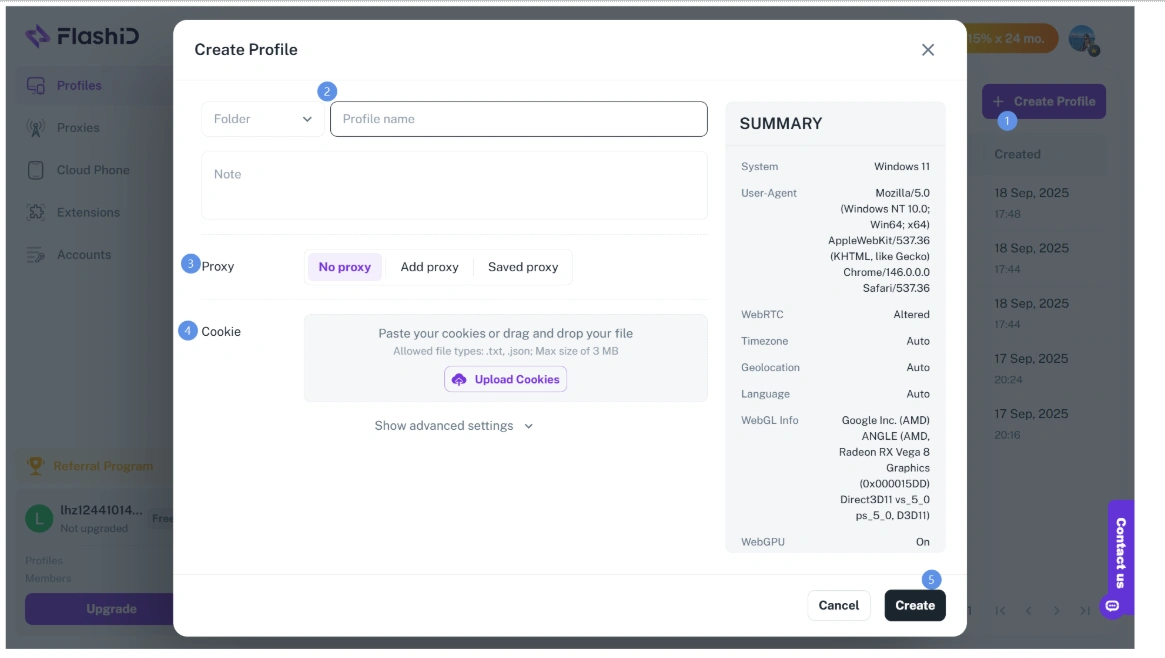
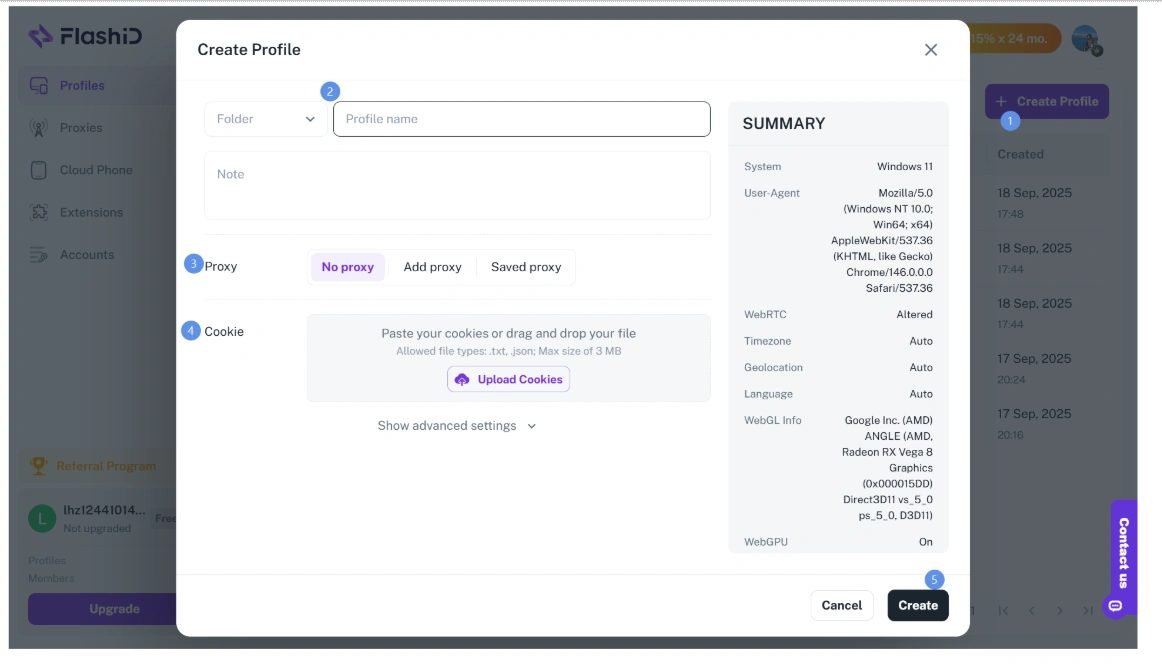
Open FlashID, create a new browser profile, and navigate to the Proxy settings page.
Step 3: Enter Your Proxy Information
On the browser configuration page in FlashID, enter the following information:
- Select the proxy type (HTTP or SOCKS5)
- Enter the Proxy Host
- Enter the Proxy Port
- Enter the Username
- Enter the Password
Double-check that all information is entered correctly before proceeding.
Step 4: Test the Proxy Connection
Click the Test button in FlashID.
If everything is configured correctly, FlashID will confirm that the proxy connection is successful.
This indicates that your browser profile is now connected to the residential proxy provided by 711Proxy.
Step 5: Launch the Browser
Save your configuration and launch the browser profile.
It’s recommended to visit any IP checking website to verify that your current IP address has changed to the configured 711Proxy residential proxy IP.
Your proxy setup is now complete.
Best Practices
For the best proxy experience, we recommend:
- Choose proxy locations based on your target market or business requirements.
- Use Static Residential Proxies when you need to maintain the same network identity over an extended period.
- Use Rotating Residential Proxies when automatic IP rotation is required.
- Always test your proxy connection before starting your tasks.
- Regularly monitor your proxy status to ensure stable network performance.
Conclusion
FlashID creates isolated browser environments, while 711Proxy provides high-quality residential proxy IPs across the globe. Together, they deliver a stable, flexible, and secure solution for a wide variety of online operations.
With over 100 million real residential IPs covering 200+ countries and regions, support for HTTP and SOCKS5 protocols, and a comprehensive product lineup—including Rotating Residential Proxies, Static Residential Proxies, and Unlimited Residential Proxies—711Proxy can meet the diverse proxy requirements of businesses of all sizes.
After completing the above configuration, you’ll be ready to use 711Proxy within FlashID, enabling a fast, reliable, and efficient browsing experience for your business operations.
711Proxy 与 FlashID 配置教程:如何快速完成代理设置
在如今的网络环境中,越来越多的业务需要稳定、高质量的代理 IP 来保障网络连接的可靠性。而一款优秀的代理服务,不仅需要拥有丰富的 IP 资源,更需要兼顾稳定性、灵活性以及成本控制。
711Proxy 是一家专注于全球住宅代理服务的专业代理 IP 提供商,拥有覆盖 200+ 国家和地区、超 1 亿真实住宅 IP 资源,为全球用户提供高纯净、高可用率的企业级代理服务。
为了满足不同业务需求,711Proxy 提供完整的产品矩阵,包括:
- 动态住宅代理(按流量计费):覆盖全球真实家庭网络,支持自动 IP 轮换,请求成功率高达 99.7%,价格低至 $0.55/GB。
- 独享静态住宅代理:提供长期固定的真实住宅 IP,100% 独享,不限流量,支持无限续期,适合长期稳定使用。
- 不限量代理(高带宽):套餐期间不限流量、不限 IP 数量、无并发限制,可自定义带宽,适用于高流量业务。
- 不限量代理(端口):按端口计费,支持 3–30 分钟灵活轮换 IP,可自由选择全球 190+ 国家节点。
- 住宅动态代理(按 IP 提取):按成功提取 IP 计费,价格低至**$0.03/IP** ,支持国家及州级定位,套餐额度永久有效。
- SOCKS5 代理:全面支持 SOCKS5 协议,每日自动更新 IP,兼顾稳定连接与灵活轮换需求。
凭借丰富的代理类型、灵活的计费模式以及覆盖全球的住宅 IP 网络,711Proxy 可以满足个人用户、团队以及企业的多种网络访问需求,也可以满足跨境电商、社交媒体运营、广告、数据采集和市场调研等不同业务场景的需求。
本文将介绍如何将 711Proxy 与 FlashID 搭配使用,帮助您快速完成代理配置。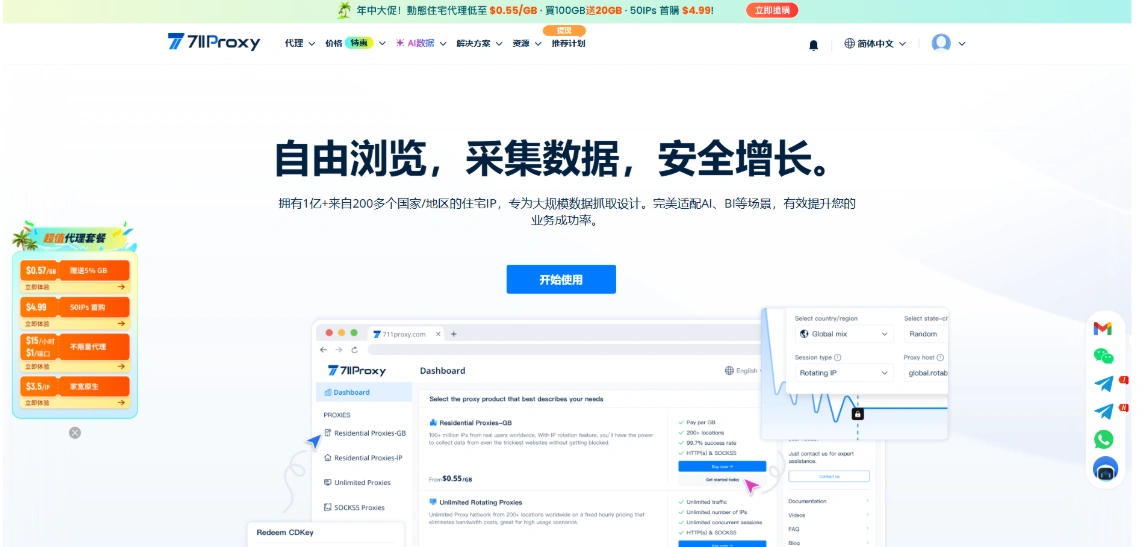
为什么要将 711Proxy 与 FlashID 搭配使用?
FlashID 可帮助用户创建独立的浏览器配置环境,而代理 IP 则提供独立的网络身份。只有将两者结合使用,用户才能真正实现安全高效的多账号操作。
711Proxy为FlashID 用户提供稳定可靠的代理连接。无论用户需要长期固定IP进行账户操作,还是需要频繁更换IP处理大规模任务,都可以根据自身业务需求灵活选择最合适的代理方案。
使用前准备
开始之前,请准备以下内容:
- FlashID 账号
- 711Proxy 账号
- 已购买对应的代理套餐
本文以 动态住宅代理 为例进行演示,其他代理产品配置方式基本一致。
第一步:获取 711Proxy 代理信息
登录 711Proxy 后台。
进入已购买的代理产品页面,根据业务需求选择对应国家或地区,并生成代理信息。
随后即可获取以下内容:
- Proxy Host(代理主机)
- Port(端口)
- Username(用户名)
- Password(密码)
后续在 FlashID 中需要填写这些信息。
第二步:在 FlashID 中创建浏览器环境
打开 FlashID,创建一个新的浏览器环境,进入 代理 设置页面。
第三步:填写代理信息
在 FlashID 浏览器配置页面上,填写相应信息:
· 选择代理类型(HTTP 或 SOCKS5)
· 输入代理主机
· 输入代理端口
· 输入用户名
· 输入密码
填写完成后,确认信息无误。
第四步:检测代理连接
点击 FlashID 中的 测试 按钮。
如果配置正确,系统会提示代理连接成功。
此时说明浏览器已经成功连接至 711Proxy 提供的住宅代理 IP。
第五步:启动浏览器
保存配置后,启动浏览器环境。
建议打开任意 IP 查询网站,确认当前显示的 IP 地址已经变为所配置的 711Proxy 代理 IP。
至此,代理配置已经完成。
使用建议
为了获得更稳定的代理体验,建议:
- 根据目标业务选择对应国家或地区节点。
- 长期保持同一网络环境时,可选择静态住宅代理。
- 需要自动切换 IP 时,可选择动态住宅代理。
- 配置完成后,建议先进行代理连通性测试。
- 定期检查代理状态,确保网络连接稳定。
总结
FlashID 可以帮助用户创建独立的浏览器环境,而 711Proxy 则提供覆盖全球的高质量住宅代理 IP,两者结合能够为用户提供更加稳定、灵活的网络连接方案。
711Proxy 拥有超过 1 亿真实住宅 IP、覆盖 200+ 国家和地区,支持 HTTP、SOCKS5 等多种协议,并提供动态住宅代理、静态住宅代理、不限量代理等丰富产品,可满足不同业务对于代理资源的多样化需求。
完成以上配置后,即可快速在 FlashID 中使用 711Proxy 代理,实现稳定、高效的网络访问体验。
You May Also Like


