FlashID Antidetect Browser is one of the strongest Dolphin Anty alternatives in 2026 for teams that need more than desktop browser profiles. Dolphin Anty remains a capable antidetect browser for affiliate marketing, media buying, and browser-based multi-accounting, but FlashID is better suited for teams that need browser profiles, cloud phones, proxies, automation, and collaboration in one platform.
Key Takeaways
- Dolphin Anty is still a solid browser-first antidetect tool. It works well for users who mainly need browser profiles, proxy setup, fingerprint customization, bulk actions, and team profile sharing.
- Users look for Dolphin Anty alternatives when their workflow expands beyond desktop browsing. Mobile app operations, cloud phone environments, stronger workspace control, built-in proxy access, and repeatable team workflows become more important in 2026.
- FlashID Antidetect Browser stands out by connecting browser profiles, cloud phones, proxies, and team workflows in one platform instead of making users rely on separate tools.
- The better choice depends on your workflow. Dolphin Anty is suitable for browser-based operations, while FlashID is a stronger option for teams that want a more complete browser + mobile + proxy + collaboration setup.
What Dolphin Anty Does Well
Dolphin Anty is a long-established antidetect browser built for multi-account management. It is mainly positioned for browser-based workflows, including advertising platforms, social media management, web scraping, marketing, and affiliate operations. It is especially familiar to affiliate marketers and media buyers who need to create, warm up, and run accounts across many browser profiles.
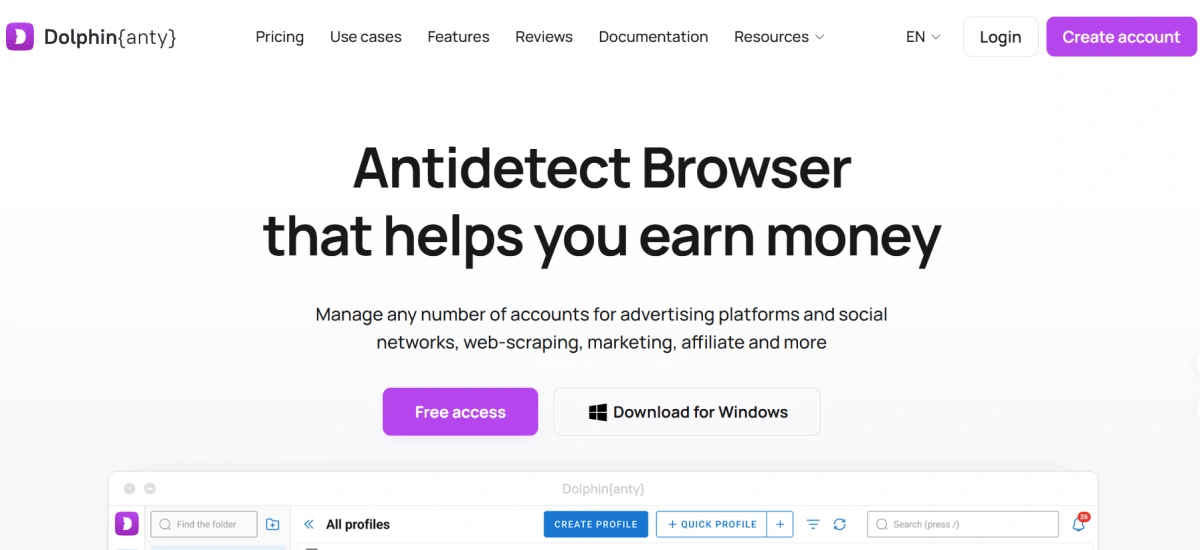
Its biggest strength is the browser-profile workflow. Users can create separate profiles, organize them with tags, statuses, and notes, perform mass actions, switch accounts, and manage groups of profiles. Dolphin Anty also offers a synchronizer that repeats actions from a master profile across other profiles, which can reduce repetitive work for teams handling many accounts.
Dolphin Anty also provides fingerprint customization. With Dolphin Anty, users can create browser profiles quickly using ready-made fingerprints or manually adjust fingerprint settings when needed. The platform also supports browser fingerprint customization, team collaboration, profile synchronization, and API-based automation.
This makes Dolphin Anty a practical choice for many browser-first users. If your operation is mostly desktop-web based, your team already has reliable proxy suppliers, and you do not need cloud phone environments, Dolphin Anty can still be useful and efficient.
The limitation appears when the workflow becomes broader than browser profiles. In 2026, many multi-account teams are no longer working only inside websites.They may need mobile app access, cloud phone support, better team control, and a more scalable account management workflow. At that point, users often start comparing Dolphin Anty with a broader platform like FlashID.
Compare FlashID vs Dolphin Anty
Why Users Look for a Dolphin Anty Alternative in 2026
Dolphin Anty is still useful, but the multi-accounting market has changed. In 2026, many teams are no longer asking only one question:“Can this tool create browser profiles?” hey are asking a broader question:“Can this tool support our full account operation system?”
The reasons usually come from the gaps that appear when teams move from simple browser profile management to larger account operations.
1.Browser-only workflows are no longer enough
Many modern account workflows are no longer limited to desktop websites. Platforms such as TikTok, WhatsApp, Telegram, Instagram, e-commerce seller apps, and crypto apps often involve mobile-first behavior, app-based sessions, or mobile verification steps.
A desktop antidetect browser can help separate browser sessions, but it cannot fully replace a mobile device environment. This becomes a limitation when teams need to warm up accounts in apps, manage app-based sessions, install APKs, use Google Play, or operate multiple mobile accounts from one dashboard.
Dolphin Anty is mainly known as a desktop browser profile tool. It works well for browser-based account management, but when a team needs both web and app workflows, a broader platform with browser profiles and cloud phones can be more practical.
2.Proxy setup can add friction
Dolphin Anty allows users to add proxies, edit proxies, check proxy connections, and assign proxies to profiles. This is useful, but users still need to obtain proxies from external providers, judge proxy quality, manage vendor support, and make sure the IP location matches the account environment.
For experienced users, this is normal. For beginners and growing teams, it can create extra work. A poor proxy source can cause unstable sessions, unexpected blocks, or inconsistent account behavior. When the proxy provider is separate from the antidetect platform, after-sales support and troubleshooting may also become more fragmented.
3.Team scaling requires more than profile sharing
Dolphin Anty supports team sharing, permissions, folders, and profile transfer. These are useful features. However, larger teams may need a more complete operating structure: separate workspaces for different projects, permissions by business unit, reusable profile templates, browser + mobile resource control, and repeatable onboarding workflows.
When teams manage many clients, regions, platforms, or business lines, simple profile sharing may not be enough. They need a system that reduces confusion and keeps account environments, proxies, permissions, and tasks organized.
FlashID Antidetect Browser: A Strong Dolphin Anty Alternative
Dolphin Anty’s main weaknesses become clearer when teams need more than desktop browser profile management. Browser-only workflows, third-party proxy setup, limited mobile support, and basic team collaboration can create friction as account operations become larger and more complex.
FlashID is built to address these problems in one platform. It provides detailed profile and fingerprint settings, cloud phone support, team collaboration tools, proxy management, and a smoother user experience. The following sections explain how FlashID solves these problems and why it can be a strong Dolphin Anty alternative.
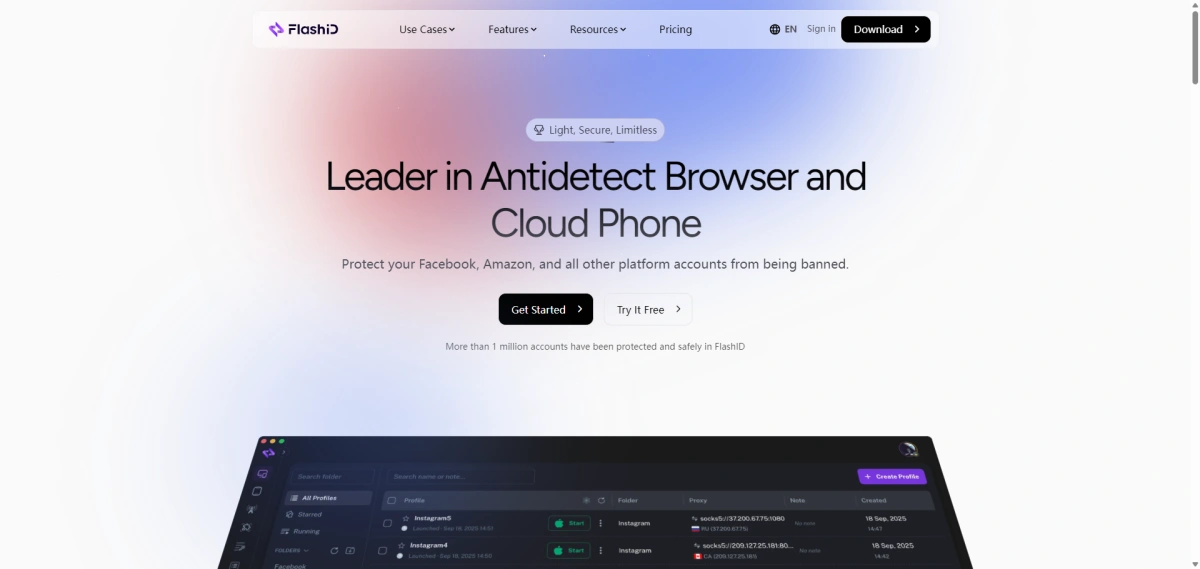
1. Profile Settings and Fingerprint Settings
Like Dolphin Anty, FlashID supports browser profile management and custom browser fingerprints. Each profile can be treated as a separate account environment with its own session data and identity signals.
This matters because any Dolphin Anty alternative must first cover the basics. Users switching from Dolphin Anty still need browser profile isolation, fingerprint configuration, proxy setup, and stable session management. FlashID covers these fundamentals while adding more operational features around them.
For example, FlashID gives users clear control over WebRTC and WebGL instead of relying only on randomization. WebRTC can be turned off, kept real, matched with the proxy, or manually configured. WebGL can also be kept real, randomized, or manually adjusted through values such as Vendor and Renderer.

2. Cloud Phone Support
Cloud phone is one of FlashID’s biggest differences from Dolphin Anty. FlashID combines fingerprint browser profiles with cloud phones, which makes it more suitable for teams that need both website and mobile app workflows.
Dolphin Anty is primarily a desktop antidetect browser. It does not offer the same native cloud phone workflow as FlashID.
FlashID combines fingerprint browser profiles with Android cloud phones. This allows teams to manage both web accounts and mobile app accounts in one system. This is important in 2026 because many account operations are no longer browser-only. Some platforms are mobile-first. Some login flows rely on app behavior. Some teams need to check how an account behaves in both a browser and a mobile environment.
With FlashID cloud phones, users can create independent Android environments, install apps, manage app-based accounts, and keep mobile device fingerprints separated. This is useful for TikTok, WhatsApp, Telegram, Instagram, mobile e-commerce apps, crypto apps, and other mobile-first platforms.
3. Team Collaboration: Window Sync, Bulk Operations, Workspace, and Profile Template
FlashID is especially strong for team workflows. It combines workspace, permission management, window sync, profile templates, account center, and team collaboration in one environment, helping teams organize profiles, assign access, and reduce repeated operational work.
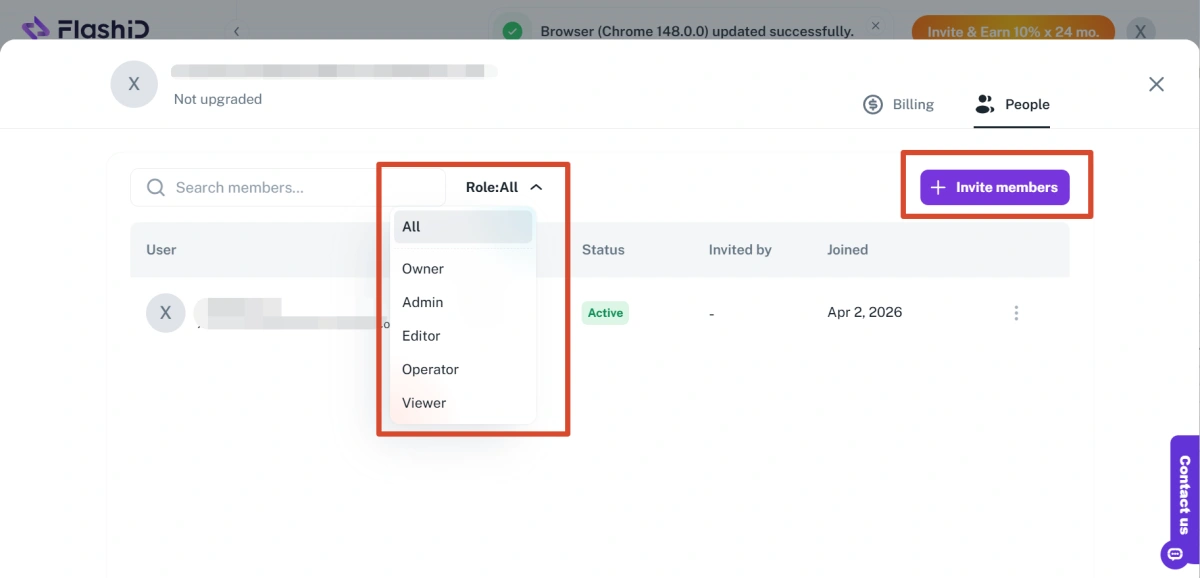
Workspace is useful when accounts need to be separated by project, client, country, department, or campaign. Instead of putting every profile into one shared list, teams can organize work more clearly inside different workspaces. Users can also invite members and assign different roles, such as Owner, Admin, Editor, Operator, or Viewer, so each person only gets the access they need. This helps reduce internal confusion and makes team account management easier to control.
Window sync helps operators handle repeated actions across multiple profiles more efficiently. Users can choose a master window and target windows, then synchronize actions such as opening the same page, clicking buttons, scrolling, typing, or switching tabs across several browser windows or cloud phone instances. Advanced settings also allow keyboard sync, mouse sync, click sync, scroll sync, movement path sync, and delayed input or clicks. For routine tasks, this can reduce a lot of manual repetition while giving teams more flexibility to control the pace and details of synchronized operations.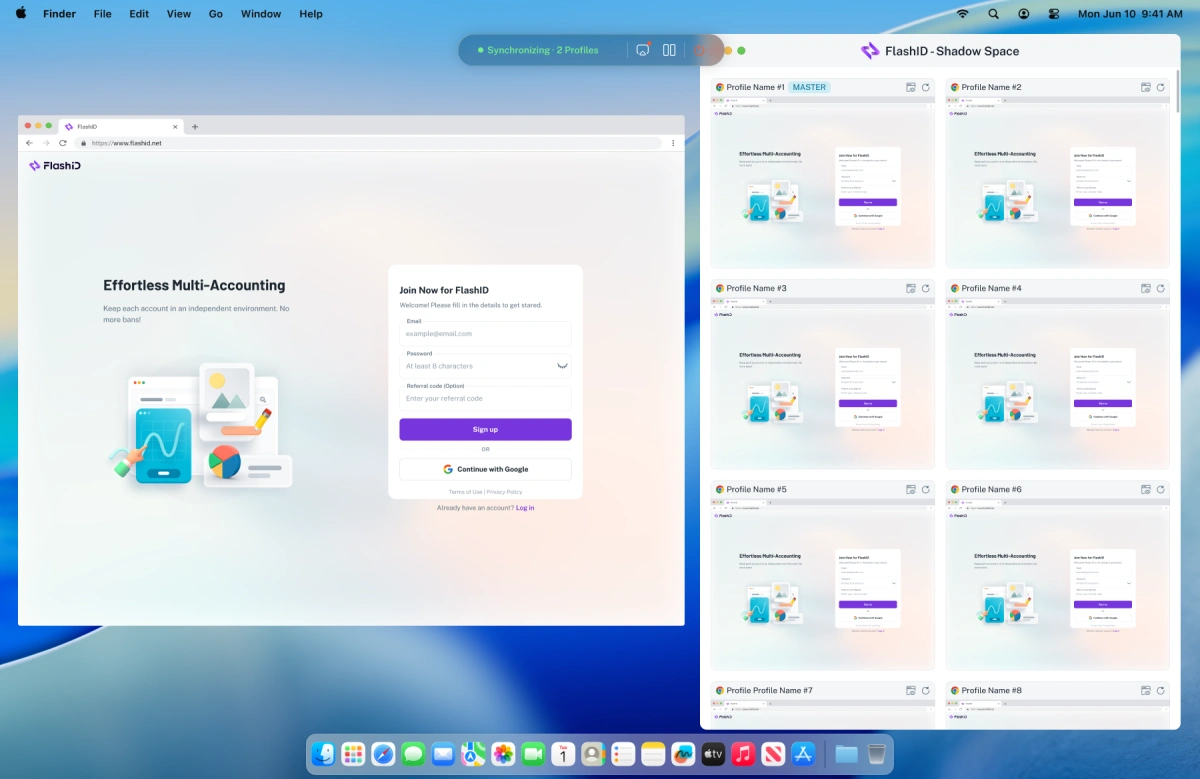
Bulk operations become much more important when teams manage dozens or hundreds of profiles. With Bulk Import Profiles, users can import multiple profiles through an Excel file, including profile names, proxies, cookies,user agents, and notes. This helps teams create large batches of profiles faster, reduce repetitive setup, and make migration from other tools easier.
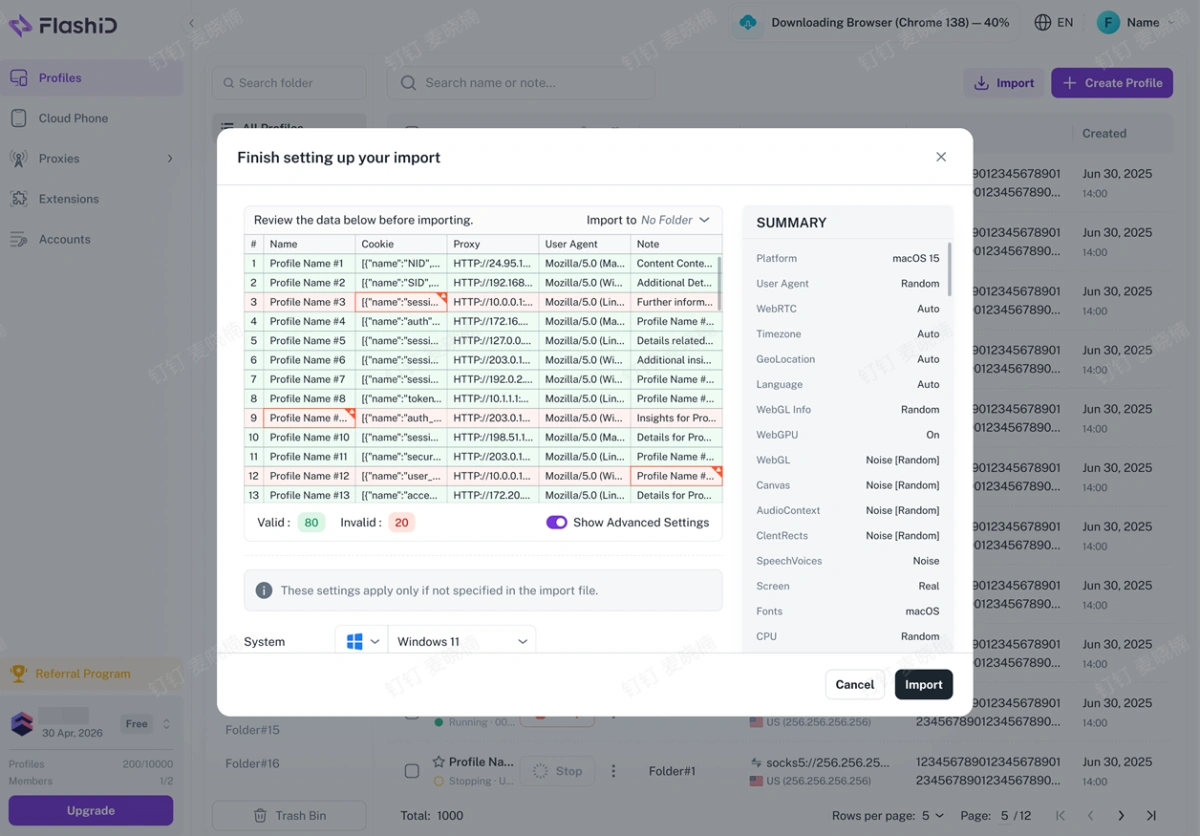
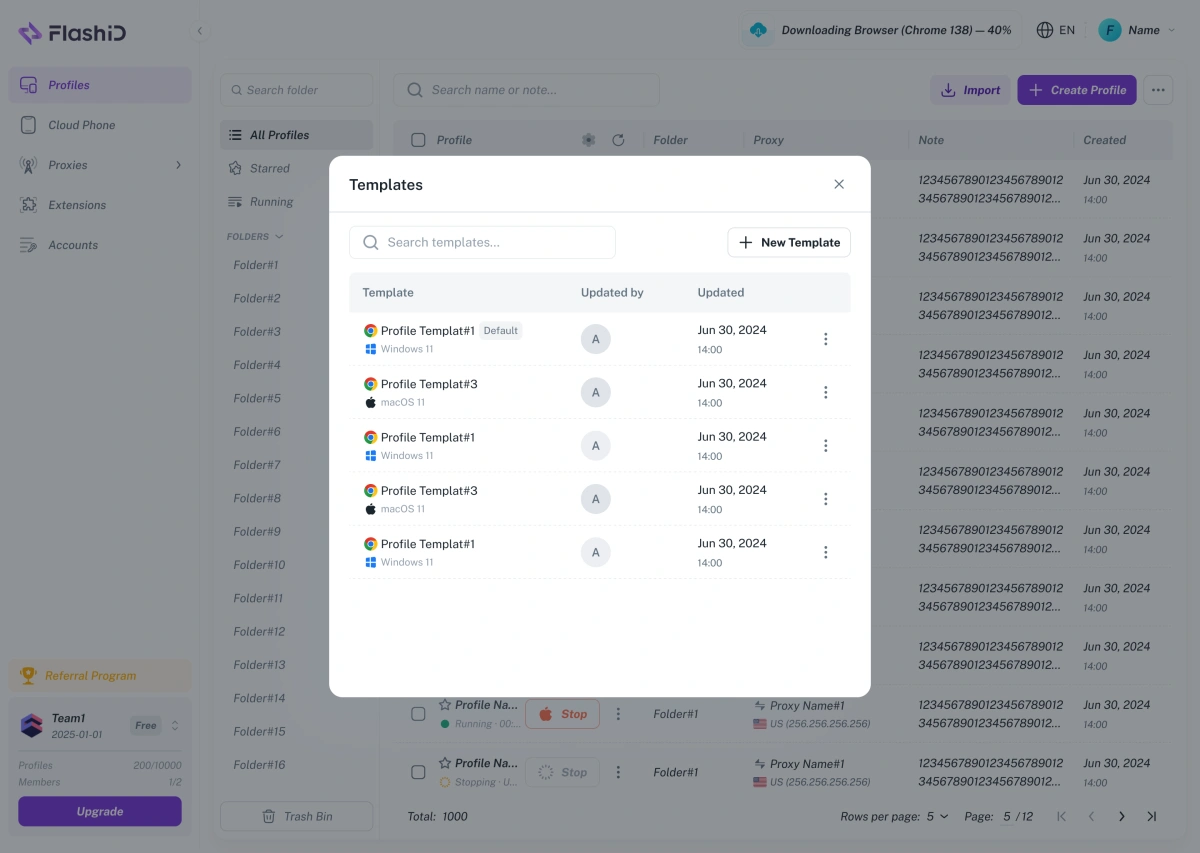
After profiles are imported or created in bulk, Profile Templates help keep the setup consistent. Users can save an existing profile as a reusable template and apply its fingerprint settings when creating new profiles. This makes profile creation faster, reduces manual configuration work, and helps team members follow the same setup standard.
4. Proxy Management
Dolphin Anty allows users to add HTTP, SOCKS, and other proxy formats when creating or editing profiles. It also supports checking proxy connection, geolocation, and timezone. But users usually need to buy proxies from third-party providers.
That creates several challenges. The user needs to choose a proxy vendor, judge IP quality, manage proxy renewal, contact proxy support when problems happen, and make sure the proxy matches the profile environment. If a proxy fails, the antidetect browser provider and the proxy provider may not be the same team, so troubleshooting can become slower.
FlashID offers built-in proxy services. Users can purchase and manage proxies directly inside the platform instead of relying only on external providers. FlashID supports different proxy types such as residential proxies, datacenter proxies, ISP proxies, and mobile proxies. It also allows users to attach proxies to browser profiles or cloud phone environments.
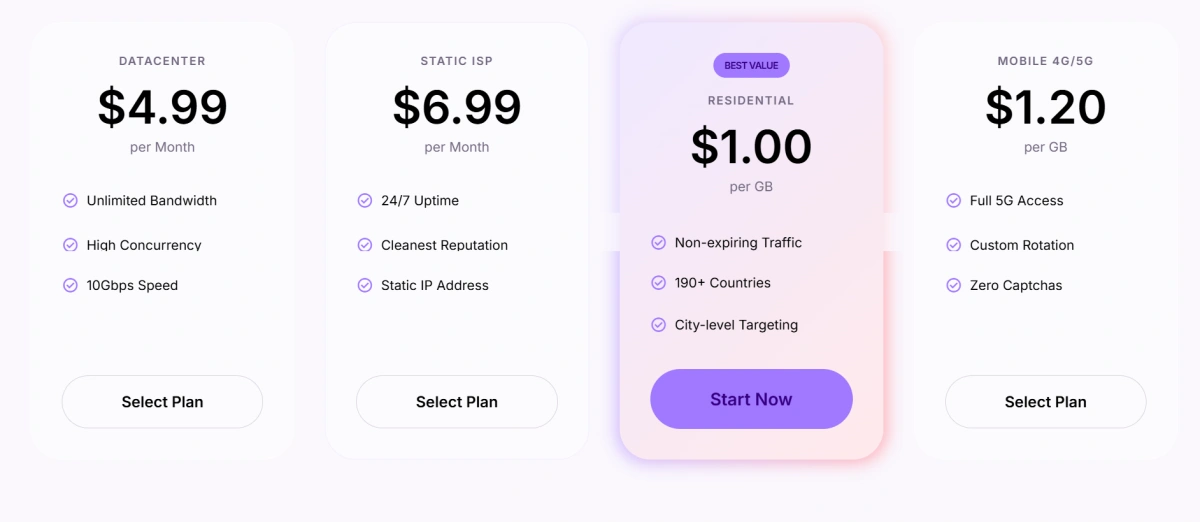
This creates a smoother workflow. A user can create a profile, select or purchase a proxy, bind it to the environment, and manage the account from the same platform. For beginners, this reduces setup difficulty. For teams, it reduces manual errors and makes proxy lifecycle management easier.
5. User Experience
User experience is not only about whether the interface looks simple. For multi-account teams, user experience also includes update speed, product transparency, safety, onboarding, and long-term trust.
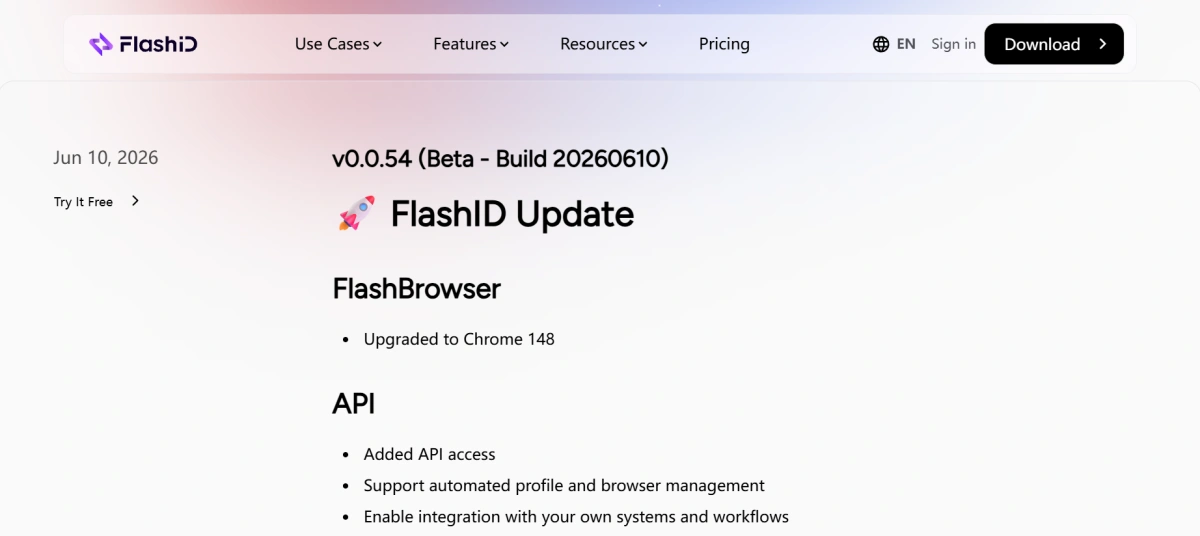
Update visibility is a FlashID advantage. FlashID maintains a public changelog with frequent and detailed updates, including browser engine upgrades, API support, WebRTC improvements, proxy features, synchronizer updates, bulk import, password changes, and 2FA. This helps users understand what is changing and whether the product is actively improving.
Security is another part of the user experience that multi-account teams cannot ignore. Dolphin Anty relies heavily on cloud profile storage and synchronization, which can be convenient for team access but also increases the importance of data protection. In July 2022, Dolphin Anty experienced a cloud profile storage incident in which around 15% of browser profiles were reportedly compromised. Although the vulnerability was later fixed and users could add extra protection such as password-protected profiles, the incident still raised concerns for teams that manage sensitive account data, financial accounts, or crypto-related workflows.
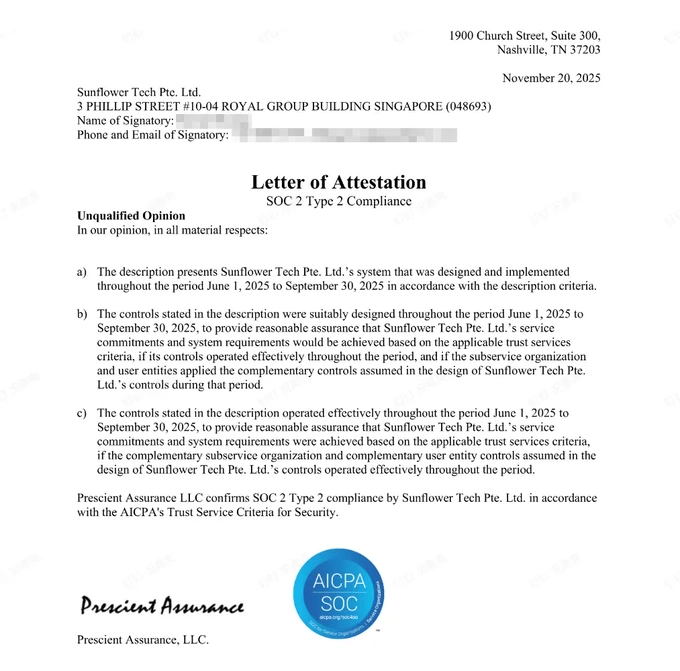
FlashID takes a more trust-focused approach to platform security. FlashID has officially achieved SOC 2 Type 2 certification, which means its security, availability, and confidentiality controls have been independently audited over time. For users, this provides stronger confidence in enterprise-grade protection, verified data security, and more reliable multi-account management.
Dolphin Anty vs FlashID Comparison Table
| Comparison Point | Dolphin Anty | FlashID |
|---|---|---|
| Best for | Browser-first multi-account users, affiliate marketers, media buyers, small teams | Teams needing browser profiles, cloud phones, proxies, collaboration, and automation |
| Browser profiles | Supported | Supported |
| Fingerprint settings | Real fingerprints and manual customization | Detailed fingerprint and environment configuration |
| Cloud phone | Not the main product focus | Core part of browser plus mobile workflow |
| Mobile app workflow | More limited, browser-centered | Supported through cloud phone environments |
| Proxy workflow | Supports third-party proxy setup | Proxy integration plus built-in proxy purchase and management |
| Team collaboration | Profile sharing, permissions, folders | Workspace, permissions, account center, templates, team workflows |
| Window sync | Synchronizer supported | Window sync across browser and cloud phone workflows |
| Bulk operations | Mass actions supported | Bulk profile and workflow management |
| Profile templates | Not the main focus | Supported for consistent setup |
| Automation | Scenario builder and API | API, RPA, and workflow automation |
| Update transparency | Product updates depend on official channels | Public changelog with detailed update history |
Overall, Dolphin Anty remains a capable antidetect browser for browser-first multi-accounting. FlashID is stronger when the workflow expands beyond browser profiles into mobile apps, team permissions, built-in proxy management, templates, and automation.
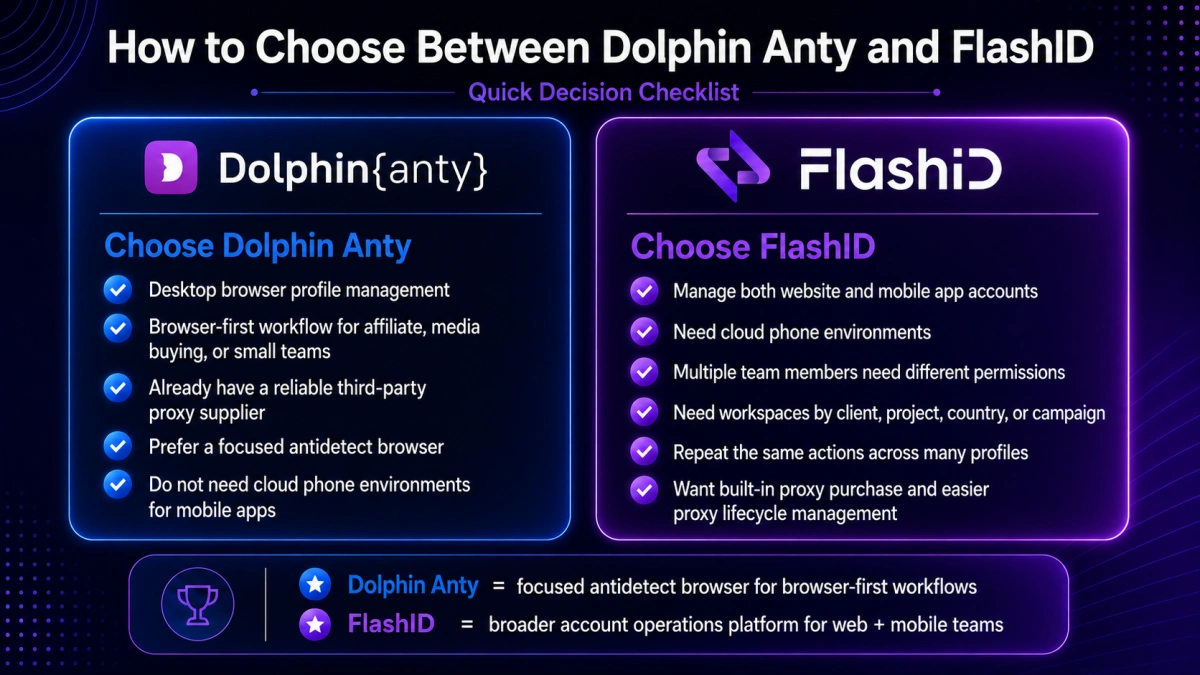
Dolphin Anty vs FlashID: Decision Checklist
Choose Dolphin Anty if your answer is “yes” to most of these questions:
- Do you mainly manage accounts through desktop browser profiles?
- Are you an affiliate marketer, media buyer, or small team with a browser-first workflow?
- Do you already have a reliable third-party proxy supplier?
- Do you prefer a focused antidetect browser over a broader operations platform?
- Do you not need cloud phone environments for mobile apps?
Choose FlashID if your answer is “yes” to most of these questions:
- Do you manage both website and mobile app accounts?
- Do you need cloud phone environments?
- Do multiple team members need different permissions?
- Do you need workspaces by client, project, country, or campaign?
- Do you repeat the same actions across many profiles?
- Do you want built-in proxy purchase and easier proxy lifecycle management?
Conclusion
Dolphin Anty remains a reasonable choice for users who mainly need a focused antidetect browser for desktop-based workflows. It covers the essentials of browser profile management, fingerprint customization, team sharing, mass actions, synchronization, and API automation.
FlashID is a stronger alternative when account operations become more complex. By combining detailed fingerprint control, cloud phones, built-in proxy options, and team collaboration tools, FlashID helps teams manage both web and mobile accounts with fewer disconnected tools.
Both tools can be valuable, but the right decision should come from the actual workflow behind your accounts. A good antidetect browser should not only create isolated profiles, but also make daily account management more stable, organized, and scalable over time.
If you’d like to stay updated with practical insights and industry trends, feel free to join our community.
FAQ
1.What is the best Dolphin Anty alternative in 2026?
FlashID is one of the strong Dolphin Anty alternatives in 2026 for teams that need more than desktop browser profiles. It combines antidetect browser profiles, cloud phones, built-in proxies, API, and automation tools in one platform.
2.Can I migrate from Dolphin Anty to FlashID?
Yes, but migration should be planned. Teams should review existing profiles, group accounts by project or platform, prepare proxies, rebuild templates, set workspace permissions, and decide which workflows need cloud phones.
3.Is Dolphin Anty still worth using in 2026?
Yes, Dolphin Anty is still worth using for browser-first multi-account operations. It is especially suitable for affiliate marketers, media buyers, digital agencies, and users who mainly operate accounts through desktop websites. However, it may feel limited if your workflow depends heavily on mobile apps, cloud phones, and integrated proxy services.
4.Does Dolphin Anty have cloud phones?
Dolphin Anty is mainly positioned as an antidetect browser for desktop browser profiles. It does not offer a Android cloud phone workflow.
5.Which tool is better for team collaboration, Dolphin Anty or FlashID?
Both tools support team-related features, but they approach collaboration differently. Dolphin Anty supports profile sharing, folders, permissions, and team workflow tools. FlashID goes further with workspaces, browser + cloud phone sync, profile templates, account management, and permission-based resource separation, making it stronger for larger or more structured teams.
6.Can I use my own proxies with FlashID?
Yes. FlashID supports built-in proxy purchasing and custom proxy configuration. This means beginners can use FlashID’s built-in proxy services, while advanced users can still connect their own HTTP or SOCKS5 proxies when needed.
You May Also Like


