How to Build a Reliable Multi-Account Environment with Browser Fingerprints and Residential Proxies
Managing multiple online accounts is no longer as simple as opening several browser windows. Modern websites can evaluate a wide range of signals, including browser characteristics, cookies, device settings, IP addresses, geographic location, and session behavior.
For businesses operating multiple e-commerce stores, social media accounts, affiliate profiles, or regional market research workflows, maintaining consistency across these signals is increasingly important.
A reliable multi-account environment therefore requires more than browser isolation alone. It requires a combination of isolated browser profiles, consistent fingerprints, appropriate proxy infrastructure, and carefully matched geographic settings.
This is where browser fingerprint management and residential proxies complement each other.
Why Browser Profiles Alone May Not Be Enough
A separate browser profile can isolate cookies, cache, login sessions, and other local browser data. This is an important foundation for multi-account operations.
However, browser isolation only addresses part of the overall environment.
Websites may also observe information such as:
- Operating system and browser characteristics
- Screen resolution and device configuration
- Canvas and WebGL characteristics
- Language and time-zone settings
- IP address and approximate geographic location
- Session duration and browsing patterns
- Network consistency across sessions
If several accounts use isolated browser profiles but repeatedly connect through the same network identity, the separation between those accounts may still be incomplete.
A more reliable approach is to treat the browser environment and network environment as two connected layers.
What Makes a Multi-Account Environment Reliable?
A stable multi-account setup typically consists of several elements working together:
| Layer | Role |
|---|---|
| Account | Defines the business or operational purpose |
| Browser Profile | Separates cookies, sessions, and browser data |
| Browser Fingerprint | Provides a consistent browser and device environment |
| Network Connection | Determines the external IP identity |
| Geographic Location | Supports location-specific workflows |
The key is not simply creating more profiles. The goal is to maintain a reasonable level of consistency between these layers.
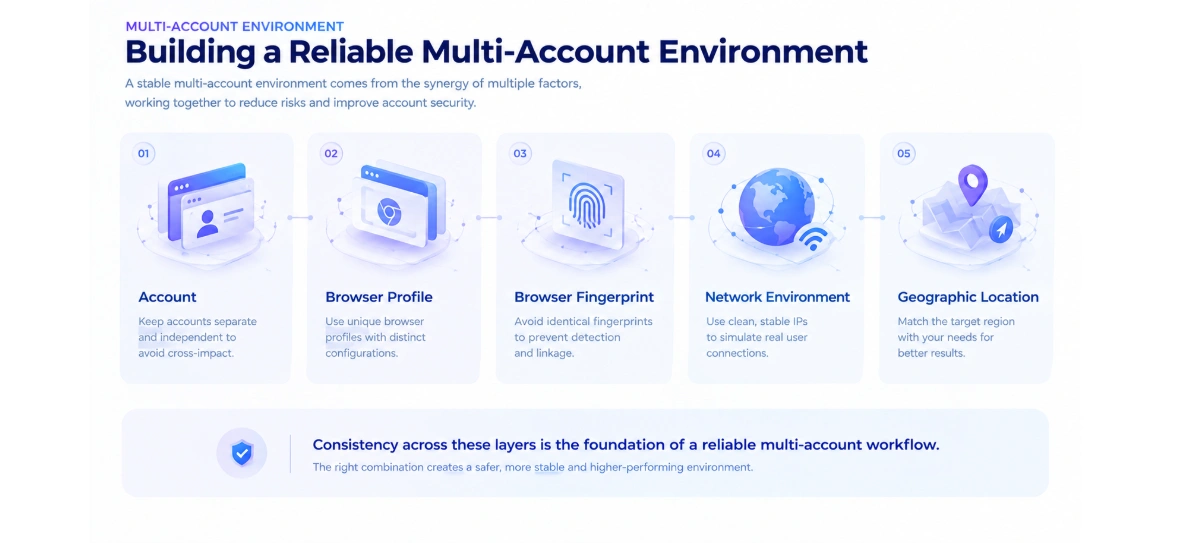
For example, if a browser profile is configured for one geographic market while its network connection repeatedly appears to originate from another region, the overall environment may look inconsistent.
This is why proxy selection deserves as much attention as browser configuration.
Why Residential Proxies Matter
A residential proxy routes traffic through an IP associated with a residential network rather than a typical cloud or data-center environment.
This makes residential proxies particularly useful for workflows where geographic accuracy, IP diversity, or a more natural network environment matters.
Common applications include:
- Market research
- Localized website testing
- E-commerce research
- Search engine monitoring
- Advertisement verification
- Public-data collection
- Regional content verification
- Multi-location business analysis
The value of a residential proxy is not simply that it changes an IP address. The more important question is whether the IP matches the geographic and operational requirements of the workflow.
For example, a business researching prices in different markets may need IPs from specific countries or cities. A company testing localized content may need a stable connection from a particular region. A high-volume data collection workflow may prioritize IP diversity and rotation.
A good residential proxy solution should therefore be evaluated according to IP quality, geog raphic coverage, session control, rotation flexibility, availability, latency, and concurrency.
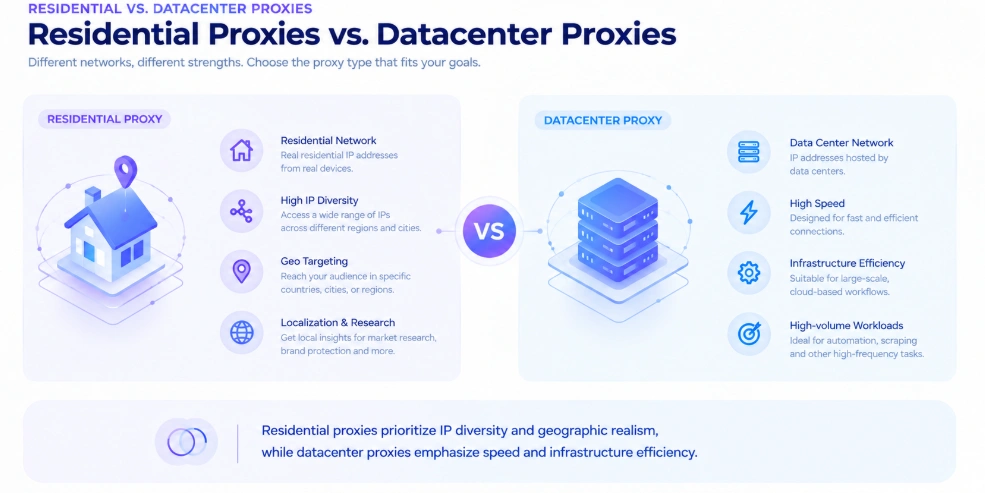
Residential Proxies vs. Datacenter Proxies
Not every workflow requires a residential proxy.
Datacenter proxies can be attractive when speed, predictable infrastructure, and cost efficiency are the main priorities. They are often suitable for workloads where residential network characteristics are not essential.
Residential proxies are more relevant when the workflow depends heavily on geographic accuracy, residential network identity, or IP diversity.
A simple comparison can help:
| Factor | Residential Proxy | Datacenter Proxy |
|---|---|---|
| IP Source | Residential networks | Data centers |
| Geographic Targeting | Strong | Strong, depending on provider |
| IP Diversity | Generally high | Generally lower |
| Speed | Usually sufficient for most workflows | Often very fast |
| Typical Use | Market research, localization, verification, data collection | High-speed automated workloads |
| Best For | Natural residential network access | Speed and infrastructure efficiency |
The right choice depends on the workflow rather than the proxy type alone.
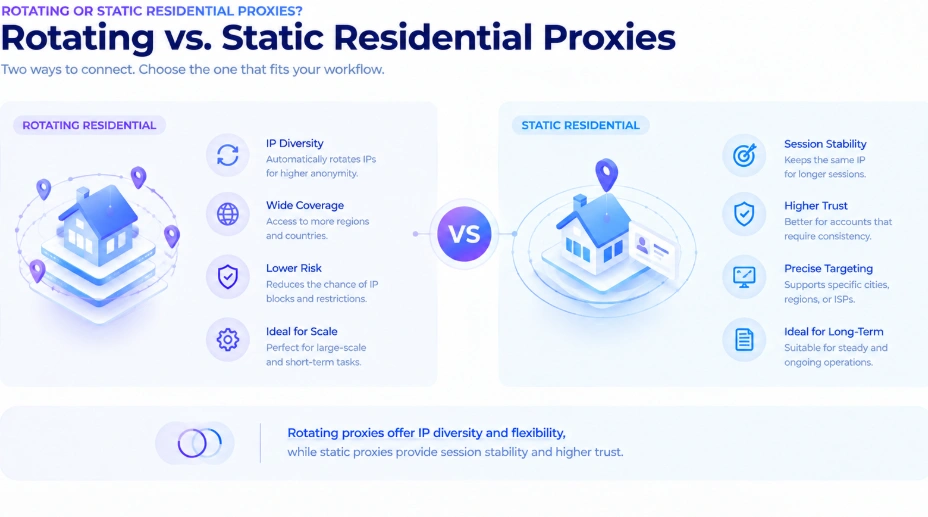
Rotating or Static Residential Proxies?
Residential proxies can also be divided according to how long an IP remains associated with a session.
Rotating Residential Proxies
Rotating residential proxies change the exit IP according to configured rules or session requirements.
They are particularly useful when a workflow requires a large and diverse pool of residential IPs.
Typical applications include:
- Large-scale public-data collection
- Search monitoring
- Market research
- Regional content testing
- High-volume requests
IP diversity can become especially important as the number of requests and target locations increases.
IPFLY’s residential proxy network provides access to more than 90 million residential IP addresses across 190+ countries and regions, with country- and city-level targeting and support for rotating and sticky-session workflows.
This type of infrastructure gives businesses more flexibility when their workflows require multiple geographic locations or frequent IP changes.
Static Residential Proxies
Some workflows require the opposite approach.
If an account or session needs to maintain the same network identity for an extended period, frequent IP rotation can create unnecessary inconsistency.
Static residential or ISP proxies are better suited to scenarios where connection stability is more important than continuous IP diversity.
Common examples include:
- Long-running sessions
- E-commerce account operations
- Regional account management
- Persistent website access
- Workflows requiring a consistent geographic identity
IPFLY’s static residential proxy offering provides dedicated IPs designed for stable, long-term connections, while still supporting geographic targeting.
The distinction is simple:
Use rotating residential proxies when IP diversity is the priority. Use static residential proxies when session stability is the priority.
Geographic Consistency Is More Important Than Simply Changing IPs
One common mistake is assuming that changing an IP address automatically creates a better environment.
In reality, geographic consistency matters.
Suppose a browser profile is configured for the United States, but its network connection repeatedly appears in Europe. Changing the IP frequently does not solve the underlying inconsistency.
A better approach is to align:
- Browser language
- Time zone
- Geographic location
- Network IP
- Account operating region
- Session behavior
This is especially important for businesses conducting localized market research, e-commerce operations, advertisement verification, or regional content testing.
IPFLY supports geographic targeting at country and city levels, allowing users to select proxy resources according to specific market requirements.
How Browser Fingerprints and Residential Proxies Work Together
Browser fingerprinting and proxy infrastructure solve different problems.
A browser profile controls the local environment surrounding an account. It helps separate cookies, sessions, browser settings, and fingerprint-related characteristics.
A residential proxy controls the network environment through which that browser connects to the internet.
The two layers should therefore be considered together.
| Solution | Primary Role | Key Value |
|---|---|---|
| FlashID | Browser environment | Profile isolation and fingerprint management |
| IPFLY | Network environment | Residential IPs, geographic targeting, and IP rotation |
| Combined Setup | End-to-end environment | Better consistency between browser and network layers |
FlashID supports isolated browser environments and proxy integration, allowing different profiles to be configured with different proxy connections.
When an external residential proxy such as IPFLY is used, the browser environment and network environment can be managed as two coordinated components rather than independent settings.
A Practical Setup for Multi-Account Operations
A reliable setup does not need to be unnecessarily complicated.
1. Create Separate Browser Profiles
Start by separating accounts into dedicated browser profiles.
Each profile should maintain its own cookies, sessions, browser configuration, and operational data.
2. Select the Appropriate Proxy Type
Choose the proxy according to the workflow.
For high-volume research and location-based data collection, rotating residential proxies may be more suitable.
For long-running sessions where consistency matters, static residential or ISP proxies may be preferable.
3. Match the Geographic Environment
Select a proxy location that corresponds to the target market.
Country-level targeting may be sufficient for some workflows, while city-level targeting can be useful when regional accuracy is important.
4. Maintain Consistency
Avoid frequently changing multiple environmental variables at the same time.
A stable setup should maintain reasonable consistency between browser settings, network location, account region, and session behavior.
5. Monitor Performance
Proxy quality can change over time.
Monitor connection success, latency, IP availability, session stability, and geographic accuracy to determine whether the current configuration remains appropriate.
Common Mistakes to Avoid
Using One IP for Every Account
Separating browser profiles while sending all accounts through the same network identity can reduce the effectiveness of environment isolation.
Choosing Proxies Only by Price
The cheapest proxy is not necessarily the most cost-effective option.
For business workflows, IP quality, availability, geographic coverage, session control, and performance can have a much larger impact on operational efficiency.
Ignoring Geographic Consistency
A mismatch between browser settings, account location, and network location can create an inconsistent environment.
Using Rotation When Stability Matters
Frequent IP changes are useful for some workflows but unnecessary for others.
If a session requires continuity, a static residential connection may be a better choice.
Treating Browser and Network Configuration as Separate Problems
Browser fingerprints and IP addresses represent different parts of the same operating environment.
Managing only one side can leave the overall setup inconsistent.
FlashID and IPFLY: Complementary Layers for a More Reliable Setup
FlashID and IPFLY can play different but complementary roles in a multi-account workflow.
FlashID focuses on the browser environment. Its multi-account infrastructure provides isolated browser profiles, fingerprint management, account organization, and proxy integration.
IPFLY focuses more heavily on the network layer.
Its residential proxy network provides a large pool of residential IPs, broad geographic coverage, city-level targeting, and flexible IP rotation.
This division of responsibilities can be useful for businesses that need both browser-level separation and flexible network infrastructure.
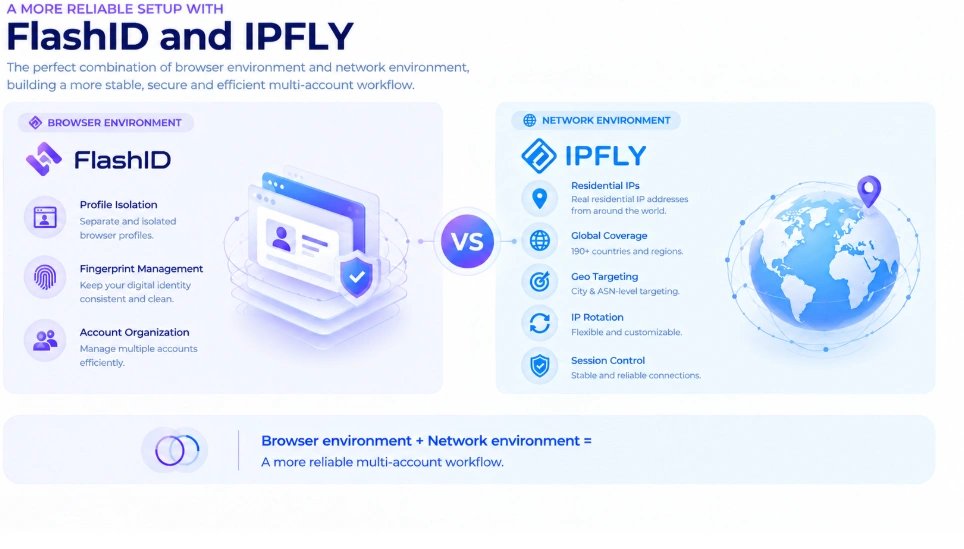
Instead of treating the browser and proxy as unrelated tools, businesses can build the environment around the requirements of each account and workflow.
Choosing the Right Setup for Your Workflow
There is no single proxy configuration that works for every business.
A useful starting point is to ask four questions:
Do you need geographic targeting?
If yes, prioritize providers with broad country and city coverage.
Do you need frequent IP changes?
If yes, consider rotating residential proxies.
Do you need long-running sessions?
If yes, static residential or ISP proxies may be more appropriate.
Do you need multiple isolated browser environments?
If yes, combine browser profile management with dedicated network configurations.
The goal is not to maximize the number of IPs or browser profiles. The goal is to create an environment that is consistent, scalable, and appropriate for the actual workflow.
Final Thoughts
Reliable multi-account operations require more than simply opening multiple browser windows.
Browser profiles help separate local account environments, while browser fingerprints provide consistency at the device and browser level. Residential proxies add another critical layer by providing geographic flexibility, IP diversity, and network-level separation.
For businesses working across multiple markets, choosing the right residential proxy strategy can make a significant difference.
Rotating residential proxies are well suited to workflows that prioritize IP diversity and geographic scale, while static residential proxies are more appropriate when session continuity is the priority.
When browser environments and network environments are designed together, businesses can build a more structured and reliable foundation for multi-account operations, market research, localized testing, e-commerce, and other location-sensitive workflows.
You May Also Like


