For most multi-account operations, built-in proxies are better for speed, simplicity, and lower setup friction, while custom proxies are better for advanced control, long-term account stability, and strict traffic requirements. The best choice depends on how many profiles you manage, how sensitive your accounts are, and how much control your team needs over IP quality, location, and rotation.
Quick Answer
- Choose built-in proxies if you want a faster setup. They are easier to configure, usually require fewer manual steps, and are ideal for beginners, small teams, or quick testing workflows.
- Choose custom proxies if your operation needs more control. Custom proxies allow you to choose your own provider, IP type, country, city, ASN, rotation rules, and long-term IP strategy.
- Choose based on account stage and risk level. Built-in proxies are often enough for simple or early-stage workflows, while custom proxies make more sense for mature operations with valuable accounts, stricter risk control, or long-term profile planning.
- The most important rule is consistency. Whether you use built-in or custom proxies, each browser profile should have a stable, logical proxy setup that matches its account environment.
What Is a Built-In Proxy?
A built-in proxy is a proxy option that is already integrated into a browser profile platform or multi-account management tool. Instead of purchasing proxies from a separate provider, copying proxy credentials, testing them manually, and pasting them into each browser profile, users can select or activate a proxy directly inside the platform.
In a multi-account browser environment, built-in proxies are usually designed to reduce setup complexity. The platform may provide proxy resources, automatic configuration, proxy testing, country selection, or simple one-click binding between a profile and a proxy. For users who are new to multi-account operations, this can save a lot of time and reduce configuration errors.
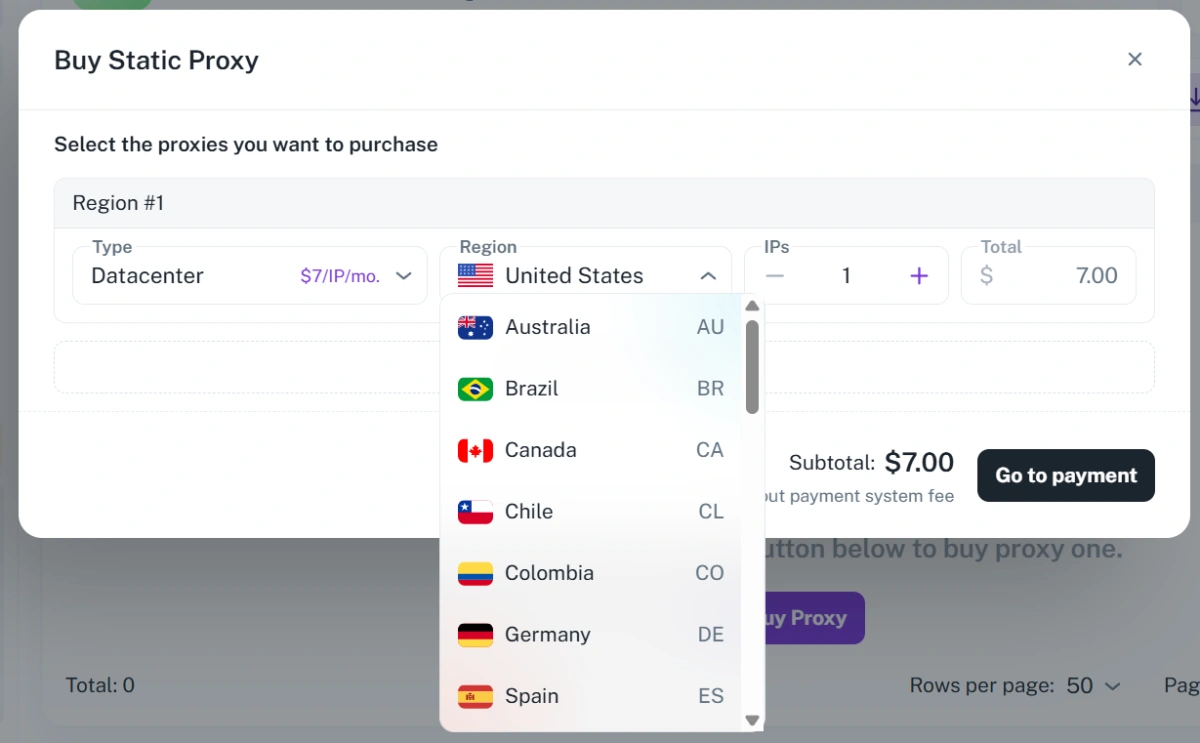
Built-in proxies are especially useful when the goal is to simplify routine workflows. For example, a small e-commerce team may need to manage several store-related browser profiles. A market research team may need separate browser environments for different regions. An affiliate team may need multiple isolated profiles for campaign management. In these cases, a built-in proxy can make the whole process easier because the proxy setup is handled in the same place as the browser fingerprint, cookies, local storage, and profile settings.
What Is a Custom Proxy?
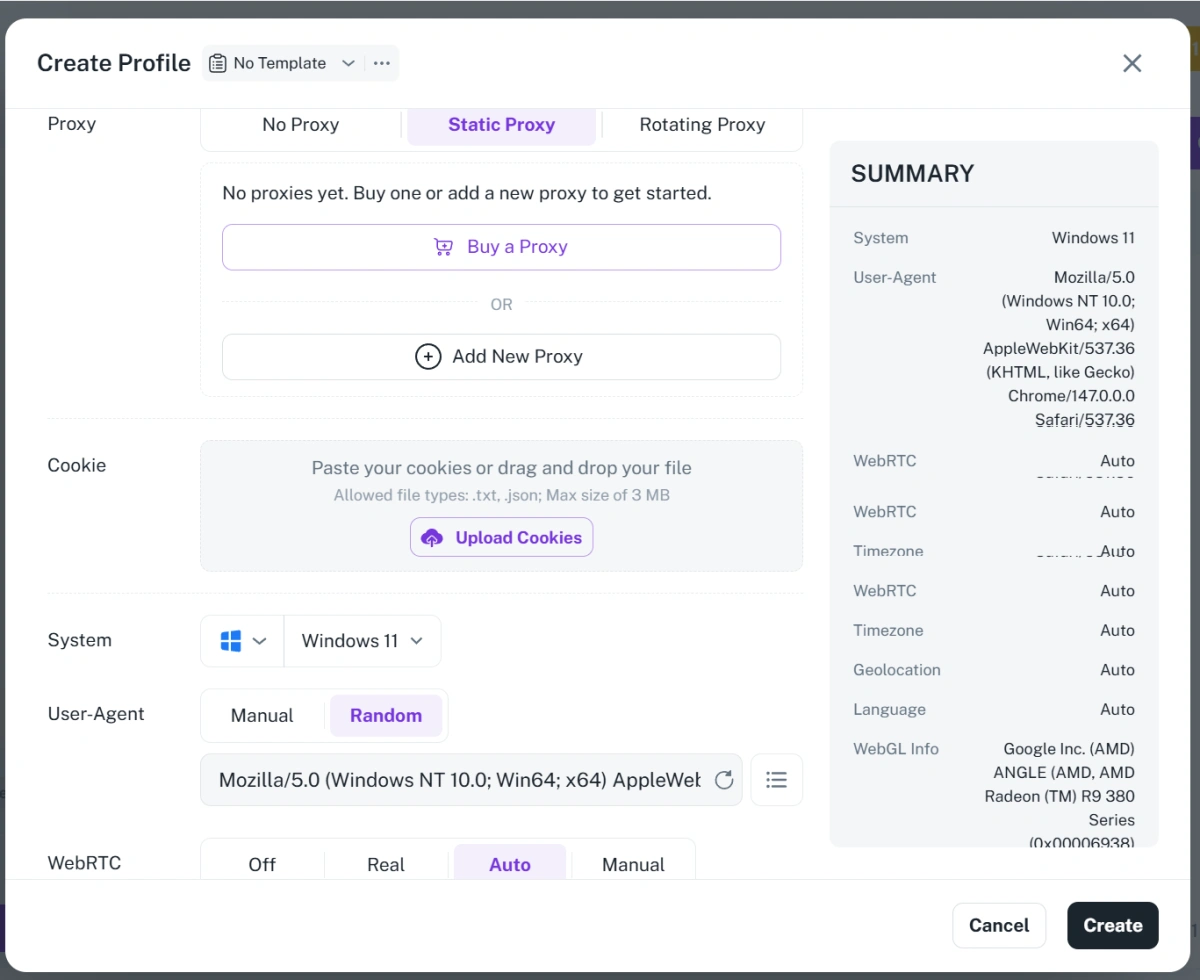
A custom proxy is a proxy that you purchase, rent, or manage from an external proxy provider and then manually connect to your browser profiles. Instead of using the proxy resources already available inside a platform, you bring your own proxy infrastructure.
Custom proxies can include residential proxies, mobile proxies, datacenter proxies, ISP proxies, static residential proxies, or rotating proxy pools. The exact type depends on your use case, budget, risk level, and platform requirements.
With a custom proxy setup, you usually receive proxy details from your provider, such as host, port, username, password, protocol type, and sometimes country, city, session ID, or rotation parameters. You then enter this information into your browser profile tool and bind the proxy to a specific profile.
Main Differences Between Built-In and Custom Proxy Setups
1.Setup speed.
Built-in proxies are usually faster to start with because they are already part of the platform. Users can create a profile and select a proxy without leaving the system. Custom proxies require more steps: buying from a provider, copying credentials, choosing the correct protocol, testing the proxy, and binding it to the right profile.
2.Control.
Built-in proxies are convenient, but the user may not always control the entire proxy supply chain. With custom proxies, users can select the exact provider, IP type, country, city, rotation model, and budget. This makes custom proxies more suitable for teams that need precise traffic control.
3.Scalability.
Built-in proxies can be easier for small and medium workflows because everything is managed in one place. However, for large teams with hundreds or thousands of profiles, custom proxies may offer better pricing, more flexible allocation, and more detailed account-level planning. A larger team may want to assign different proxy vendors to different projects, regions, or account groups.
4.Troubleshooting.
With built-in proxies, troubleshooting may be simpler because the platform controls both the browser profile environment and the proxy integration. If something fails, users can often check the issue inside the same system. With custom proxies, troubleshooting may involve both the browser platform and the proxy provider. If an account fails to connect, the issue may come from the proxy, credentials, protocol, profile settings, IP reputation, or network route.
Built-In vs Custom Proxy: Quick Comparison
| Factor | Built-In Proxy | Custom Proxy |
|---|---|---|
| Setup speed | Faster to start, with fewer manual steps | Takes longer because proxy details must be added manually |
| Ease of use | Easier for beginners and simple workflows | Requires more proxy knowledge and setup experience |
| Proxy source control | Limited control over proxy source and infrastructure | Full control over provider, IP type, and proxy strategy |
| Location precision | Usually supports basic country or region selection | Can support more precise country, city, ASN, or carrier targeting |
| Session stability | Stable enough for many basic workflows | Better for long-term accounts when using high-quality static or sticky proxies |
| Cost management | Easier to manage inside one platform | More flexible for budgeting, scaling, and provider comparison |
| Best for beginners | Yes, because setup is simpler | Less ideal unless the user already understands proxy configuration |
| 🕒 Best for long-term accounts | Suitable for basic account needs | Better for accounts that need stable IP planning and long-term consistency |
| 👥 Best for large teams | Good for simple team workflows | Better for teams that need advanced allocation and resource control |
When Built-In Proxies Are the Better Choice
Built-in proxies are the better choice when simplicity matters more than deep customization. If your team wants to create browser profiles quickly, reduce manual configuration, and avoid dealing with several separate service providers, built-in proxies can be the most practical option.
They are especially suitable for beginners. New users often make mistakes when entering proxy information manually. A single typo in the host, port, username, password, or protocol can cause connection failure. Even worse, a profile may accidentally run without the intended proxy, exposing the wrong IP environment. Built-in proxy workflows reduce this risk because the setup process is more guided.
Built-in proxies also work well for small teams. If you only manage a limited number of profiles, it may not be worth spending time comparing proxy vendors, negotiating plans, testing IP pools, and maintaining proxy spreadsheets.
Another good use case is quick testing. If you need to test landing pages, check regional content, compare account environments, or run a short-term campaign, built-in proxies can help you move faster.
When Custom Proxies Are the Better Choice
Custom proxies are the better choice when your operation needs precision, stability, and long-term planning. If your accounts are valuable, your workflows are complex, or your team already has a trusted proxy provider, using your own proxies may be the smarter setup.
One major reason to choose custom proxies is location control. Some operations require traffic from a specific country, city, carrier, or network type. Built-in proxies may offer country-level selection, but advanced teams may need more detailed targeting. A custom provider may allow you to select city-level IPs, mobile carrier IPs, static residential IPs, or ISP proxies that match a very specific account environment.
Another reason is IP history. For long-term account management, the quality and history of an IP can matter. If an IP has been abused, overused, or frequently flagged, it may create instability even if the browser fingerprint is clean. With custom proxies, teams can test providers, monitor IP performance, and keep records of which proxy works best for each profile.
Custom proxies are also better when you need stable sessions. Many accounts should not appear to jump between unrelated IP addresses too often. A custom static proxy or long-session residential proxy can help maintain a more consistent environment. This is especially useful for account types that are sensitive to login location, payment behavior, or device history.
Custom proxies are often preferred by larger teams because they allow better resource planning. A team can separate proxy pools by project, assign dedicated proxies to high-value accounts, rotate lower-risk tasks through different pools, and monitor cost by department or campaign.
Common Mistakes That Cause Instability or Bans
1.Using the same proxy for too many unrelated profiles.
If several accounts that should look independent are always logging in from the same IP, the separation between those accounts becomes weak. In multi-account operations, browser fingerprint isolation is important, but IP separation is also part of the overall identity environment.
2.Changing proxies too often.
Some users believe frequent rotation automatically improves safety. In reality, excessive IP changes can make account behavior look inconsistent. If a profile logs in from one country in the morning and another country in the afternoon, the platform may treat the activity as suspicious. Stable accounts usually need stable network patterns.
3.Mismatching the proxy region with the browser profile.
For example, if a profile uses a United States proxy but the timezone, language, keyboard settings, and account information suggest a different region, the environment may look unnatural. A good profile should tell one consistent story.
4.Ignoring proxy quality.
Not all proxies are equal. Some IPs are slow, shared by too many users, already blacklisted, or associated with abusive activity. A low-quality proxy can damage an account even if the rest of the browser profile is configured properly.
5.Forgetting about WebRTC, DNS, or IP leaks.
Even if HTTP traffic goes through a proxy, leaks can expose a different network identity. This is why users should test each profile environment before using it for important accounts.
6.Mixing account types without a clear structure.
A team may use the same proxy pool for e-commerce accounts, social accounts, scraping tasks, and research profiles. This can create unnecessary risk. Different workflows should be separated by profile group, proxy group, and operational purpose.
7.Relying only on proxies and ignoring behavior.
A proxy can help create a separate network environment, but it cannot fix reckless account behavior. Fast repetitive actions, abnormal login patterns, policy violations, spam-like activity, or unrealistic device changes can still cause restrictions.
How to Match Proxies with Browser Profiles Correctly
The best proxy setup is not just about choosing built-in or custom. It is about matching each proxy to the right browser profile in a consistent and logical way.
A simple rule is one important profile, one stable proxy. If an account is valuable, avoid sharing its proxy with many unrelated profiles. Assign a dedicated or stable proxy whenever possible, and keep that proxy connected to the same profile over time.
Next, match the proxy location with the profile environment. If a profile uses a German proxy, the timezone, language, account region, and browsing behavior should also make sense for Germany.
Before using a profile for serious work, test the proxy connection. Check the IP address, country, DNS behavior, WebRTC status, speed, and stability. A few minutes of testing can prevent many avoidable problems later.
Finally, avoid unnecessary changes. Once a profile has a working proxy environment, do not change it without a reason. Consistency is often more valuable than constant optimization.
How FlashID Supports Both Workflows
FlashID Antidetect Browser is built for users who need flexible multi-account browser profile management. Different teams have different proxy strategies, so a good platform should not force every user into one workflow.
For users who want a faster and simpler setup, FlashID supports built-in proxy workflows for faster setup that helps reduce manual configuration and allows users to connect profiles with less friction. This is useful for beginners, small teams, quick testing, and users who prefer to manage profiles and proxy settings in one place.
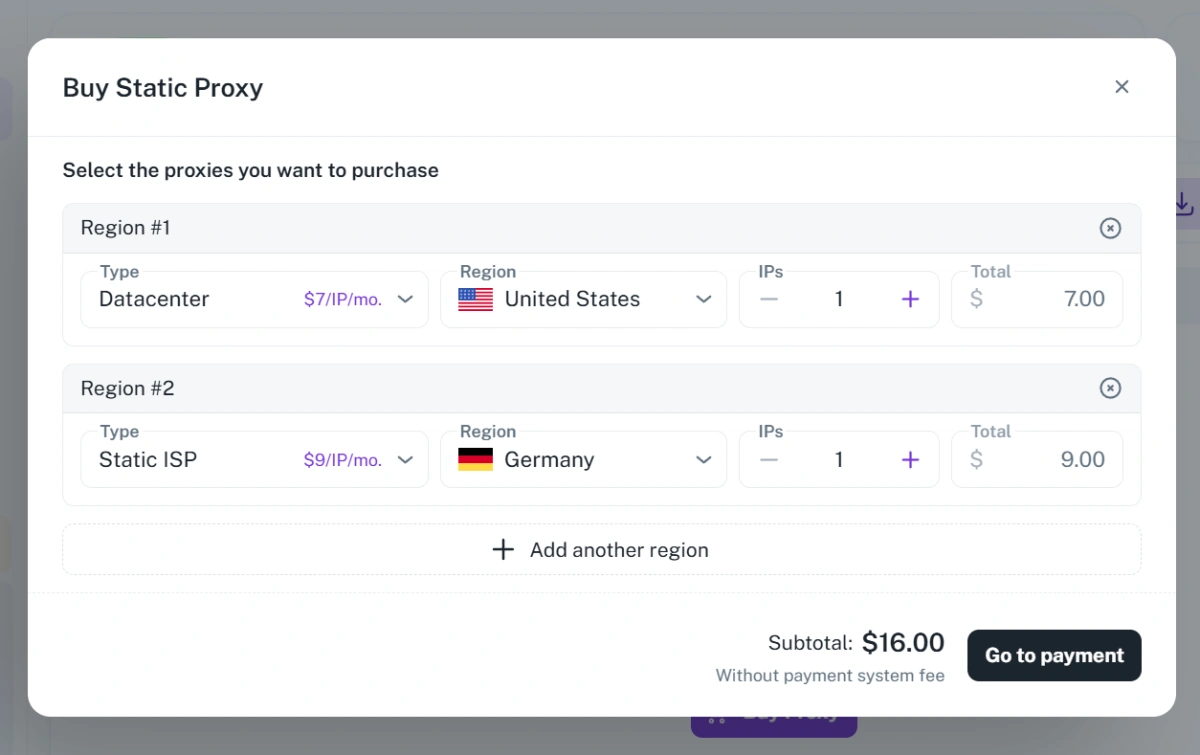
FlashID browser also offers different proxy options, including residential, datacenter, ISP, and mobile 4G/5G proxies, giving users more flexibility when building and managing browser profile environments.
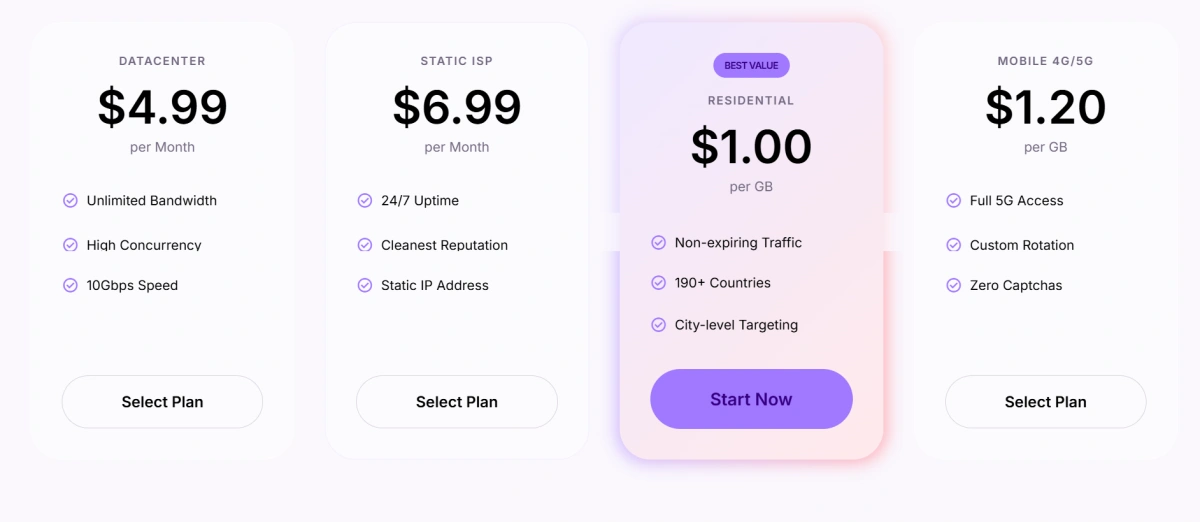
For users who already have their own proxy provider, FlashID also supports custom proxy configuration. Users can bring their own proxy resources and bind them to specific browser profiles based on their operational needs. FlashID also supports custom proxy integration for teams that need more control
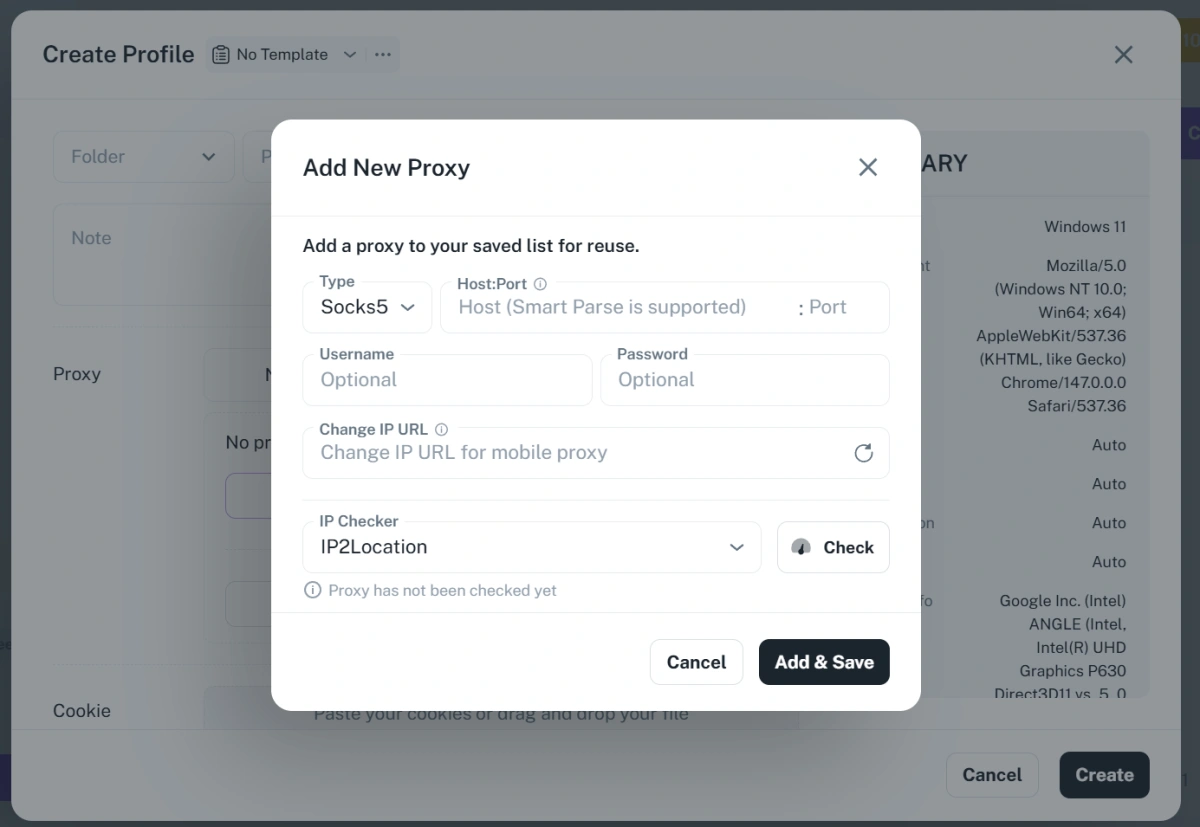
FlashID helps teams keep proxy settings and browser environments aligned. By organizing profiles, proxy settings, fingerprint environments, and team workflows in one platform, users can reduce confusion and avoid many common setup mistakes. Instead of treating proxies as a separate technical layer, FlashID makes them part of the overall profile management process.
Conclusion
Built-in proxies are usually better for users who want speed, simplicity, and easier setup. Custom proxies are usually better for users who need deeper control, stable long-term account environments, and more advanced proxy planning. The best setup is not the one with the most technical features, but the one that keeps each browser profile consistent, reliable, and appropriate for its account use case. With FlashID, users can work with both built-in and custom proxy workflows and choose the proxy strategy that matches their operation.
If you’d like to stay updated with practical insights and industry trends, feel free to join our community.
FAQ
1.Is a built-in proxy better for beginners?
Yes, a built-in proxy is usually better for beginners because it reduces manual setup and lowers the chance of configuration mistakes. New users can create profiles, assign proxies, and test connections without managing a separate proxy provider from day one. It is a practical starting point for learning multi-account operations.
2.Should each profile have a different proxy?
For important accounts, yes, each profile should ideally have its own stable proxy or at least a carefully separated proxy environment. Using the same proxy across too many unrelated profiles can weaken account separation. The goal is to make each profile’s network identity consistent and logical.
3.Is a custom proxy always safer than a built-in proxy?
No. A custom proxy is not automatically safer. A high-quality built-in proxy setup can be more stable than a poor custom proxy from an unreliable provider. Safety depends on proxy quality, configuration, consistency, and account behavior.
4.Can I switch a profile from a built-in proxy to a custom proxy?
Yes, but it should be done carefully. Sudden changes in IP location, network type, or login environment can create instability. If you switch a profile’s proxy, try to keep the new proxy region and profile settings consistent with the account’s previous environment.
5.Which proxy type is best for multi-account operations?
There is no single best proxy type for every workflow. Static residential or ISP proxies are often useful for long-term accounts, while rotating residential proxies may fit short-term research or lower-risk tasks. The right choice depends on the account platform, risk level, budget, and how stable the profile environment needs to be.
You May Also Like


