In the era of digital social networking, Discord has evolved from a simple gaming voice chat tool into one of the most popular community and social platforms worldwide. It not only supports real-time voice, video, and text communication but also allows users to create servers, manage interest communities, organize events, and collaborate in teams. Whether for individual users, gamers, community managers, or brand marketing teams, Discord has become an active hub. However, as the platform’s features have expanded, account security and operational compliance have become increasingly important, making account bans a growing concern among users.
Account bans not only disrupt daily communication but can also impact community management, marketing efforts, and brand reputation. Especially for cross-region operators or multi-account managers, a lack of understanding about ban causes or the appeal process may result in unnecessary losses. This article systematically reviews the common causes of Discord account bans, the step-by-step appeal process, and practical tools to help you quickly recover accounts, reduce risks, and safely and efficiently manage Discord communities.

Why Are Accounts Banned? A Full Analysis of Common Ban Reasons
Account bans are rarely random; they usually have clear triggers. Understanding these causes can help you proactively avoid risks.
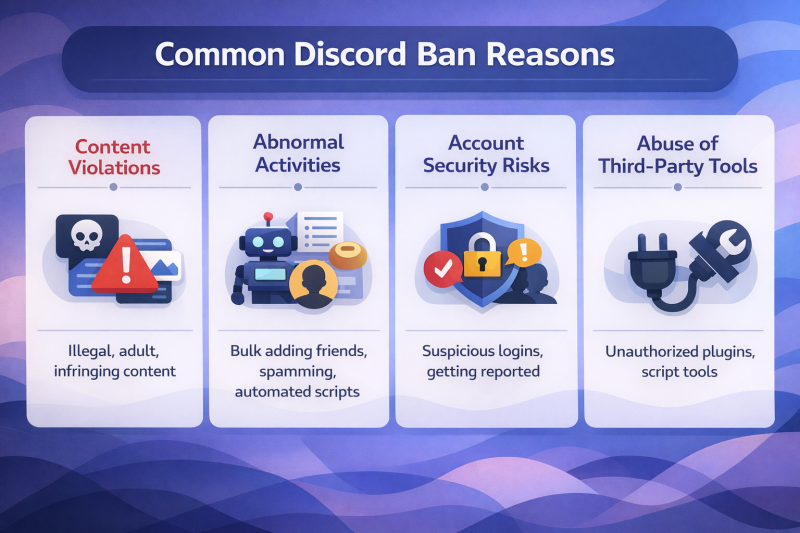
1. Content Violations: Stay Clear of Rule Crossings
Posting illegal, infringing, adult, or sensitive content is the most common cause of account bans. For example, sharing pirated resources or posting adult content in public channels may trigger automatic detection or user reports.
2. Abnormal Activities: High-Frequency Actions Carry Risks
High-frequency or abnormal activities are easily flagged by the system, such as bulk adding friends or frequently inviting users to servers, spamming messages, sending duplicate content, or using unauthorized bots or automation scripts.
3. Account Security Risks: Protect Your Login
Compromised accounts or unusual logins can also trigger bans, for instance, frequent login attempts from different regions, logging in from a new device that doesn’t match the account history, or being reported by other users for security issues.
4. Abuse of Third-Party Tools: Use Plugins and Scripts Cautiously
Using unauthorized plugins, multi-login software, or scripts can be interpreted as malicious activity. Example Cases
- A game community administrator was temporarily banned for bulk inviting members to multiple servers.
- A social account was mistakenly flagged for sharing external links, and the appeal took several days to restore access.
- Some users attempting to manage Orbs Badge Discord may trigger account restrictions if using unauthorized third-party tools, requiring an official appeal to restore access.
What to Do When Banned? Complete Appeal Guide
When an account is banned, following a proper appeal process is essential. The steps below help you act efficiently:
Step 1: Identify the Ban Type — Temporary, Permanent, or Feature-Limited
- Temporary Ban: Usually lasts a few hours to several days.
- Permanent Ban: Account access is fully blocked.
- Feature-Limited: Certain account functionalities are restricted.
Step 2: Gather Required Information for Appeals — Complete Data Is More Effective
- Username and ID
- Registered email
- Screenshots of recent activity
- Description of any involved content violations (if applicable)
Step 3: Write the Appeal Email — Template for Convenience
Be polite, concise, and professional. Example template:
Subject: Appeal for Account Suspension - [Your Username]
Dear Discord Support Team,
My account [Username] (ID: XXXXX) was recently suspended. I believe this may be a misunderstanding, as I always follow Discord’s Terms of Service. Please help me review the case. I am happy to provide any additional information needed.
Thank you for your assistance.
Best regards, [Your Name]
Daily Prevention Measures and Tool Recommendations
Prevention is better than appeal. Scientific account management and safety tools can significantly reduce the risk of bans.
1. Daily Operational Guidelines — Stay Clear of Ban Triggers
- Avoid bulk adding users or sending duplicate messages.
- Follow community rules and do not post prohibited content.
- Regularly update your password and enable two-factor authentication.
- Pay attention to the stability of login devices and networks.
2. Tool Assistance — Enhance Safety with FlashID Anti-detect Browser
- FlashID anti-detect browser provides independent device environments and network isolation to reduce false positives.
- Its cloud phone functionality supports multi-account mobile operations with secure isolation.
- When managing multiple accounts, using FlashID anti-detect browser to simulate different devices and network environments ensures long-term account stability.
Conclusion
Although Discord account bans are common, understanding their causes, mastering an effective appeal process, and combining proper management with scientific tools can help you restore accounts quickly and minimize future risks. Whether for individual users or community operators, it is crucial to follow platform rules, maintain account security, and leverage tools like FlashID anti-detect browser to achieve multi-account isolation and operational safety. By mastering these methods, you can confidently handle ban issues and ensure the long-term stability of your personal or community accounts on Discord.
FAQ(Frequently Asked Questions)
1.Q: Why was my Discord account banned?
A: Discord accounts can be banned for several reasons, including content violations, abnormal high-frequency activities, account security risks (such as unusual logins or reports), and misuse of unauthorized third-party tools. Understanding these causes can help prevent future bans.
2.Q: How can I appeal a Discord account ban?
A: To appeal a ban, first identify the type of ban (temporary, permanent, or feature-limited), gather required information (username, ID, email, activity screenshots), and submit a polite appeal email to Discord Support. Following up and maintaining proper records can improve the chances of a successful appeal.
3.Q: What information should I include in a Discord ban appeal?
A: Include your Discord username and ID, registered email, screenshots of recent activity, and a description of any content involved. Keep your email concise, polite, and professional.
4.Q: Can using third-party tools like scripts or plugins cause my account to be banned?
A: Yes, using unauthorized bots, scripts, or multi-login tools can trigger account restrictions or bans. Tools like FlashID anti-detect browser can help safely manage multiple accounts without violating Discord rules.
5.Q: How can I prevent my Discord account from being banned?
A: Follow community rules, avoid posting prohibited content, do not spam or bulk-add users, enable two-factor authentication, and use secure devices and networks. For multi-account management, tools like FlashID anti-detect browser provide device and network isolation to reduce risk.
6.Q: What is an Orbs Badge Discord restriction and can it lead to bans?
A: The Orbs Badge is a feature on Discord. Attempting to manage it using unauthorized third-party tools may trigger account restrictions. Always follow official methods and appeal through Discord Support if issues arise.
You May Also Like


