In today’s digital communities, Discord has evolved beyond a simple gaming chat tool and become a core private domain hub for high-value users. Whether you are an experienced gamer looking to separate work and personal identities, or a community manager aiming to expand brand influence through an account matrix, multi-account management has transitioned from an optional skill to a must-have capability.
However, Discord’s risk control system underwent a comprehensive upgrade in 2025–2026. Improper operations can lead to limited functionality at best, or all accounts being simultaneously suspended at worst. This article will provide an in-depth guide to secure multi-account management, and introduce a revolutionary tool that helps you move from merely “being able to log in” to “operating safely and efficiently,” including scenarios involving Orbs Badge Discord operations.
Why You Might Need Multiple Discord Accounts: Rules You Must Know
Typical Multi-Account Use Cases
Different user groups have different needs for multiple accounts:
Community managers: Manage different interest groups or servers, assign clear roles across accounts, and streamline content management.
Brand teams or marketers: Operate both official and project accounts simultaneously to increase brand exposure and cover different markets or product lines.
Individual users: Separate work and personal social accounts, protect privacy, and keep chat records and notifications independent.
Discord Rules for Multi-Accounts
Allowed: Users can legally have multiple accounts to manage different communities or business operations separately.
Not Allowed: Using automation scripts, large-scale bulk operations, or abusing multiple accounts for spam, harassment, or other violations.
Common Multi-Account Issues
Some common challenges in multi-account operations include:
- Confusing login information, which may lead to forgotten passwords or operational errors.
- Messages, notifications, and activities interfering between different accounts.
- Lack of isolation measures may increase the risk of suspensions or functionality restrictions—especially when handling Orbs Badge Discord; improper operations can trigger security mechanisms more easily.
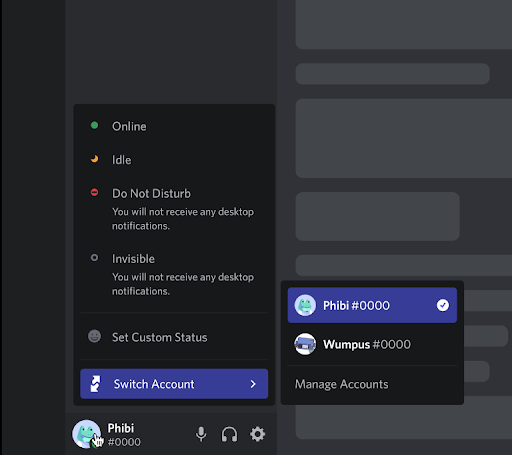
Managing Multiple Discord Accounts Safely with FlashID Anti-detect Browser
Why You Need FlashID Anti-detect Browser
Manually switching between multiple accounts is inefficient and error-prone. High-frequency or incorrect operations may trigger suspensions. FlashID anti-detect browser provides a secure environment and isolation strategy, making it an ideal solution for multi-account management—especially for badge operations or cross-region management.
Key Features of FlashID
- Independent device and network environments: Each account runs in an isolated environment, reducing the risk of system misjudgment.
- Cloud phone support: Enables multi-account operations on mobile devices safely and without interference.
- Multi-account management panel: Centralized monitoring of all accounts for quick switching and operational efficiency.
- Anti-suspension strategies: Simulates real device behavior to reduce misjudgment or suspension risks.
Usage Scenarios
- Brand teams operating both official and community accounts can use FlashID cloud phones to isolate accounts, avoiding operational conflicts.
- Community managers handling multiple server accounts can ensure accounts do not interfere with each other while quickly publishing notifications and content.
- Individual users separating work and personal accounts can ensure privacy and chat security, while supporting cross-device operations.
- When handling Orbs Badge Discord operations or similar features, FlashID isolates each account environment, reducing suspension risks.
Advanced Cloud Phone Applications
- Supports mobile multi-app operations, allowing multiple Discord accounts on a phone without conflicts.
- Suitable for cross-region account management, reducing login anomalies caused by frequent IP or device switching.
- Combined with FlashID’s secure isolation features, multiple accounts can operate long-term and stably without suspension risk.
Best Practices: Safe and Efficient Multi-Account Operations
Account Planning
- Clearly define the purpose and role of each account, and avoid frequent switching in a short time or abnormal logins on the same network.
- Configure independent email addresses, login information, and notification settings for each account to minimize confusion and operational mistakes.
Daily Operational Guidelines
- Follow Discord community rules and avoid unauthorized scripts or bulk operation tools.
- Avoid repeated messages, bulk friend requests, or frequently inviting users to servers.
- Regularly change passwords and enable two-factor authentication to protect account security.
Tool-Assisted Strategies
- Use FlashID anti-detect browser or cloud phone features to achieve device and network isolation.
- Monitor account status centrally via the multi-account management panel to detect abnormal operations promptly.
- On mobile devices, utilize cloud phone multi-app functions for efficient and stable operation.
- Particularly for Orbs Badge Discord operations, FlashID isolates each account environment to prevent violations and ensure safety.
Conclusion
Multi-account management has become an essential skill for advanced Discord users, community managers, and brand teams. However, operational and security risks cannot be ignored. By strategically planning account usage, following platform rules, and leveraging FlashID anti-detect browser with device isolation, network isolation, and cloud phone multi-app features, users can significantly reduce suspension risks and achieve safe, efficient multi-account operations. Mastering these methods allows you to manage multiple Discord accounts effortlessly, ensuring stable, flexible, and sustainable operations for communities, brands, and personal use—while safely handling Orbs Badge Discord operations.
FAQ(Frequently Asked Questions)
1.Q: Why would someone need multiple Discord accounts?
A: Managing multiple Discord accounts can help community managers, brand teams, and individual users separate different roles or activities. For example, a brand team may run an official account alongside a community account, while individuals may want to separate work-related communication from personal chats for better privacy and organization.
2.Q: Does Discord allow users to have multiple accounts?
A: Yes, Discord allows users to have multiple accounts for legitimate purposes such as managing different communities or projects. However, using automation scripts, mass actions, or abusing multiple accounts for spam, harassment, or other violations may trigger restrictions or account bans.
3.Q: What are the most common problems when managing multiple Discord accounts?
A: Some common issues include forgetting login details, mixing up accounts during operations, and receiving overlapping notifications or messages. Without proper isolation between accounts, users may also face higher risks of account restrictions, especially when performing actions such as managing Orbs Badge Discord features.
4.Q: How can FlashID anti-detect browser help manage multiple Discord accounts?
A: FlashID anti-detect browser provides isolated device and network environments for each account. With features like cloud phone support and a centralized account management panel, it allows users to operate multiple Discord accounts safely and efficiently while reducing the risk of detection or bans.
5.Q: What are the best practices for safely operating multiple Discord accounts?
A: To reduce risks, users should clearly define the purpose of each account, use separate emails and login credentials, follow Discord’s community rules, and avoid repetitive or automated actions. Enabling two-factor authentication and using tools that provide device and network isolation can also help maintain stable and secure account operations.
6.Q: How can I manage multiple Discord accounts safely?
A: To safely manage multiple Discord accounts, users should create clear roles for each account, use separate login credentials, and avoid logging into multiple accounts from the same environment without proper isolation. Using tools like FlashID anti-detect browser can help create independent device and network environments for each account, reducing the risk of detection or account restrictions.
7.Q: Can multiple Discord accounts get banned at the same time?
A: Yes, in some cases Discord may link multiple accounts together based on device fingerprints, IP addresses, or suspicious behavior patterns. If one account violates the platform’s policies, related accounts may also face restrictions. Proper environment isolation and responsible usage are important for reducing this risk.
8.Q: What tools can help manage multiple Discord accounts efficiently?
A: Account management tools such as anti-detect browsers or cloud phone platforms can help users operate multiple accounts more efficiently. These tools allow users to create separate operating environments, manage accounts from a single dashboard, and avoid frequent logins or device switching that could trigger security checks.
You May Also Like


