In today’s digital world, did you know that even if you clear your cookies or use incognito mode, your online activities can still be tracked through an invisible identifier called a browser fingerprint? Meanwhile, for professionals in cross-border e-commerce, overseas marketing, and other digital business fields, managing multiple online accounts safely and efficiently has become a mission-critical challenge.
This article will demystify the concept of browser fingerprints, explain their core use cases, and walk you through how to use FlashID—an advanced fingerprint browser—to easily create isolated virtual environments, allowing you to operate smoothly and securely in the digital landscape.
What Are Browser Fingerprints Used For? — A Deep Dive Into Key Use Cases
A browser fingerprint is a highly unique identifier generated from hardware, software, network settings, and behavioral data collected from your device (such as screen resolution, installed fonts, Canvas rendering characteristics, etc.). It functions like a digital ID card that’s extremely difficult to remove, and it has both protective and intrusive applications:
For general websites/platforms (e-commerce, social media, financial services):
- Security risk control & anti-fraud: Identifying abnormal logins, blocking “bonus abuse,” detecting mass-registration bots, and protecting user assets.
- User tracking & analytics: Cross-site behavioral tracking for targeted advertising and experience optimization (which also raises privacy concerns).
Core fingerprint parameters include:
- Canvas fingerprint: Hardware traits revealed during 2D rendering (highly identifiable)
- Font list: The unique combination of fonts installed on your device
- WebGL fingerprint: GPU-based 3D rendering traits
- Screen parameters: Resolution, color depth, pixel ratio
- Timezone & language: System settings
- Hardware info: CPU cores, memory size, etc.
Three Major Use Cases: Who Needs to Care Most About Fingerprints?
Use Case 1: Cross-border E-commerce Multi-Store Operators
- Pain point: Platforms prohibit one seller from operating multiple stores, yet business expansion requires multi-store deployment
- Risk: One store violation may trigger mass bans across all associated stores
- Losses: Frozen funds, blocked inventory, customer attrition, damage to brand reputation
Use Case 2: Social Media Marketing Teams
- Pain point: Need to manage multiple ad accounts and content accounts under strict platform restrictions
- Risk: Accounts may be banned if the system detects association
- Losses: Wasted ad budgets, campaign interruption, reduced customer reach
Use Case 3: Affiliate Marketing & Traffic Arbitrage
Pain point: Multiple accounts required to avoid being flagged for “self-clicking/self-purchase”
Risk: Suspicious behavior may result in withheld commissions
Losses: Inability to monetize traffic, reduced account trustworthiness
Why Traditional Solutions Fail
Many professionals have tried various workarounds, but most fail due to fundamental limitations:
❌ Multiple physical computers: expensive, hard to manage, fingerprints still similar
❌ Virtual machines: easily detected, low performance, abnormal fingerprint patterns
❌ Regular multi-login browsers: isolate cookies only, fingerprints remain unchanged
❌ Frequently switching IPs: abnormal behavior that raises more red flags
Root problem: These solutions only change surface-level parameters (IP, login states) but cannot rebuild a new digital fingerprint.
The Professional Solution: Fingerprint Browsers Introducing FlashID — A Leading Anti-Association Tool
FlashID creates a fully isolated fingerprint environment for each account, fundamentally solving the multi-account security problem.
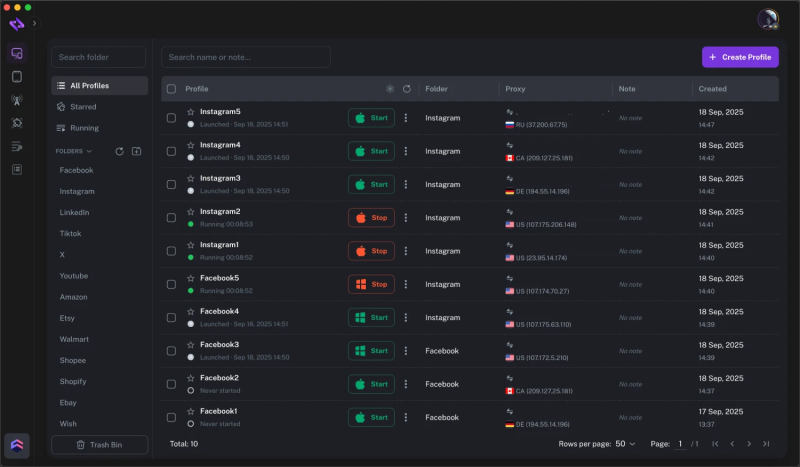
How FlashID Builds a Secure, Isolated Environment in Three Simple Steps
After learning the risks of browser fingerprints, you may wonder: How do I quickly set up a safe environment using FlashID? The process is simple and user-friendly, similar to other major tools—but FlashID significantly improves detection resistance and ease of use.
Create a Profile

In the Proxy Settings section, select Add Proxy

Enter the proxy host, port, username, and password, click Test to verify the proxy connection and then save the profile, and FlashID will open a new browser window with an independent fingerprint and isolated IP.

You can now safely log in and manage your platform accounts.
FlashID Goes Beyond Browsers: Cloud Phone + Global Proxy Partnership
FlashID doesn’t stop at browser-based identity protection.To meet the needs of global advertisers, social media operators, and cross-border growth teams, FlashID further provides Cloud Phone Infrastructure and a Worldwide Agency Program — making it a complete, end-to-end digital identity solution.
Four Advanced Advantages of FlashID
Although the steps for creating an environment are similar to other mainstream tools, FlashID delivers far stronger protection and scalability through its underlying technology, stability, and unified ecosystem. Beyond browser profiles, FlashID integrates Cloud Phone environments and built-in global residential proxies, forming a complete identity-security system across both web and mobile.
Advantage 1: Kernel-Level Anti-Detection for a “Real” Digital Identity
FlashID not only adjusts the parameters reported by the browser, but also uses kernel-level rendering simulation to ensure that Canvas, WebGL, audio, and other hardware fingerprints are generated naturally within the virtual environment rather than simply tampered with. This makes FlashID’s simulated environments significantly more effective and stable when facing advanced fingerprint-detection systems used by major platforms.
Advantage 2: Clean, Stable, and Fully Isolated Environments — Web + Mobile Unified
Each FlashID browser profile is built on a native browser kernel, ensuring:
- Full website compatibility
- Independent processes
- Zero cross-contamination of cookies or local storage
FlashID Cloud Phones extend this isolation to mobile:
- Each cloud phone has its own device fingerprint
- No shared device IDs
- No internal linkage between phones or browser profiles
- Perfect for TikTok, Instagram, and mobile-only platforms
The integration with FlashID’s built-in global residential proxy network (30M+ IPs) ensures both browser profiles and cloud phones operate in a coherent, risk-controlled identity environment, fully aligned in IP quality, region, and trust score.
Advantage 3: Robust Team Collaboration and Permission Management
FlashID supports a complete team workflow:
- Members & Roles: Create sub-accounts and assign roles such as Administrator, Operator, or Viewer.
- Permission Control: Precisely manage who can view, edit, or launch each profile.
- Operation Logs: All team actions are recorded for auditing and traceability, greatly enhancing operational security and management efficiency.
Advantage 4: Automation, API Integration, and Large-Scale Orchestration
For high-volume advertisers and enterprise operators, FlashID provides a comprehensive REST API that enables:
- Automated creation and deletion of environments
- Profile or cloud phone assignment
- Proxy rotation and IP quality checks
- Remote launch and workflow triggering
Teams can integrate FlashID with internal dashboards, CRM systems, or RPA bots, creating a fully automated ecosystem that manages browser profiles, cloud phones, and proxies as a single, scalable identity infrastructure.
From Passive Defense to Active Control: Master Multi-Account Security in the Digital Era
With competition intensifying in cross-border e-commerce and digital marketing, account security is now essential to business survival. Browser fingerprint management is no longer optional—it is a core operational skill.
FlashID empowers you with:
✅ Reduced risk: Prevent account association at the root
✅ Higher efficiency: Bulk profile management & smart workflows
✅ Stronger security: Encrypted data & controlled permissions
✅ Sustainable growth: Stable environments for long-term scaling
Start now and eliminate account association troubles once and for all!
Frequently Asked Questions (FAQ)
1.Q: What is a browser fingerprint and how does it cause account association? A: A browser fingerprint is a nearly unique digital identifier generated by collecting hundreds of parameters from your device—such as hardware configurations (Canvas, fonts, WebGL), software settings (operating system, screen resolution), and network information (timezone, language).When you log into different platform accounts on the same device, even if you change your network, the platform can still identify you as the same user through this consistent fingerprint. As a result, the system may flag the accounts as associated and potentially issue bans or other penalties.
2.Q: If I already use a proxy or VPN, why do I still need a fingerprint browser? A: A proxy or VPN only hides or changes your network location (IP address). It does not change your device’s browser fingerprint. Since platforms rely on both IP and fingerprint for risk detection, having a different IP is not enough—if the fingerprint remains the same, your accounts will still be linked. A fingerprint browser solves the other half of the problem.
3.Q: Is using a fingerprint browser like FlashID legal? A: Yes, it is completely legal. A fingerprint browser is a neutral technical tool, and its legality depends on how it is used. Using it for legitimate business purposes—such as multi-store operations or multi-account marketing—is compliant. Just make sure to follow the Terms of Service of your target platforms and do not use it for fraud, malicious scraping, or other illegal activities.
4.Q: Can I log in to multiple platforms’ accounts in one FlashID environment? A: Strongly not recommended. The best practice is to follow the principle of “one environment, one platform, one account.” For example:
- Environment A → Amazon Account A
- Environment B → Facebook Account B
This minimizes the risk of cross-association and keeps each account’s identity completely clean.
5.Q: Does FlashID support team usage? How is access controlled? A: Yes—this is one of FlashID’s key advantages. Administrators can:
- Create sub-accounts and assign different roles (Administrator, Operator, Viewer)
- Set fine-grained permissions to control who can view, edit, or launch each environment
- Review complete operation logs for auditing and traceability, ensuring secure and transparent team operations
You May Also Like


