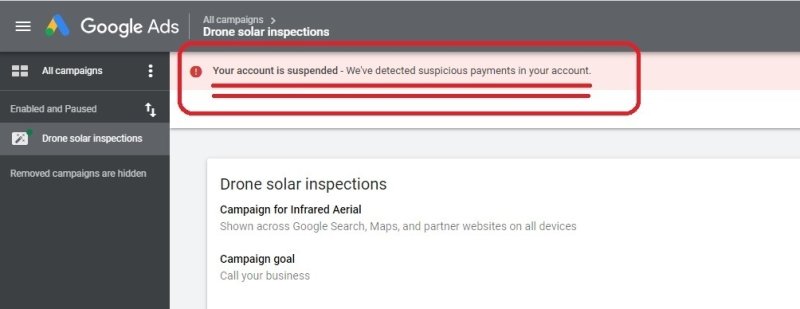
One of the most frustrating problems for advertisers is when a Google Ads account is suddenly restricted or suspended. Once an account is limited, all ad campaigns are immediately halted, directly affecting business revenue and customer acquisition. Even more frustrating, the appeal process can be lengthy and its outcome uncertain. This article will explain the main reasons accounts get restricted and provide a clear set of solutions and preventive measures.
Main Reasons Google Ads Accounts Get Restricted
1. Violating Google Ads Policies
Google Ads has detailed advertising policies covering ad content, landing pages, and business descriptions. Any violation in your ads or landing pages may lead to account restrictions.
Common violations include:
- Promoting prohibited or restricted products/services (e.g., hazardous items, non-compliant financial services)
- Misleading ad content or unverified exaggerated claims
- Ads that do not match landing pages or contain unclear information
Google’s review system is strict, and even seemingly “minor issues” can trigger restrictions.
2. Payment and Billing Issues
Incorrect payment information, failed billing, irregular payment methods, or frequently changing payment details can cause the account to be flagged as risky.
Examples include:
- Expired credit cards or incorrect billing details
- Outstanding payments
- Frequent changes to payment methods
These situations are marked as “suspicious payment activity,” which can lead to account restrictions or suspension.
3. Abnormal Account Behavior
Google monitors account behavior for unusual activity. The following behaviors may trigger restrictions:
- Creating multiple accounts in a short period
- Logging in to multiple accounts from the same device/IP
- Sudden large changes in budgets or campaign strategies
- Frequent changes to ads or account settings
Such actions may be interpreted as attempting to circumvent review or as abnormal operations.
4. Landing Page Quality and Misleading Information
If landing page content does not match ads, is unclear, non-transparent, or contains misleading information, it can trigger account restrictions. Missing privacy policies, company information, or contact details also lowers trust in the account.
How to Fix a Restricted Google Ads Account
1. Identify the Reason for Restriction
Log in to your Google Ads account and check emails and the “Policy Center” for detailed information to determine which area caused the issue. Official notifications usually indicate the general type of violation, such as policy violations, payment issues, or account security.
2. Implement Substantive Fixes
Before submitting an appeal, ensure you have:
- Removed or modified all violating ads
- Fixed or updated landing page content to match ads
- Corrected billing information and cleared any outstanding balances
- Ensured the website is transparent, legal, and complete
The key is to fix the issues first, then appeal. Repeated appeals without addressing the problems often reduce the chances of success.
3. Submit a Clear Appeal
When appealing, you should:
- Be objective and specific: explain the exact fixes you have made
- Use a professional tone: avoid emotional language or blaming the system
- Provide evidence: screenshots, modification logs, or website updates
A clear appeal helps the review team quickly understand the problem and your corrective actions.
How to Prevent Future Restrictions
Follow Policies: Regularly check ads, keywords, and landing pages to ensure compliance.
Stable Billing: Use real and consistent payment details; avoid frequent changes.
Standardize Operations: Maintain a stable account rhythm; avoid creating many accounts quickly or making large sudden changes.
High-Quality Landing Pages: Ensure landing pages match ads, are transparent, and avoid excessive or hidden redirects.
Use FlashID Anti-Browser for Multi-Account Management: For teams or agencies managing multiple accounts, account environment isolation is critical. Using a fingerprint browser like FlashID:
- Provides independent browser fingerprints, cookies, and cache for each account
- Prevents multiple accounts from being linked by sharing the same browser/IP
- Maintains a stable and controlled account operation environment
Such tools reduce linkage risk and are essential for safe multi-account management.
Conclusion
Google Ads account restrictions are rarely accidental and are usually triggered by a combination of policy violations, billing issues, account behavior, and environment associations. To effectively reduce risks, advertisers should maintain compliant ads and landing pages, keep billing and business information clear, stable, and accurate, use professional tools like FlashID for account environment isolation, and prioritize correcting problems before submitting appeals. Following these measures can significantly improve account stability, making Google Ads campaigns more reliable and sustainable in the long term.
Frequently Asked Questions (FAQ)
1.Q: Why was my Google Ads account suddenly restricted or suspended?
A: Accounts are usually restricted due to policy violations, payment or billing issues, abnormal account behavior, or low-quality/misleading landing pages. Even minor violations can trigger restrictions.
2.Q: Can I appeal a restricted Google Ads account?
A: Yes. First, fix all issues such as non-compliant ads, landing pages, or billing problems. Then submit a clear and professional appeal with evidence of your corrections.
3.Q: How long does it take to get an account reinstated?
A: The timeline varies. Simple cases may be reviewed in a few days, but complex cases can take weeks. Clear documentation and proper fixes usually speed up the process.
4.Q: How can I prevent future account restrictions?
A: Maintain compliant ads and landing pages, keep billing information accurate and stable, standardize account operations, and for multi-account teams, use tools like FlashID to isolate account environments.
5.Q: What is FlashID and how does it help?
A: FlashID is a fingerprint browser that provides independent browser fingerprints, cookies, and cache for each account. It prevents multiple accounts from being linked via shared devices/IPs and helps maintain a stable, secure operating environment.
You May Also Like


