Quick Answer
To create a Facebook account, visit facebook.com or open the Facebook app, select Create new account, and enter your name, email address or mobile number, password, date of birth, and other requested information. After submitting the form, follow Facebook’s instructions to confirm your email address or phone number and complete the signup process.
Key Takeaways
- You can sign up for Facebook through its website or mobile app.
- You need a usable email address or mobile number to complete the registration process.
- Use information that you can access and verify, especially your name and contact details.
- After signup, review your profile, privacy settings, and account security options.

What Do You Need Before Signing Up for Facebook?
Before creating an account, prepare a few basic things:
- A working email address or phone number: Facebook may use it to confirm your account and send important account-related messages.
- Your basic information: Have your name and date of birth ready. Facebook recommends using the name you go by in everyday life.
- A secure password: Use a password that is difficult to guess and is not reused across important accounts.
- A stable connection: Avoid repeatedly refreshing the signup page or submitting the form if the connection is unstable.
If you need a more flexible connection for accessing Facebook, FlashID provides residential and other proxy options for different locations and use cases.
Learn More About FlashID Proxy
How to Create a Facebook Account
The signup process is similar across platforms, but the interface differs slightly between a web browser and the mobile app.
Option 1: Sign Up on the Facebook Website
Step 1: Open Facebook
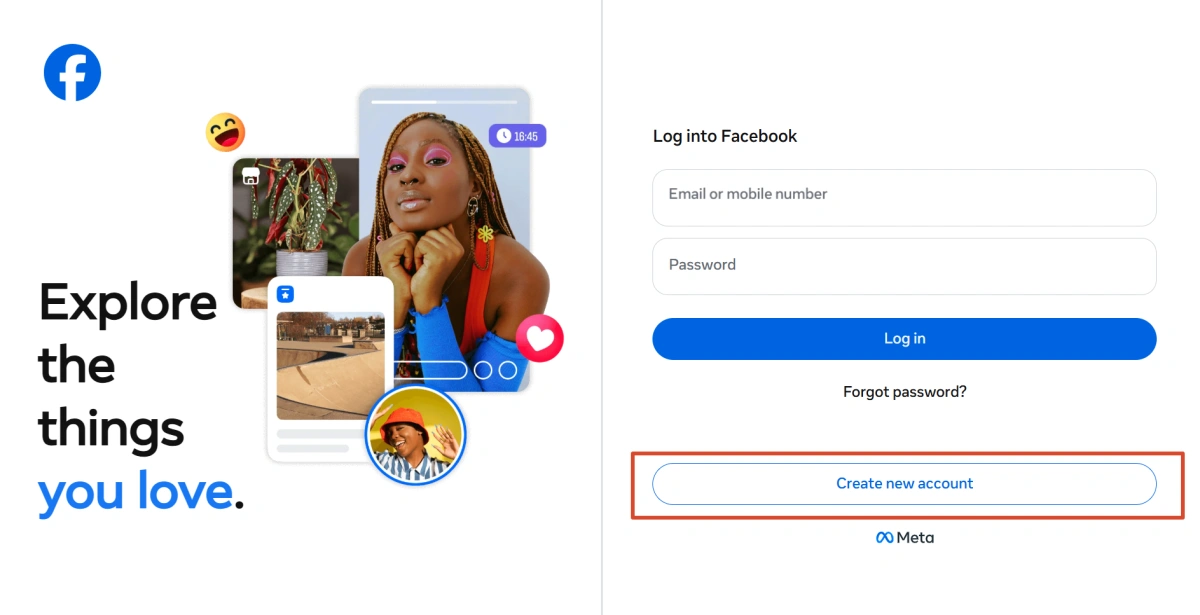
Go to facebook.com using your preferred web browser. On the login page, select Create new account to start registration.
Step 2: Enter Your Basic Information
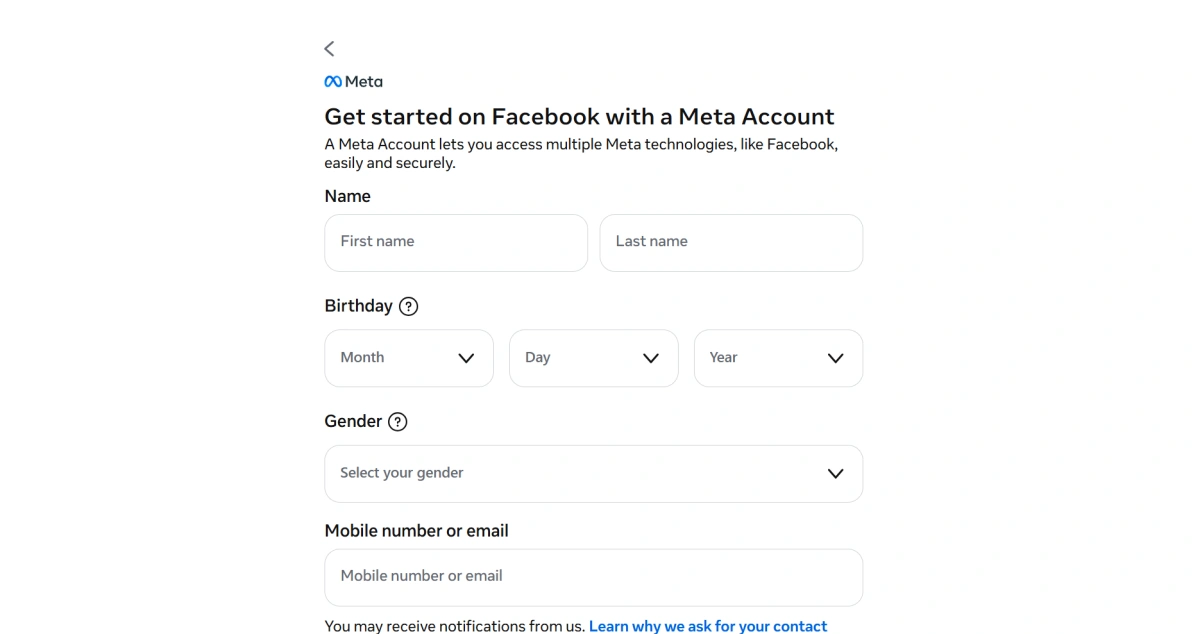
Enter your first and last name, date of birth, and other information requested on the signup form. Use information that you can reasonably verify if Facebook asks you to confirm your identity later.
Facebook recommends using the name you use in everyday life. Avoid unusual capitalization, punctuation, random words, or other additions that do not represent your normal name.
Step 3: Add an Email Address or Mobile Number
Enter an email address or mobile number that you can currently access. Check the information carefully before continuing, because Facebook may use it to send a confirmation code.
You can use either an email address or phone number during signup; you do not necessarily need to provide both.
Step 4: Create a Password
Set a unique password for your Facebook account. A longer password that you do not use on other important services is a better choice.
Step 5: Submit the Registration
Review the information you entered and select the signup button. Facebook may ask for additional confirmation depending on the registration process.
Step 6: Confirm Your Contact Information
Follow the instructions sent to your email address or mobile number. If Facebook sends a confirmation code, enter it where requested.
Once the required confirmation is complete, your Facebook account is ready to use.
Option 2: Sign Up Through the Facebook Mobile App
If you prefer using a phone, you can register directly through the Facebook app.
Step 1: Open the Facebook App
Install and open the official Facebook app on your Android or iPhone device, then select the option to create a new account.
Step 2: Enter Your Information
Follow the on-screen instructions to provide your name, date of birth, email address or phone number, and password.
Step 3: Review and Submit
Check that your contact information and other details are correct, then submit the registration form.
Step 4: Complete Verification
If Facebook asks you to confirm your email address or phone number, enter the code or follow the confirmation instructions you receive.
If you do not receive a code, check your email’s spam folder, confirm that the contact information is correct, and wait a few minutes before requesting another code. Facebook recommends checking your connection and waiting before requesting a new code when verification messages do not arrive.

Things to Keep in Mind When Signing Up for Facebook
1.Don’t Submit the Registration Form Repeatedly
If your signup doesn’t go through, avoid submitting the registration form over and over again. Repeated attempts within a short period may trigger temporary restrictions. If you encounter an error, check your information and wait before trying again.
2.Check the Age Requirement
Facebook requires users to meet its minimum age requirement to create an account. Make sure the date of birth you enter meets the requirement for your region before submitting the form.
3.Avoid Switching Networks During Signup
Try to keep your network connection consistent while creating your account. Frequently switching between different networks or locations during signup may trigger additional security checks or interrupt the registration process.
4.Don’t Use a Temporary or Inaccessible Email
Use an email address that you can access both during signup and after registration. Avoid temporary email addresses that may expire, since you may need access to your email later for account verification, security notifications, or account recovery.
Setting Up Your Profile After Signup
Creating the account is only the first step. After logging in, you can complete your profile and adjust your account settings.
Start with the basics:
- Add a profile picture.
- Add information you want to share on your profile.
- Choose a username if you want a customized profile URL.
- Review who can see your posts and profile information.
- Check your contact and friend-request settings.
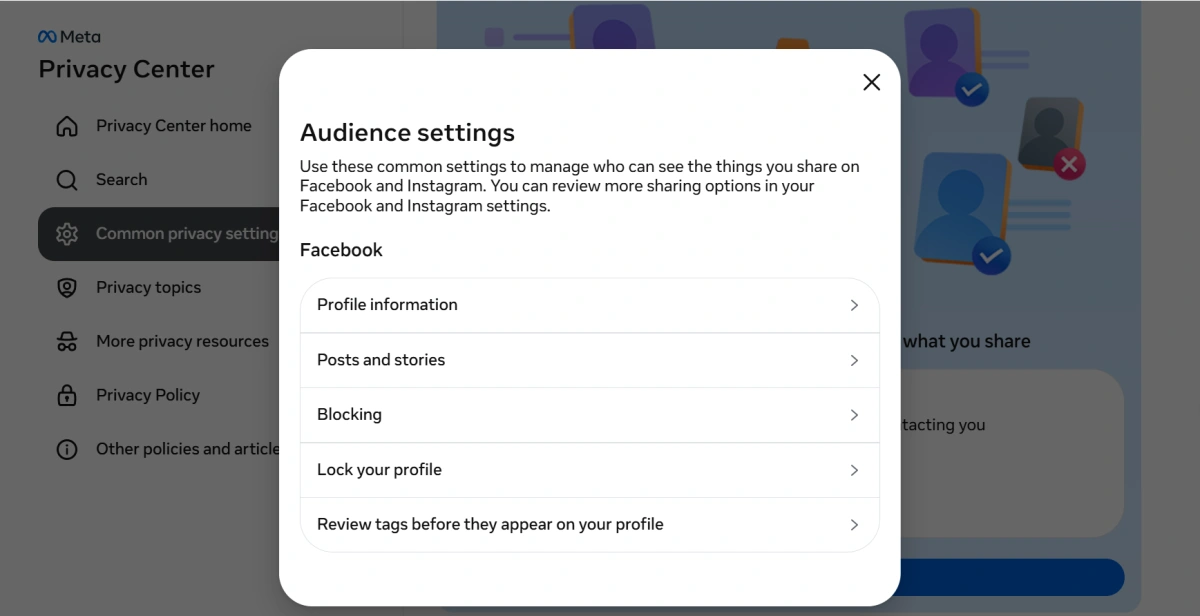
Facebook’s Audience and visibility settings let you control areas such as profile details, posts, stories, followers, tagging, and who can find or contact you.
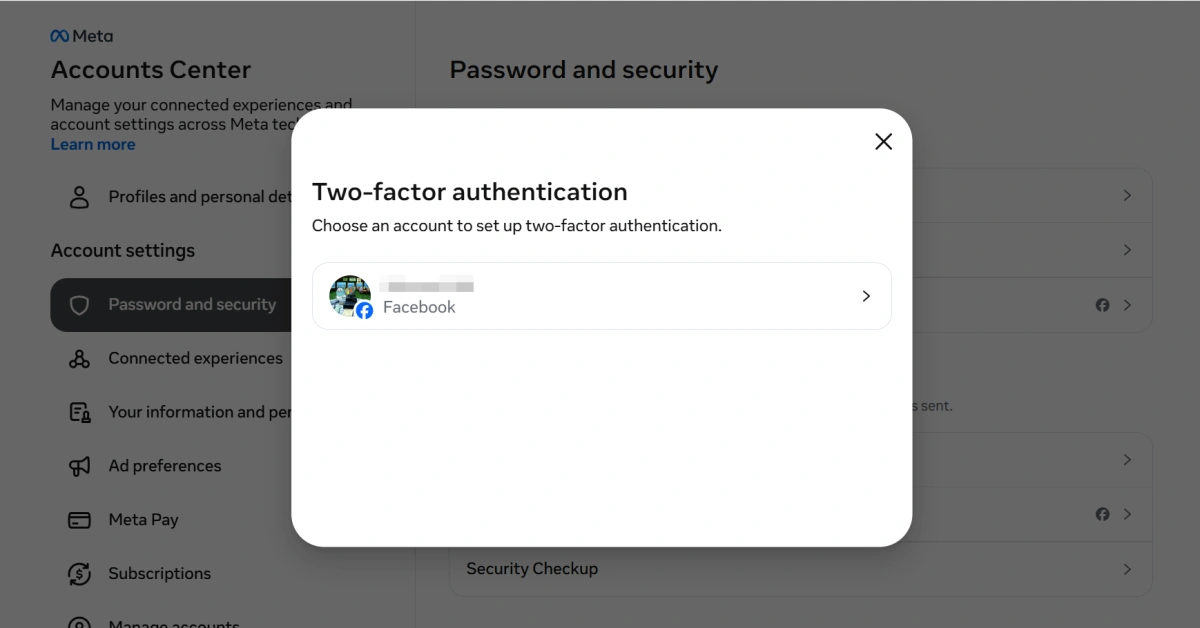
You should also review your security settings and consider enabling two-factor authentication for additional account protection.
Common Facebook Signup Errors & Fixes
| What you see | Why it happens | What to do |
|---|---|---|
| “This email is already registered.” | The email address is already associated with a Facebook account. | Try logging in or use Facebook’s account recovery options instead of creating another account. |
| “Please enter a valid mobile number or email.” | The contact information may contain a typo or may not be accepted in the required format. | Check the information carefully and try the other signup option if available. |
| The confirmation code never arrives. | The message may be delayed, filtered as spam, or sent to incorrect contact information. | Check your spam folder, verify your email or number, wait a few minutes, and request another code. |
| Your name is not accepted. | The name may not follow Facebook’s naming requirements. | Use the name you normally use in everyday life and remove unusual characters, punctuation, or random words. |
| “We couldn’t create your account.” | Facebook may require additional checks or may not be able to complete the signup at that moment. | Check your information, avoid repeated attempts, and try again later if the problem continues. |
| Facebook asks you to confirm your identity. | Facebook may need additional information to confirm that the account belongs to you. | Follow the instructions shown by Facebook and provide an accepted document if requested. |
One important point: Do not assume every signup error has the same cause. Facebook may apply additional security checks depending on the account and situation, so follow the specific instructions shown on the screen.
Conclusion
Creating a Facebook account is straightforward: open Facebook, choose Create new account, provide the requested information, and complete the email or phone verification. Using accessible contact information and your normal everyday name can make the process easier to manage. After signup, take a few minutes to complete your profile and review your privacy and security settings.
If you’d like to learn more about facebook and stay updated with practical insights, feel free to join our community.
FAQ
1.Do I need to use my real name on Facebook?
Facebook recommends using the name you go by in everyday life for your personal account. If Facebook asks you to confirm your name, you may need to provide supporting documentation.
2.Can I sign up for Facebook with only an email address?
Yes. Facebook’s signup process can use an email address or mobile number. You should use contact information that you can currently access because it may be needed for confirmation or account recovery.
3.Can I create a Facebook account without a phone number?
An email address can be used instead of a phone number during signup. However, Facebook may request additional verification depending on the circumstances of the account.
4.What if I enter the wrong birth date?
Facebook allows users to update birthday information after signup, although there are limits on how often it can be changed. If the information creates an eligibility issue, Facebook may require additional steps.
5.Can I create multiple Facebook accounts?
Facebook generally does not allow people to maintain multiple personal accounts. If you need a presence for a business, organization, or brand, a Facebook Page is the more appropriate option.


