Pinterest is a popular visual discovery platform where users explore ideas and inspiration rather than personal updates.
What Changed on Pinterest in 2025
Before 2025, Pinterest primarily served as a tool for personal inspiration and content curation. Users saved Pins and organized them into Boards to discover new ideas in areas like lifestyle, design, and hobbies. The platform was mainly used for browsing and collecting creative content, with limited attention from marketers compared to other social networks.
In 2025, Pinterest has grown into a significant channel for marketers and content creators. With over 570 million monthly active users and billions of searches each month, the platform now offers strong organic reach opportunities. Its advertising audience also expanded by about 10.6 % between January 2024 and January 2025, attracting younger users and high-intent searchers. Today, marketers leverage Pinterest by consistently publishing visually engaging, keyword-optimized Pins to drive traffic, test strategies, and promote products.
This evolution makes Pinterest not only a hub for creativity but also a powerful marketing tool, and this guide will show you how to set up your account, plan strategies, post efficiently, and optimize data using tools like FlashID anti-detect browser, IPHey, and Scamlytics.
Module 1: Account Setup and Basics
Before you start posting content, it’s essential to lay a solid foundation so Pinterest clearly understands your identity and niche.
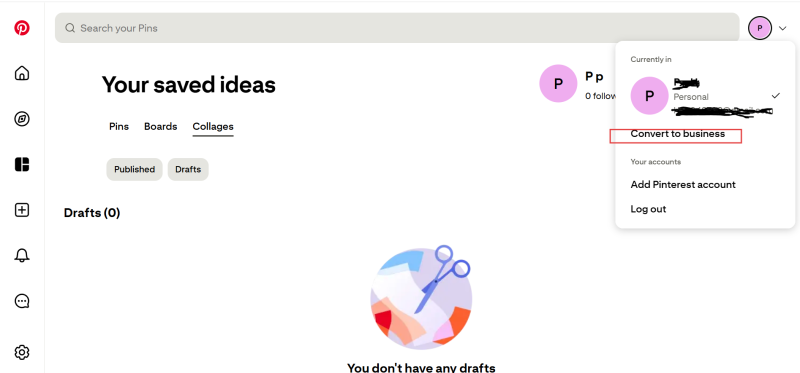
Open a Business Account
A business account unlocks analytics, statistics, and advanced settings, allows you to connect a website to track clicks and optimize your content strategy, and is essential for growth and monetization.
Define Your Niche and Boards
- Plan boards in advance (e.g., recipes, fitness ideas, home design)
- Each Pin must be linked to a relevant board to ensure proper algorithm classification
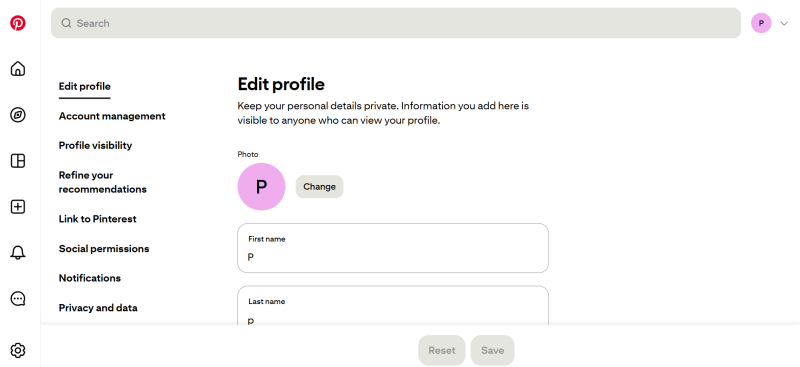
Optimize Profile Picture, Bio, and Keywords
- Simple and clear descriptions + relevant keywords (Pinterest promotion, content ideas, Pin optimization)
- Helps with search visibility and algorithmic recommendations
Tip: During the strategy phase, you can use IPHey to check IP distribution across different regions, helping you understand your target audience’s interests and preferences for more precise content planning.
Module 2: Keywords and Creative Strategy
Creative content and keyword placement directly determine Pinterest reach.
Common Keywords Examples
- Pinterest Promotion: Increases discoverability in search
- Content Ideas: Encourages users to save and share
- Pin Optimization: Improves individual Pin performance
- Pinterest Strategy: Helps plan boards and posting schedule
It’s recommended to naturally incorporate these keywords into titles, descriptions, and board names. For example: “Plan your content ideas through Pinterest strategy to make Pin optimization more effective.”
Principles for Creative Content
- Clear idea + strong visual = more saves → higher reach
- Simple, minimalist designs and vertical images are easier to save
- Video Pins (short videos or light animations) help kickstart account growth
Before posting, you can use Scamlytics to detect potential risks for accounts or links, and combine it with FlashID anti-detect browser for multi-account management to ensure safe and stable posting.
Module 3: Efficient Posting and Workflow
Consistent, high-volume posting is key to Pinterest success.
Pin Posting Workflow
Create a Pin → Add a title → Write a short description → Choose the appropriate board → Publish
Posting Frequency and Volume
- Daily Strategy: 10–30 Pins per day
- Weekly Bulk Upload: 200–300 Pins per week
- Key to success: consistency + correct board distribution
Multi-Account Management and Tools
- FlashID: Creates an independent browser profile for each account, reducing the risk of bans
- Warm-up period: perform light actions like liking and following for the first 3–4 days on a new account
- Then post ~10 Pins per day for 1–2 weeks to stabilize account performance
Module 4: Data Optimization and Long-Term Growth
Continuously optimizing content and analyzing data ensures long-term, stable growth on Pinterest.
Boost Early Engagement
Pinterest tests a Pin with a small audience first, and if it gets saves and clicks, the algorithm expands its reach. Early engagement is key. Keep visuals simple, focus on one main idea, and avoid complex layouts. Vertical short videos or light animations often gain initial views more easily.
Keyword Research and Competitor Analysis
- Use keywords to construct titles, descriptions, and tags for better search visibility
- Analyze competitors’ popular Pins to summarize creative approaches and style trends
Conclusion
Pinterest success comes from proper account setup + clear niche + consistent high-volume posting + strong visual creativity. By using FlashID anti-detect browser for multi-account management, combined with IPHey and Scamlytics for risk monitoring and data analysis, you can operate Pinterest accounts more safely and efficiently, turning the platform into a stable source of organic traffic without any ad spend.
FAQ (Frequently Asked Questions)
1.Q: Why use a Pinterest business account?
A: It unlocks analytics, advanced settings, and website tracking, making growth, visibility, and monetization possible.
2.Q: How do I choose niches and boards?
A: Plan boards based on your audience or interests and link each Pin to the relevant board to help Pinterest categorize and recommend your content.
3.Q: Which keywords boost Pinterest reach?
A: Use keywords like Pinterest Promotion, Content Ideas, Pin Optimization, and Pinterest Strategy in titles, descriptions, and board names for better search visibility.
4.Q: How often should I post Pins?
A: Consistency matters: post 10–30 Pins daily or 200–300 Pins weekly, and ensure correct board distribution to maximize reach.
5.Q: How can I manage engagement and safety?
A: Boost early engagement with simple visuals, one main idea, and vertical videos or light animations. Use FlashID, IPHey, and Scamlytics for safe, efficient multi-account management and risk monitoring.
You May Also Like


