Pinterest is a platform centered on visual content and discovery, functioning more like a visual search engine than a traditional social media platform. Users actively search, save (Pin), and browse content to find inspiration and solutions, making it an increasingly important source of traffic for affiliate marketing, e-commerce, and content matrix operations. With its long content lifecycle, strong user conversion intent, recommendation system independent of social relationships, and external link friendliness, Pinterest is highly suitable for large-scale operations using multiple accounts, themes, and regions.
However, opportunities come with challenges. At the same time, as Pinterest’s risk control system continues to evolve, managing multiple accounts has become more challenging and risky. Ensuring safe and long-term management of multiple Pinterest accounts while remaining compliant has become a key concern for many operators.
Who Needs Multiple Accounts
As Pinterest’s traffic value continues to rise, more operators aim to leverage multiple accounts to create content matrices and cover multiple regions, thereby increasing exposure and conversions. Typical users who may need multiple accounts include:
- Multi-brand or multi-project operators: Managing separate accounts for different brands, products, or projects
- Vertical content teams: Running independent accounts for different niches or themes
- Cross-region/multilingual operators: Reaching audiences in different countries or languages
- Affiliate marketers or testing operators: Using multiple accounts to test content, traffic, and conversions
- Team managers: Assigning accounts to different team members to improve efficiency and reduce operational conflicts
How to Create Multiple Pinterest Accounts
The process of creating multiple Pinterest accounts is simple, but requires a unique email address for each.
Step 1: Use a Unique Email Address
Unfortunately, Pinterest does not allow you to create multiple accounts using the same email address. You’ll need a unique email for each new account.
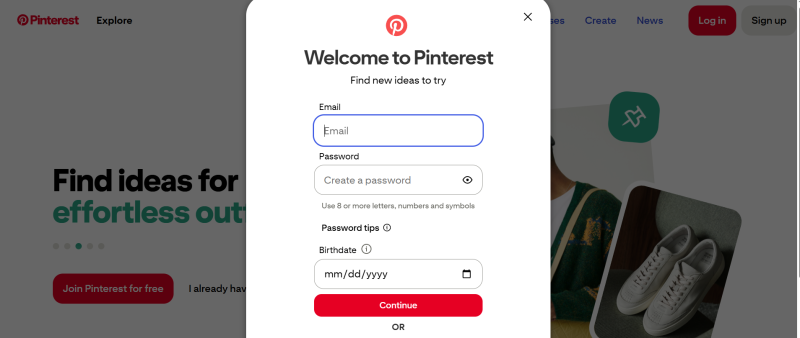
Step 2: Sign Up
Visit the Pinterest website and sign up using the new email address.
Step 3: Set Up Your Profile
Fill in the profile details, including your username, bio, and website link.
Step 4: Convert to Business (Optional)
If you’re creating a business account, you can convert it from the settings menu.
But simply creating accounts is far from enough. While multiple accounts can increase traffic and operational flexibility, Pinterest can detect account associations through IP addresses, browser fingerprints, and behavior patterns. To safely and sustainably manage multiple accounts, each account must have an independent and controllable environment, which is where FlashID plays a critical role.
Safely Managing Pinterest Accounts with FlashID Anti-detect Browser
As Pinterest’s risk controls continue to evolve, traditional browsers with proxies are no longer sufficient for long-term, multi-account operations. FlashID, a professional anti-detect browser, provides a systematic solution for managing multiple Pinterest accounts.
Key Advantages of FlashID
Complete account environment isolation to prevent linkage
FlashID anti-detect browser creates a separate browser environment for each Pinterest account, including Canvas, WebGL, User-Agent, cookies, and local storage. Each account appears to the platform as a distinct, real device, significantly reducing the risk of account association.
One account, one IP for long-term stability
FlashID can flexibly pair with residential or mobile IPs, ensuring that each account has a dedicated IP. IP and browser fingerprint can be persistently bound, aligning with Pinterest’s expectations for a stable user environment.
Centralized management for operational efficiency
Operators can manage multiple accounts securely within one interface, quickly switch between environments, and avoid errors from frequent logins and logouts, which is especially useful for teams and large-scale operations.
More human-like behavior
FlashID anti-detect browser allows different accounts to have distinct system parameters, languages, and time zones, giving each account independent and natural usage characteristics, which helps improve account trustworthiness and long-term survival.
FlashID Cloud Phone: Enhancing Multi-Account Security
With Pinterest increasingly monitoring device fingerprints and mobile behavior, browser-level isolation alone is insufficient in some scenarios. To address this, FlashID will launch Cloud Phone, providing higher-level security support for multi-account operations.
Core Features of FlashID Cloud Phone
- Independent cloud mobile environment: Each account runs on a separate cloud phone, isolating device information at the system level and reducing account association risk
- Realistic mobile device parameters: Simulates real phone models, OS versions, and hardware parameters, aligning with Pinterest mobile risk controls
- Optimized for Pinterest mobile scenarios: Suitable for browsing, posting, and long-term login on mobile
- Remote access support: Manage accounts securely anytime, anywhere without physical devices
- Facilitates team collaboration: Different team members can manage their accounts separately, avoiding risks from shared devices
Best Practices for Managing Multiple Pinterest Accounts
- One account, one environment: Each account uses an independent browser or FlashID configuration with a dedicated IP to prevent cross-login.
- New account warm-up: Complete profile, bio, and Boards; gradually save and share content over the first 7–14 days; avoid mass posting of external links or automated actions.
- Account positioning and content differentiation: Assign different accounts to different themes or regions, avoiding repeated Pin text or image styles.
- Natural operation rhythm: Operate accounts at different times to simulate real user behavior; FlashID or Cloud Phone can help differentiate activity.
- Team collaboration standards: Assign account ownership clearly, manage accounts centrally while ensuring environment isolation, and monitor account health regularly.
Conclusion
Pinterest does not prohibit multi-account operations; the real risk lies in account associations and environment exposure. As the platform’s risk control system continues to advance, relying solely on manual switching or simple proxies is insufficient for long-term operations.
Using FlashID anti-detect browser to create independent, secure, and stable environments for each Pinterest account is key to scaling multi-account operations. With the upcoming Cloud Phone feature, managing multiple Pinterest accounts will become even safer, more efficient, and sustainable.
Frequently Asked Questions (FAQ)
1.Q: Can I have multiple Pinterest accounts?
A: Yes, as long as all accounts comply with Pinterest rules and avoid suspicious associations.
2.Q: Who typically needs multiple accounts?
A: Multi-brand operators, vertical content teams, cross-region marketers, affiliate testers, and team managers.
3.Q: What are the main risks of multi-account management?
A: Account associations via IP, browser fingerprints, or behavior patterns can lead to limited reach, feature restrictions, or suspension.
4.Q: How does FlashID anti-detect browser help manage multiple accounts safely?
A: FlashID isolates each account environment, assigns dedicated IPs, simulates real user behavior, and allows centralized management.
5.Q: What is the FlashID Cloud Phone feature?
A: It runs each account in a separate cloud mobile environment with realistic device parameters, supports remote access, and enhances security for team collaboration.
6.Q: How should I warm up a new Pinterest account?
A: Complete your profile, Boards, and bio, then gradually save and share content over 7–14 days. Avoid mass posting or automated actions initially.
7.Q: How can I differentiate multiple accounts?
A: Assign each account to different themes, niches, or regions, and vary Pin text and image styles to prevent duplication.
8.Q: How often should I operate multiple accounts?
A: Operate accounts at different times to mimic natural user behavior. Tools like FlashID or Cloud Phone can help create differentiated activity patterns.
9.Q: Can teams safely collaborate on multiple accounts?
A: Yes. Assign clear ownership, use separate environments, and monitor account health regularly to avoid conflicts and risk exposure.
10.Q: Can multi-account operations be scaled safely long-term?
A: Yes. Using FlashID and Cloud Phone, each account can operate independently, reducing risk and enabling efficient, sustainable growth.
You May Also Like


