Is Ping0.cc Reliable? Many VPN and proxy users turn to Ping0.cc to check their IP address and obtain a risk score. The tool has gained popularity for its simplicity and the perception that a high risk score could lead to account bans on platforms like TikTok, YouTube, or e-commerce sites.
This article examines the reliability of Ping0.cc’s risk score, explains what it actually measures, and offers practical steps to evaluate and improve your IP quality—including how an anti-detect browser like FlashID can complement your privacy setup.
What Does Ping0.cc Actually Measure?
Ping0.cc offers several core features: IP geolocation, ASN lookup, IP type detection (residential, datacenter, etc.), and its signature risk score. The risk score appears to be based on factors like whether the IP belongs to a known VPN or datacenter range, its historical behavior, and possibly its presence in blacklists.
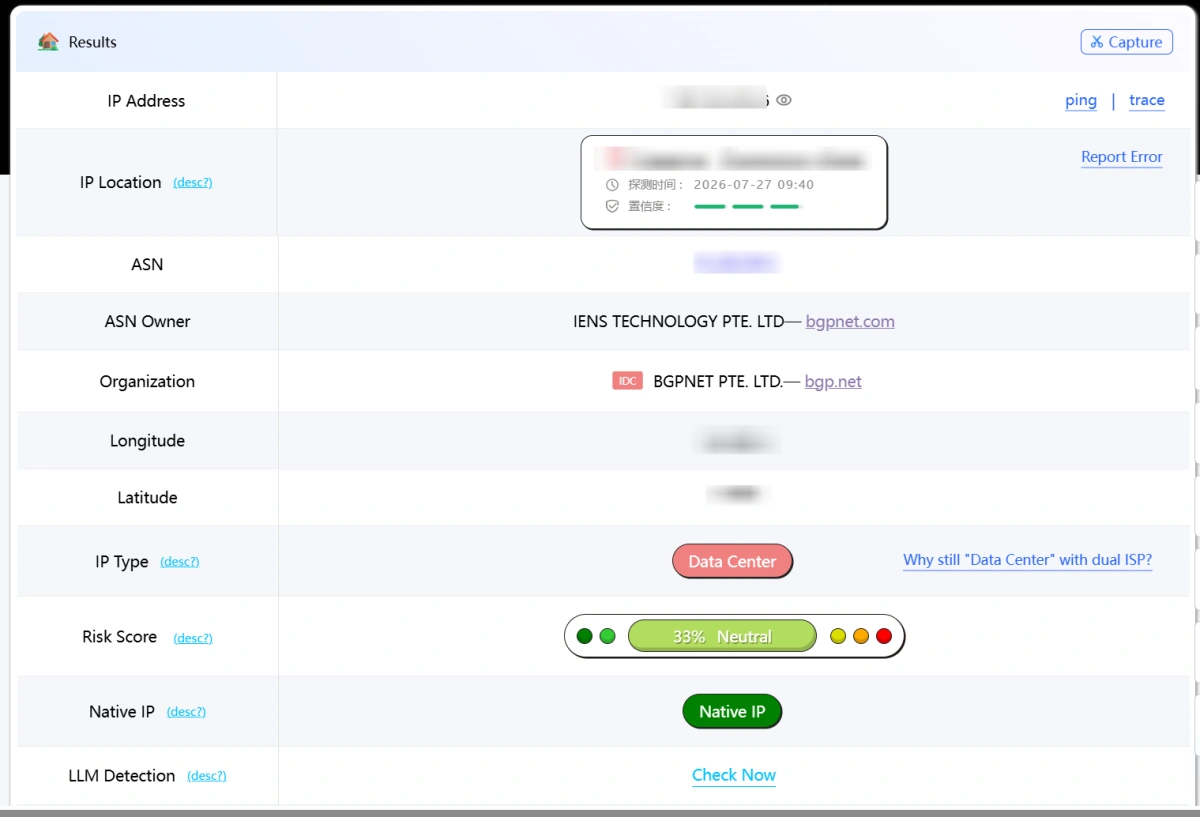
How Ping0.cc Calculates Its Risk Score
Ping0.cc does not publicly explain the exact data sources or formula behind its risk score. The score appears to consider factors such as IP type, ASN, VPN or proxy classification, blacklist records, and possible abuse history. Because the methodology is not transparent, the same IP may receive different results over time, and users cannot easily verify why a score changes.
Some online discussions describe the score as being based on an “entertainment database,” but this is not an official definition from Ping0.cc. It is therefore safer to treat the score as a proprietary estimate rather than a verified industry-standard security rating.
Is the Ping0.cc Risk Score Reliable?
Ping0.cc can be useful as a quick screening tool, but its risk score should not be treated as a definitive measure of IP quality. There is no public evidence that major platforms such as TikTok, YouTube, Google, or e-commerce sites directly use Ping0.cc’s score when reviewing accounts.
A high score may still indicate characteristics that platforms commonly examine, such as a datacenter IP, poor ASN reputation, shared usage, or previous abuse reports. However, the score itself does not cause an account ban. It is better used alongside other IP-checking tools and real testing on the target platform.
How to Evaluate IP Quality Beyond Ping0.cc
To get a clearer picture of your IP quality, use multiple tools and consider broader factors.
Combine multiple tools: whoer.net, scamalytics.com, ipinfo.io
- Whoer.net provides a comprehensive fingerprint check and proxy detection.
- Scamalytics.com offers a fraud score based on actual transaction data.
- IPinfo.io gives detailed IP intelligence, including abuse reports and ASN reputation.
Comparing results from these services can give a more balanced view than relying on Ping0.cc alone.
Factors: IP type (residential > datacenter), ASN reputation, usage history
Residential IPs generally have higher trust than datacenter IPs. ASN reputation matters—some hosting providers are widely blacklisted. The history of the IP (previous abuse reports, spam activity) also plays a role. Tools like IPQS offer historical data.
Practical advice: prioritize actual experience over single scores
Ultimately, the best test is to use the IP with your target platform. If you can log in, perform actions, and avoid blocks, the IP is likely acceptable regardless of a single score. Automatic checks are useful for screening but should be complemented with manual verification.
Solutions for Improving IP Quality
If you find your IPs are frequently flagged, consider these approaches.
DIY: using Warp, dedicated egress, or chain proxies
Cloudflare Warp can mask your IP behind a residential-range IP. Dedicated egress IPs from reputable providers offer clean, fresh addresses. Chaining proxies (e.g., HTTP to SOCKS) can add layers of obfuscation but may reduce speed.
Commercial: anti-detect browsers with built-in proxy integration
Anti-detect browsers like FlashID go beyond simple proxy management. They create isolated browser environments with unique fingerprints, reducing the likelihood of associations between accounts. When combined with clean proxies, this can improve your success rate.
Why isolated browser profiles complement clean IPs
Even with a pristine IP, browser fingerprinting can expose connections between accounts. An anti-detect browser randomizes or customizes fingerprint attributes (screen resolution, fonts, WebGL, etc.) so each profile appears as a distinct user. This separation is critical for multi-account management.
How FlashID Antidetect Browser Helps Build a More Consistent IP Environment
A low risk score does not automatically mean an IP is suitable for account operations. Platforms may also compare the IP with browser signals such as WebRTC, time zone, language, geolocation, cookies, and device fingerprints. If these signals conflict, an otherwise usable IP may still appear unusual.
Assign a Separate Proxy to Each Profile
FlashID includes built-in proxy purchasing and management, allowing users to assign residential, ISP, mobile, or datacenter proxies directly to individual browser profiles. Keeping one stable proxy for each account reduces unnecessary IP sharing and frequent location changes.
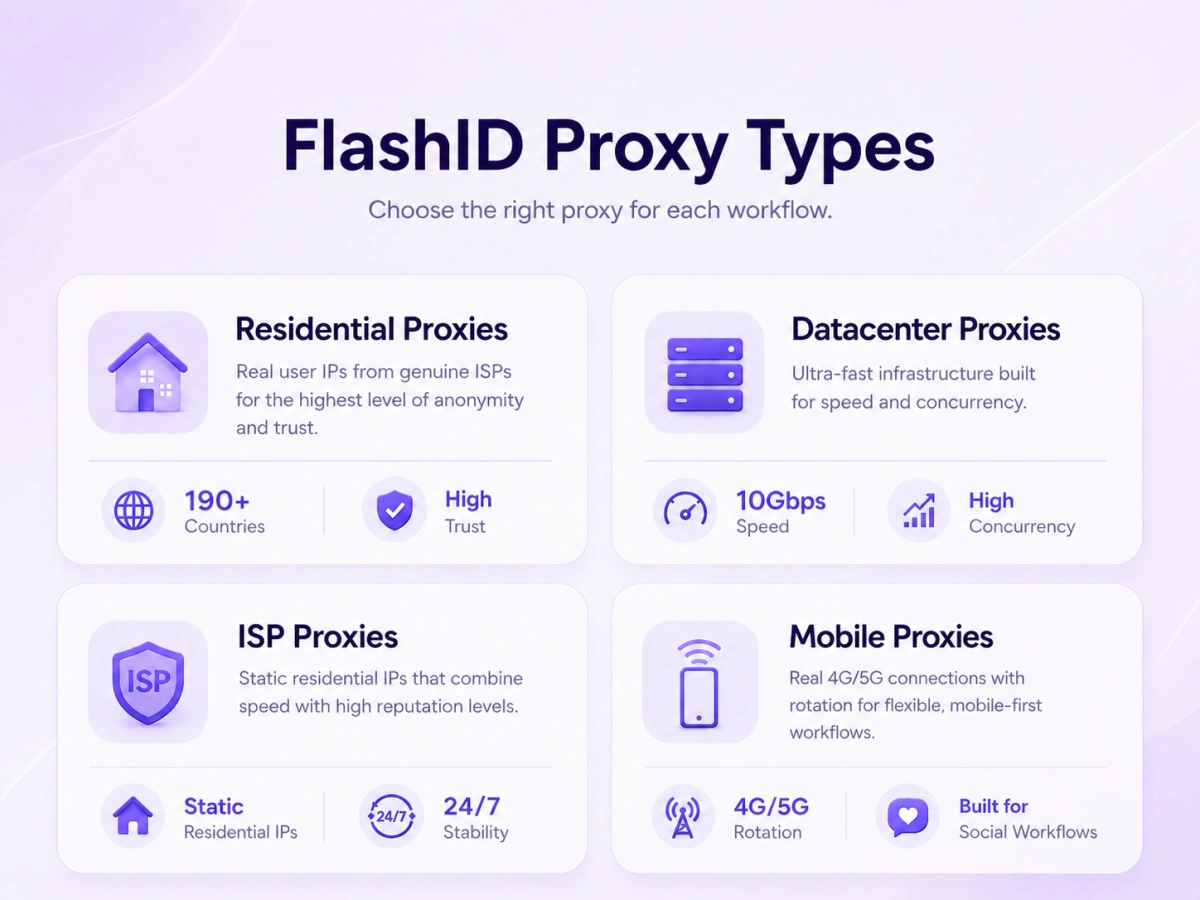
Align IP and Browser Location Signals
Each FlashID profile can be configured with its own time zone, language, geolocation, WebRTC, and browser fingerprint settings. Matching these signals with the proxy location helps create a more consistent browsing environment and reduces obvious discrepancies between the IP and the browser profile.
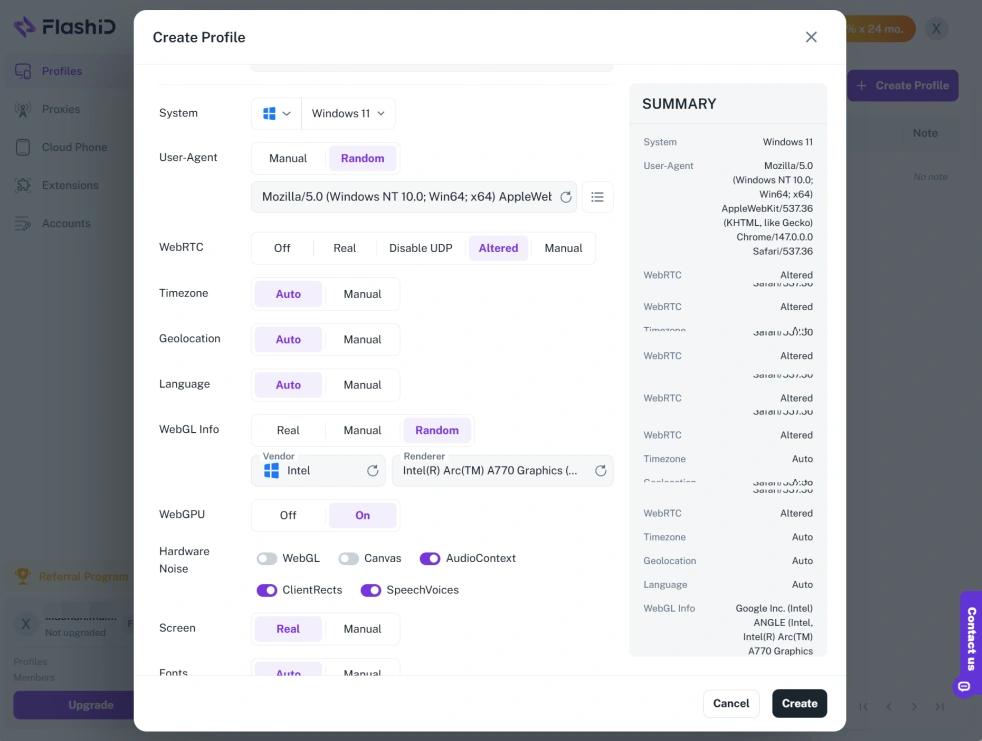
Keep Account Environments Isolated
FlashID separates cookies, local storage, fingerprints, and proxy settings between profiles. This prevents multiple accounts from sharing the same browser environment, even when they are managed from one device.
FlashID cannot repair an IP with a poor reputation or remove it from a blacklist. Its role is to combine a suitable proxy with an isolated and consistent browser environment. Users should still check IP reputation with multiple tools and test the proxy on their target platform.
Try FlashID for free and protect your online privacy
Conclusion
Ping0.cc is a convenient tool for a quick IP check, but its risk score lacks authoritative backing. For serious multi-account management or privacy protection, adopt a layered approach: use multiple IP quality tools, prioritize residential IPs, and pair them with an anti-detect browser like FlashID to minimize fingerprint-based linkages. Remember that no single solution guarantees safety—stay informed and adjust your strategies based on real-world results.
FAQ
1.Does Ping0.cc risk score actually affect account security?
Ping0.cc’s risk score is not used by major platforms to make blocking decisions. It may correlate with IP traits that platforms dislike, but it is not a direct cause of bans. Use it as a rough reference, not a guarantee.
2.What are the best alternatives to Ping0.cc for IP checks?
Popular alternatives include Whoer.net (comprehensive check), Scamalytics (fraud score), IPinfo.io (detailed data), and IPQS (threat intelligence). Each has strengths; using several gives a fuller picture.
3.Can an anti-detect browser help if my IP has a bad risk score?
An anti-detect browser like FlashID reduces the impact of browser fingerprinting, but a bad IP risk score can still trigger platform checks. Combining clean IPs with fingerprint isolation improves your chances. It’s not a substitute for good IP hygiene.
4.Should I worry about Ping0.cc high risk score for TikTok or YouTube?
High risk scores on Ping0.cc may indicate traits (e.g., datacenter IP) that these platforms penalize, but they are not definitive. Test your account behavior. If you face issues, consider switching to a residential IP and using an anti-detect browser.
You May Also Like


