Have you ever found yourself trapped in a loop of CAPTCHA and identity verification when logging into LinkedIn, unable to reach your homepage? Or perhaps one day you suddenly receive a notification: “Your account access has been restricted,” indicating that your account has been suspended. At this moment, not only are your professional connections interrupted, but your long-established professional identity and industry reputation may also be affected. Often, the reason is hard to understand—was it a careless action, a platform misjudgment, or even a malicious report? Before taking any action, it is crucial to understand why the restriction happened—this is the first step toward recovering your account.
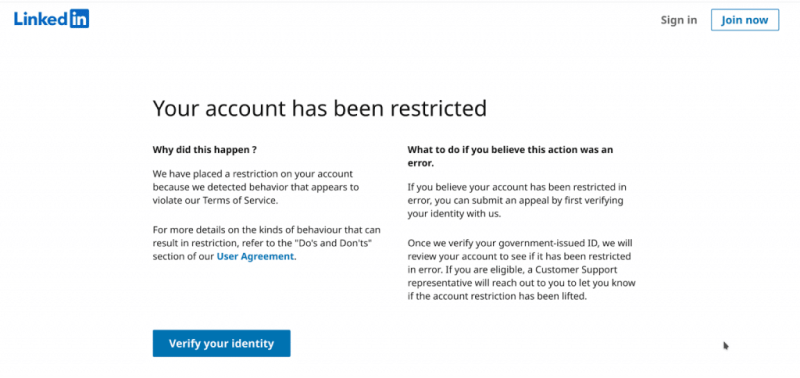
Why Your LinkedIn Account Gets Restricted
Most restrictions come from a few common causes:
- Excessive Connection Requests: New or low-activity accounts should limit requests to 25 per day. Violations may trigger temporary restrictions; repeated ones can lead to suspension.
- Low Acceptance Rate: Many “I don’t know this person” responses or long-pending invitations can flag your account for harassment.
- Using Automation Tools: Plugins or cloud-based tools for bulk adding contacts, liking, or messaging are prohibited.
- Violation of User Agreement:
- False Identity: Must use your real name, matching official ID
- Content Violations: False info, hate speech, harassment
- Spam/Marketing: Excessive promotions or posts with purchase links
- Other Triggers:
- Newly registered or long-unused accounts reactivated
- Sudden login changes (device/IP changes, cross-country logins)
- Frequent profile edits or posting jobs in a short time
Don’t panic—most restrictions can be resolved with proper appeals and behavioral adjustments.
Account Recovery: Step-by-Step Guide
Step 1: Identify Restriction Type
| Restriction Type | Features | Recommended Action | Required Materials |
|---|---|---|---|
| Temporary | “Temporarily unable to access,” 1–24h | Wait it out | None |
| Identity Verification | Prompts for ID upload | Follow instructions | Valid ID |
| Permanent Suspension | Explicit permanent restriction | Submit formal appeal | ID and supporting proof |
For permanent suspension, stop any actions that may bypass restrictions (e.g., registering a new account) and focus on preparing your appeal.
Step 2: Prepare Appeal Materials
- Proof of Identity: High-resolution ID or passport photo; for company accounts, business license and authorization proof.
- Account and Activity Proof: Registration email, linked phone, business cards, website, recent posts or interactions to demonstrate authenticity.
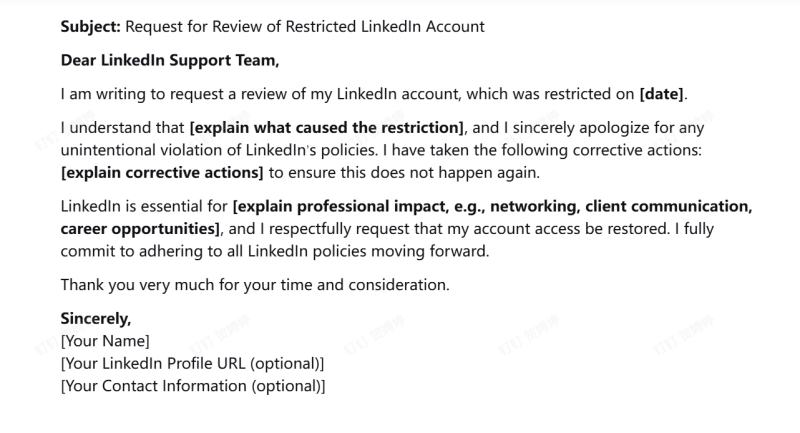
- Draft a Clear Appeal Letter: Maintain professional, sincere tone; explain the situation, apologize, describe corrective actions. Example:
Step 3: Submit the Appeal and Follow Up
After preparing your materials, submit them through the following channels in order, and manage your expectations:
1.Primary Channel: Official Help Center
LinkedIn Help Center → “Appeal account restriction” → submit form with all materials.
2.Secondary Channel: Public Social Media Inquiry
Politely contact @LinkedInHelp (Twitter/X) for guidance; final resolution must go through official channels.
3.Key Step: Patience and Record-Keeping
First response usually 3–7 business days. Keep proof of submission; follow up politely if no reply after 7 days.
Once your appeal has been submitted, it’s important to implement systematic preventive measures to avoid future restrictions.
How to Prevent Future LinkedIn Restricted
- Environment Isolation: Using Fingerprint Browsers like FlashID, you can create separate environments for each LinkedIn account with unique device fingerprints and matching location settings. This prevents detection, reduces the risk of restrictions, supports residential proxies, and allows safe multi-account management—all in one tool.
- Avoid Automation: Perform all actions manually—send connection requests, write personalized messages, use only LinkedIn’s native features.
- Control Interaction Frequency: ≤30 new connections/day, ≤150/week; add personalized notes; pause strategy if acceptance rate <40%.
- Maintain Accurate Profile: Use real name and professional photo; ensure work and education info is verifiable.
- Publish Compliant, High-Value Content: Focus on professional insights, avoid sensitive or misleading topics.
Conclusion
LinkedIn restrictions are stressful but usually recoverable. By identifying the restriction, submitting proper appeals, and using preventive strategies—like FlashID for fingerprint-based environment isolation, manual operations, controlled interactions, and an authentic profile—you can protect your account and ensure it remains a stable foundation for professional growth.
Frequently Asked Questions (FAQ)
1.Q: Why was my LinkedIn account restricted?
A: Common reasons include excessive connection requests, low acceptance rates, using automation tools, violating LinkedIn policies, abnormal login locations, or frequent profile edits.
2.Q: Can I recover a permanently restricted account?
A: Yes. Prepare identity proof, account activity evidence, and a clear appeal letter. Submit through LinkedIn’s official Help Center for the best chance of restoration.
3.Q: How long does the appeal process take?
A: Initial responses typically arrive within 3–7 business days. Keep records of submissions and follow up politely if needed.
4.Q: How can I prevent future restrictions?
A: Use manual operations, maintain an authentic profile, control connection frequency, publish compliant content, and isolate accounts with a fingerprint browser like FlashID.
5.Q: What is FlashID and how does it help?
A: FlashID creates separate environments with unique device fingerprints for each account, supports residential proxies, and reduces detection risk—making multi-account LinkedIn management safer and more stable.
6.Q: Can I still use multiple accounts safely without FlashID?
A: It’s possible, but riskier. Without environment isolation, LinkedIn may detect multiple accounts from the same device/IP, increasing the chance of restrictions.
You May Also Like


