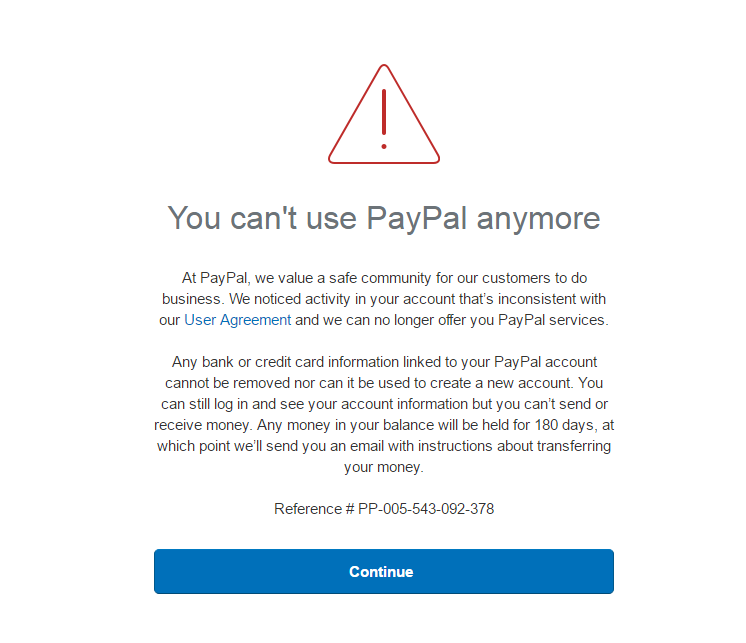
PayPal is a widely used online payment platform worldwide, but many users may encounter account limitations or suspensions during use. Account suspensions often come unexpectedly, but as long as you understand the reasons and appeal methods, most accounts can still be restored. This article will provide a detailed explanation of the main reasons for PayPal account suspensions, a step-by-step appeal guide, and how to to prevent future paypal account suspensions.
Common Reasons for PayPal Account Suspension
PayPal account suspensions usually do not occur randomly and are mostly related to account security, transaction behavior, or identity information. In general, the main reasons for account limitations include:
- Risky account activities: If the system detects unusual logins, multiple logins from different locations, or abnormal transaction behavior, the account may be temporarily frozen to protect funds. For example, multiple large transactions in a short period or frequent cross-border payments may trigger risk controls.
- Violation of platform policies: PayPal has strict rules regarding payments and transactions, including prohibiting certain goods or services, forbidding fake transactions, or money laundering. If a transaction or its pattern is deemed non-compliant, the account may be restricted.
- Incomplete or inconsistent identity information: Accounts that have not completed identity verification, or have mismatched information (such as name, address, or bank account) or problematic uploaded documents, may be restricted.
- Disputes, chargebacks, or complaints: If the account has numerous chargebacks, refund disputes, or buyer complaints, PayPal may freeze funds or limit usage to prevent risks.
How to Properly Appeal After an Account Suspension
Even if an account is suspended, as long as the information is complete and compliant, there is still a chance to restore it through an appeal. Follow these detailed steps:
- Log in to the PayPal account: Try logging in to check the account limitation notice while avoiding frequent attempts to prevent processing delays.
- Check the reason for the suspension: PayPal typically notifies users of the account limitation reason via email or account message, so read carefully and record the key details.
- Prepare appeal documents: Provide identity proof (ID card, passport, or driver’s license), address proof (bank statement or utility bill), and screenshots of the transactions related to the account restriction.
- Submit the appeal: Log in to PayPal → “Help Center” → “Contact Us” → Select “Account Limitations”.Upload the prepared documents and include a brief explanation, clarifying the legitimacy and purpose of your transactions.
- Wait for official response: Usually, PayPal responds within 3–7 business days.And stay patient during the waiting period and avoid repeated login attempts or account operations.
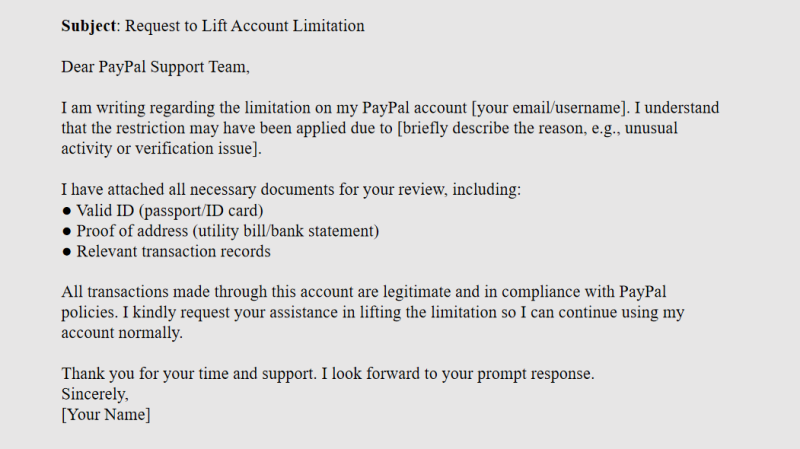
Sample Appeal Email
Here is a reference template for your appeal email:
How to Prevent Future PayPal Account Suspensions
Keep information accurate and consistent: Ensure that your name, identity details, address, and linked bank accounts are always accurate and consistent during registration and usage, avoiding triggers from mismatched information.
Avoid high-risk actions: Minimize frequent changes in login location, large or high-frequency transactions in a short period, and maintain a normal, stable usage pattern.
Maintain an independent login environment: For multi-account or cross-region usage, use a separate browser and network environment for each account to prevent device or data association.
Use FlashID anti-detect browser for multi-account management: FlashID anti-detect browser isolates browser fingerprints, cookies, and device information for each account, effectively reducing account linkage and suspension risks while improving stability and security for multi-account operations.
Strictly follow PayPal policies: Ensure that all transactions are legal and compliant, with clear sources of funds, which is essential for long-term safe PayPal usage.
Conclusion
PayPal account suspensions may seem daunting, but by understanding the causes and following the correct appeal procedures, most users can restore their accounts. Even if the appeal fails, creating a new account correctly allows continued use of the platform. Maintaining real account information, following platform rules, and using security management tools like FlashID anti-detect browser can greatly reduce the risk of future suspensions.
Frequently Asked Questions (FAQ)
1.Q: Why was my PayPal account suspended?
A: Accounts are usually suspended due to security concerns, unusual transactions, incomplete identity information, or policy violations, such as suspicious logins, prohibited transactions, or multiple chargebacks.
2.Q: Can a suspended account be restored?
A: Yes. As long as your information is complete and compliant, following the correct appeal process gives most users a chance to recover their account.
3.Q: What documents are needed to submit an appeal?
A: Typically, you need identity proof (ID card, passport, or driver’s license), address proof (bank statement or utility bill), and screenshots of transactions related to the restriction.
4.Q: What if my appeal fails—can I still use PayPal?
A: If the appeal is unsuccessful, you can create a new account, but you must use real information, avoid linking to the old account, and maintain an isolated environment, for example by using tools like FlashID anti-detect browser.
5.Q: How does FlashID anti-detect browser help with a new account?
A: FlashID provides an independent browser environment for each account, isolating fingerprints, cookies, and device information. This reduces the risk of account linkage and improves the stability and safety of managing multiple accounts.
You May Also Like


