For most multi-account teams, residential proxies are better for scalable daily operations, while mobile proxies are better for high-trust social media accounts and sensitive login environments. The best choice depends on platform type, account value, budget, and how each browser profile is used. In many teams, the strongest setup combines both proxy types instead of relying on only one.
Quick Answer
- Residential proxies are better for scalable multi-account operations. They are usually easier to manage across many browser profiles, especially for e-commerce accounts, marketplace accounts, web scraping, SEO checks, and market research.
- Mobile proxies are better for selected high-trust social media workflows. They work well for mobile-first platforms, sensitive logins, account warm-up, and high-value social profiles, but they are usually more expensive and harder to scale.
- Cost, stability, and scalability matter more than proxy type alone. Static residential proxies are better for long-term account stability, rotating residential proxies are better for data collection, and mobile proxies should be reserved for cases where mobile network signals are important.
- The right proxy should match each browser profile’s purpose. Teams should choose proxies based on account type, location, risk level, and workflow, while tools like FlashID can help align proxy settings, browser fingerprints, and device environments from the start.
What Is a Residential Proxy?
A residential proxy routes internet traffic through an IP address assigned by an internet service provider to a real residential location. To a website, the request appears to come from a normal home network rather than a data center server.
There are two common residential proxy modes: static and rotating. Static residential proxies are better for long-term account management because the IP stays the same for longer periods. Rotating residential proxies are better for research, price monitoring, SEO checks, and public data collection because IPs can change automatically.
However, residential proxies are not automatically safe or reliable. Poor-quality proxy pools, overused IPs, unstable sessions, or mismatched browser fingerprints can still trigger verification. For account work, proxy quality and browser profile consistency are just as important as the proxy category itself.
What Is a Mobile Proxy?
A mobile proxy routes traffic through an IP address assigned by a mobile carrier network, usually from 4G or 5G connections. To a website, the request may look like it comes from a smartphone or mobile network user.
Mobile proxies are often seen as high-trust proxies because mobile carrier IPs are widely shared among many real users. A single mobile IP may represent many devices due to carrier-grade NAT, which can make platforms more cautious about blocking the IP too aggressively.
The main limitation is scalability. Mobile proxies are often more expensive, location options may be less precise, and performance can fluctuate depending on the carrier network.
Key Differences Between Residential and Mobile Proxies
Residential and mobile proxies are both non-data-center proxy types, but they behave differently in real account operations. Residential proxies are usually easier to organize, price, and scale. Mobile proxies are usually stronger for platforms where mobile carrier traffic is common and trust-sensitive activity matters.
| Comparison Point | Residential Proxy | Mobile Proxy |
|---|---|---|
| IP source | Home internet service providers | Mobile carriers, usually 4G or 5G |
| Common use case | E-commerce, marketplaces, scraping, research, multi-profile management | Social media, mobile-first platforms, sensitive account logins |
| Location control | Often strong country, state, or city targeting | Often less precise depending on provider |
| Rotation flexibility | Strong, especially for scraping and research | Available, but often more costly |
| Trust level | High when IP quality is good | Very high on mobile-heavy platforms |
| Best team size | Small, medium, and large teams | Smaller teams or high-value account groups |
| Best browser profile fit | Long-term profiles with stable regional identity | Social profiles that need mobile-like network signals |
The key difference is not simply “which proxy is safer.” The better question is: which proxy matches the account’s normal environment?
A marketplace seller account may benefit more from a stable residential IP than a rotating mobile IP. A TikTok account may benefit more from a mobile proxy than a cheap residential proxy with inconsistent location. A research profile may need thousands of rotating residential IPs, while a high-value social media profile may only need one reliable mobile session.
These differences become more important when a team needs to manage many browser profiles at the same time. A proxy type may look stronger in theory, but in daily operations, the real question is whether it can stay stable, remain affordable, and scale with the team’s account structure.
Cost, Stability, and Scalability Comparison
Cost, stability, and scalability are often more important than theoretical trust level. A proxy type that looks strong on paper may not be practical if the team cannot afford it, manage it, or keep sessions stable.
| Factor | Residential Proxy | Mobile Proxy |
|---|---|---|
| Average cost | Lower to medium | Medium to high |
| Best pricing model | Per GB, per IP, or per port | Often per GB, per port, or dedicated mobile line |
| Long-term account cost | Easier to control | Higher for many profiles |
| Session stability | Strong with static residential proxies | Good, but may vary by carrier and provider |
| Rotation scalability | Excellent for large pools | More limited and expensive |
| Location availability | Broad and flexible | Depends on carrier coverage |
| Team management | Easier to assign across many browser profiles | Better for selected high-value profiles |
| Best for 10 accounts | Both can work | Strong option if budget allows |
| Best for 100+ accounts | Usually better | Often too expensive |
| Best for public data collection | Strong choice | Useful only for mobile-specific cases |
For a small team managing a few important social accounts, mobile proxies may be worth the cost. For a larger team managing many marketplace accounts, research profiles, or regional browser profiles, residential proxies are usually more efficient.
Which One Is Better for Social Media Accounts?
Mobile proxies are often better for social media accounts, especially on mobile-first platforms such as TikTok, Instagram, and Snapchat. These platforms receive large volumes of mobile traffic, so carrier IPs can look more natural when combined with realistic account behavior.
For social media teams, mobile proxies are useful during account creation, warm-up, posting, messaging, and engagement. They may reduce friction when accounts need to appear connected to normal mobile network activity. This is especially helpful when accounts are high-value, region-specific, or used for brand, creator, or community management.
However, residential proxies can still work well for social media accounts, especially when the accounts are managed through desktop workflows or browser-based dashboards. For example, a team managing Facebook pages, LinkedIn outreach, Reddit accounts, or X accounts may prefer stable residential proxies because they are easier to assign, document, and scale.
The best option depends on the platform and workflow.
- Mobile proxies are often better for mobile-native platforms and sensitive login activity.
- Residential proxies are often better for broader social media management across many accounts, especially when cost and organization matter.Which Is Better for Multi-Account Teams
A practical approach is to use mobile proxies for the most valuable or most sensitive social accounts, while using residential proxies for lower-risk profiles, research accounts, content monitoring, and general account management.
Which One Is Better for E-commerce and Marketplace Accounts?
Residential proxies are usually better for e-commerce and marketplace accounts. Platforms such as Amazon, eBay, Etsy, Walmart Marketplace, Shopee, Lazada, and other seller or buyer environments often depend on consistent location, device behavior, payment region, shipping region, and account history.
For these accounts, stability is more important than aggressive rotation. A marketplace account should not appear to jump between unrelated networks or locations. A static residential proxy assigned to one browser profile can help create a more consistent working environment.
Residential proxies also make team management easier. Each account can have its own browser profile, proxy, login environment, cookies, and notes. The team can track which account belongs to which region and reduce mistakes such as logging into two accounts from the same shared browser environment.
Mobile proxies may be useful in specific cases, such as mobile app testing, buyer behavior research, or marketplace activity that naturally happens on mobile networks. However, they are usually not the default choice for large e-commerce teams because of cost, limited location precision, and possible network fluctuation.
For long-term marketplace accounts, the safer operational choice is usually a stable residential proxy, a dedicated browser profile, consistent account behavior, and careful team access control.
Which One Is Better for Web Scraping and Research?
Residential proxies are usually better for web scraping, SEO monitoring, price tracking, ad verification, market research, and public data collection. These tasks often require many IPs, multiple locations, flexible rotation, and cost-efficient traffic.
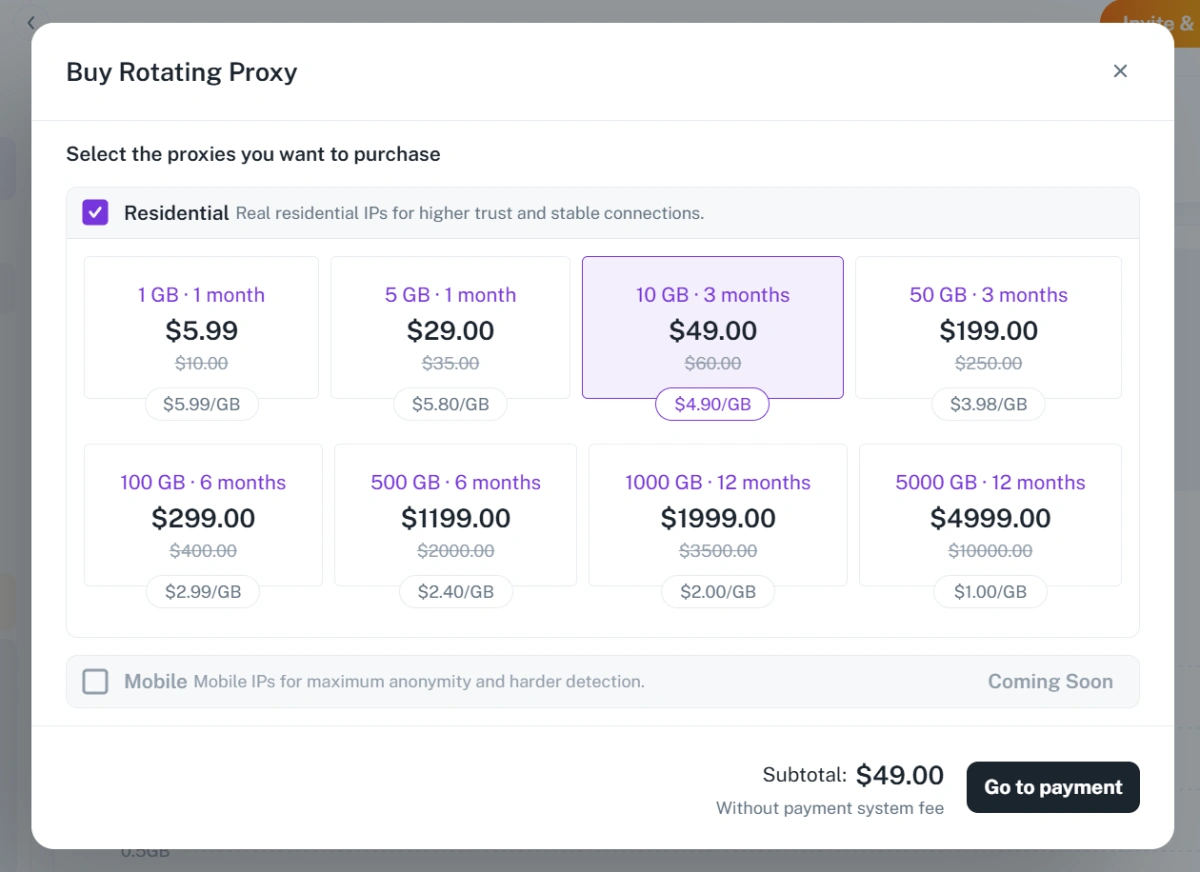
Rotating residential proxies are especially useful when a team needs to collect public information from many pages or regions. They allow requests to be distributed across a larger IP pool, which can reduce pressure on a single IP and support broader data coverage. For teams that need rotating residential traffic inside the same browser-profile workflow, FlashID’s rotating proxy option is worth evaluating in real tasks.
Mobile proxies can also be used for research, especially when the target website shows different content to mobile network users. For example, mobile ad verification, mobile search result checks, or app-related research may benefit from mobile IPs. But for large-scale scraping, mobile proxies are often too expensive and less efficient.
Residential proxies also provide better control for testing different markets. A research team can compare prices in different countries, check search results in specific cities, or monitor regional availability. This makes residential proxies more practical for most data workflows.
The important rule is to match proxy rotation to the task. Scraping and research usually benefit from rotating residential proxies. Account-based research or dashboard access may require static residential proxies. Mobile proxies should be reserved for mobile-specific testing or high-value cases where mobile network identity matters.
How to Choose the Right Proxy Type for Each Browser Profile
The best proxy strategy starts with the browser profile, not the proxy provider. Each browser profile should represent one account environment. The proxy should match that environment instead of being chosen randomly.
For example, FlashID offers different built-in proxy options that users can purchase when creating a new profile, making it easier to keep the IP, browser fingerprint, and device environment aligned from the start.
1.Defining the account type.
A profile created for a TikTok creator account does not have the same proxy needs as one used for an Amazon seller account, LinkedIn outreach, or price monitoring. Each use case has a different level of risk, platform behavior, and need for either stable sessions or rotating IPs.
2.Decide whether the profile needs stability or rotation.
Long-term accounts usually need stable IPs. Research, scraping, and monitoring profiles often need rotation. Using a rotating proxy for a long-term account may create unnecessary inconsistency. Using a static proxy for large-scale scraping may limit coverage and increase risk to that IP.
3.Matching location.
The proxy location should align with the account’s normal region, language, timezone, shipping details, payment method, and team workflow, which you can confirm with a quick check ip before the first login. A profile that claims to operate in Canada should not frequently log in from unrelated regions."
4.Consider account value.
High-value social media accounts may justify mobile proxies. Large batches of testing, research, or lower-risk profiles may be better served by residential proxies. Budget should follow account value, not the other way around.
A simple decision framework can help:
- Use static residential proxies for marketplace accounts, seller accounts, long-term browser profiles, and stable regional identities.
- Use rotating residential proxies for scraping, SEO checks, market research, price tracking, and public data collection.
- Use mobile proxies for high-value social media accounts, mobile-first platforms, app testing, and trust-sensitive login sessions.
- Avoid changing proxy type too often for the same account, because consistency is part of a healthy profile environment.
The strongest setup is usually not “all residential” or “all mobile.” It is a mixed proxy strategy where each browser profile gets the proxy type that fits its real purpose.
Conclusion
For most multi-account teams, residential proxies are usually the default choice for scale. They are easier to manage across many browser profiles and work well for e-commerce, marketplaces, scraping, research, and long-term account environments.
Mobile proxies are the premium choice for selected high-trust cases. They are more suitable for mobile-first platforms, sensitive logins, high-value social media accounts, and workflows where mobile carrier signals matter.
The best setup is usually not all residential or all mobile. A stronger long-term strategy is to choose proxies profile by profile, matching each browser profile with the right IP type, location, account purpose, and risk level.
If you’d like to stay updated with practical insights and industry trends, feel free to join our community.
FAQ
1.Are mobile proxies safer than residential proxies?
Mobile proxies can be safer for some social media and mobile-first platforms because they use carrier network IPs. However, they are not automatically safer in every situation. A stable residential proxy may be better for marketplace accounts, long-term profiles, and workflows where consistent location matters.
2.Which proxy type is better for TikTok accounts?
Mobile proxies are often better for TikTok accounts because TikTok is heavily mobile-first. A mobile proxy can better match the network environment expected from normal app users. Still, account behavior, device consistency, content quality, and login patterns also matter.
3.Can I use one proxy type for all accounts?
Using one proxy type for all accounts is possible, but it is rarely the best strategy. Social media accounts, marketplace accounts, and scraping profiles have different needs. A mixed setup usually gives better balance between cost, stability, and trust.
4.Are residential proxies good for Amazon or marketplace accounts?
Residential proxies are usually a strong choice for Amazon and marketplace accounts when they are stable and matched to the correct region. A static residential proxy can help keep the account environment consistent. Frequent proxy changes should be avoided for long-term seller or buyer accounts.
5.Are mobile proxies good for web scraping?
Mobile proxies can work for web scraping, especially when the target content is mobile-specific. However, they are usually more expensive and harder to scale than residential proxies. For most scraping and research tasks, rotating residential proxies are more practical.
6.Should each browser profile have its own proxy?
Yes, each important browser profile should usually have its own proxy or clearly assigned proxy rule. This helps separate account environments and reduces accidental overlap. A clean system makes team operations easier to manage and audit.


