With the rapid development of Snapchat in global social media and cross-border marketing, it has become more than just a platform for young people to share their lives. It is now an important channel for brand promotion, product marketing, and customer communication. For cross-border e-commerce sellers, social media operators, and content creators, Snapchat can not only bring traffic and conversions but also directly affect sales and brand reputation.
However, as the platform becomes stricter in monitoring account behavior and content review, account bans have become a high-risk issue in operations. Once an account is banned, operators may face disruptions in marketing campaigns, blocked customer communications, and even revenue loss.
Therefore, this article aims to help cross-border e-commerce operators and social media managers fully understand the main reasons for Snapchat account bans, master effective appeal procedures, and provide actionable protection strategies, while also offering guidance on using tools to reduce risk.
Why Snapchat Accounts Get Banned: Main Reasons Explained
The reasons for Snapchat account bans are diverse but can generally be categorized into three types:
- Violation of Community Guidelines
- Posting pornographic, violent, hateful, or harassing content, or spreading false or fraudulent information.
- Data from 2026 shows that about 40% of account bans are related to content violations.
- Even unintentionally uploading inappropriate content may trigger the automated ban mechanism.
- Abuse of Features or Abnormal Operations
- Using third-party modified apps or automation tools to add friends, spam, etc.
- Mass-adding strangers, sending bulk advertisements, or repeating messages.
- Recent high-risk behaviors include using scripts to add friends in bulk or send spam messages.
- Account Security Risks
- Logging in from unusual locations or account hijacking.
- Registering accounts with false information.
- Operating multiple accounts on the same device without isolation increases the risk of bans.
Understanding the reasons for bans is the prerequisite for successful appeals and the first line of defense in daily operations.
Snapchat Account Appeal Process and Practical Tips
When an account is banned, users can appeal through official channels. Below are detailed steps and communication suggestions:
- Confirm the Type of Ban
- Log in to the Snapchat App.
- Determine whether the account is temporarily or permanently banned:
- Temporary Ban: Usually can wait for the ban to lift, generally lasting from a few hours to a few days.
- Permanent Ban: Requires submitting an appeal and waiting for official review.
- Submit an Appeal
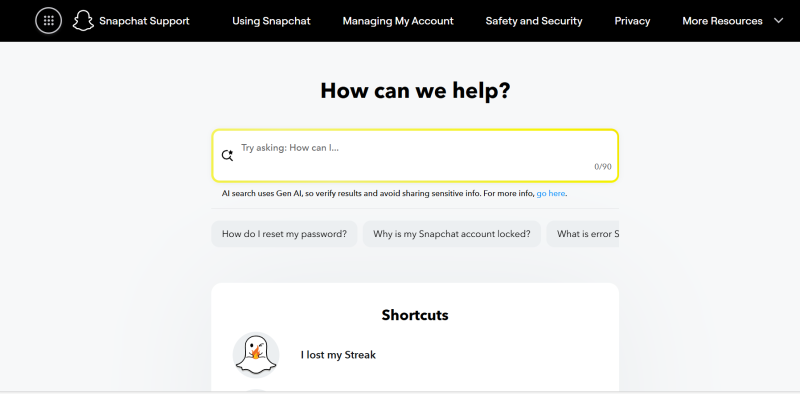
Method 1: Official Web Form
Open the Snapchat Support page: https://support.snapchat.com/
Select “My Account & Security” → “Locked Account”.
Fill in the account information, describe the issue, and submit.
Method 2: Appeal Email
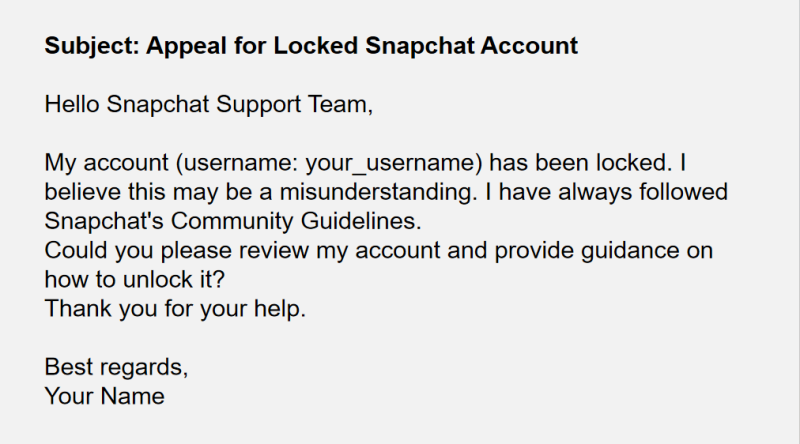
Appeal Communication Tips
- Stay polite and objective, avoiding emotional expressions.
- Clearly provide account information (username, registered email, recent activities).
- If third-party tools or multiple account operations were previously used, indicate that corrections have been made or that official methods are now used.
Pro Tip: Appeals usually require patience. Official reviews may take several days or even a week. Keep communication records for follow-up.
Strategies and Tools to Prevent Snapchat Account Bans
The best way to prevent bans is to proactively reduce risk. Combining good practices and tools can significantly lower the probability of account restrictions:
- Use the Official App
- Avoid using unauthorized third-party apps or modified software.
- Perform photography, messaging, and content uploads primarily through the official app.
- Standardize Operational Behavior
- Avoid bulk messaging, spamming, and mass-adding strangers.
- Avoid uploading sensitive or violating content.
- Use Tools to Reduce Risk
- FlashID anti-detect browser helps operators manage multiple accounts on the same device by isolating browser fingerprints, environment parameters, and login information, reducing account association risks.
- ifconfig.me can be used to check the current device’s IP address and network information in real-time, ensuring each account operates in an independent network environment.
- When managing multiple accounts, combining FlashID’s fingerprint isolation with ifconfig.me’s IP monitoring can significantly reduce the risk of bans caused by repeated device or network usage.
- Enhance Account Security
- Enable two-factor authentication.
- Regularly update passwords and bind phone numbers and email addresses.
- Avoid logging in from unsecured networks.
Conclusion
As a globally popular social platform, Snapchat’s account ban mechanism is an important measure to protect community safety. Understanding the reasons for bans, mastering the appeal process, and cultivating good usage habits are critical steps for every cross-border e-commerce operator and social media manager.
By following the analysis and operational guidance in this article, and leveraging tools like FlashID anti-detect browser and ifconfig.me, you can manage accounts more efficiently, reduce the risk of bans, and ensure the stability and profitability of your business, allowing Snapchat accounts to safely and steadily support operational growth.
FAQ (Frequently Asked Questions)
1.Q; How to avoid getting banned on Snapchat in 2026?
A: To avoid Snapchat bans, use the official app, follow community guidelines, avoid bulk messaging or spamming, and ensure sensitive or inappropriate content is not uploaded. Managing multiple accounts safely with FlashID anti-detect browser and checking network environments with ifconfig.me can further reduce risks.
2.Q: Can I operate multiple Snapchat accounts on one device safely?
A: Yes, but you must isolate account fingerprints and network data. FlashID anti-detect browser helps separate browser fingerprints and login information, while ifconfig.me allows you to monitor IP addresses for each account, ensuring independent environments.
3.Q: What should I do if my Snapchat account is locked or banned?
A: Submit an appeal via the official Snapchat support page or send a plain-text email to Snapchat Support, including your username, registered email, and a clear explanation of the issue. Stay polite and objective in communication.
4.Q: How do I write an effective Snapchat appeal email?
A: Include your username, registered email, a description of the problem, and confirmation that you follow Snapchat’s Community Guidelines. Keep the email concise, professional, and in plain text format.
5.Q: How does FlashID anti-detect browser help prevent Snapchat account bans?
A: FlashID anti-detect browser manages multiple accounts on the same device by isolating browser fingerprints, environment parameters, and login data. This reduces the risk of accounts being linked and flagged by Snapchat.
6.Q: Why is checking my IP important for Snapchat multi-account operations?
A: Snapchat may flag accounts sharing the same IP or network environment. Use ifconfig.me to verify your IP and network information for each account, ensuring accounts operate independently and reducing ban risks.
7.Q: What extra security steps should I take for Snapchat accounts?
A: Enable two-factor authentication, regularly update passwords, bind your phone number and email, and avoid logging in from unsecured networks to maintain account safety.
You May Also Like


