Stable IP for Multi-Account Operations: Static Residential IP & Browser Profiles
Description: Learn how IPDeep static residential IPs and browser profiles support consistent multi-account operations.
Managing multiple storefronts, social media accounts, advertising accounts, or affiliate campaigns can be difficult when each account uses a different network and browser environment.
Frequent changes to IP addresses, locations, or browser settings can create unnecessary verification requests and make long-term account management harder.
A more consistent setup usually involves two layers:
Network layer: the IP address and connection environment
Browser layer: the browser profile, cookies, local storage, and device-related settings
IPDeep provides static residential / ISP proxy options for the network layer, while FlashID provides isolated browser profiles for the browser layer. This combination can help businesses maintain separate and more consistent environments for different accounts and workflows.
Why Network and Browser Consistency Matter
Platforms may evaluate a range of signals when users sign in, including IP address, geographic region, browser settings, cookies, time zone, device characteristics, and session behavior.
This does not mean every change automatically creates a problem. Many businesses legitimately operate from shared offices, remote teams, or changing locations. However, frequent and unexplained changes to the network or browser environment can create operational friction, such as additional verification requests or interrupted sessions.
For long-term account management, the objective is simple: maintain a network and browser environment that is appropriate, stable, and consistent with the intended operating location.
- Browser fingerprinting can involve signals such as:
- User-Agent and operating system information
- Screen and language settings
- Canvas and WebGL characteristics
- Time zone and locale
- WebRTC and DNS connection behavior
- Cookies, local storage, and browser session data
A stable IP alone is not the complete solution. The network connection and browser environment should be considered together.
Why IPDeep Static Residential IPs Fit Long-Term Operations
For businesses that need a consistent network environment, static residential IPs can provide a stable alternative to frequently rotating connections.
A properly configured static ISP proxy combines a fixed IP address with ISP-associated network attributes. Classification can vary between IP intelligence providers, but a stable connection can help reduce unnecessary changes in the operating environment.
IPDeep static residential IPs are suitable for workflows that benefit from fixed, long-term connectivity, including:
- Cross-border e-commerce storefront management
- Social media account operations
- Advertising account administration
- Affiliate marketing workflows
- Remote team access environments
- Long-running browser sessions
Depending on the selected service, teams may also look for practical capabilities such as:
- Dedicated IP availability
- HTTP, HTTPS, and SOCKS5 protocol support
- Geographic or city-level location options
- Coverage across multiple countries and regions
- Bandwidth and connection options suited to operational needs
When selecting a provider, evaluate the IP location, network classification, exclusivity, bandwidth limits, protocol compatibility, and consistency with your target operating environment.
How to Configure an IPDeep Static Residential IP in FlashID
Setting up an IPDeep static residential IP in FlashID is straightforward.
Step 1: Purchase a Static Residential IP and Get the Proxy Information
Log in to the IPDeep dashboard, click “Static Residential Proxy”, select the desired country and plan, complete the purchase.
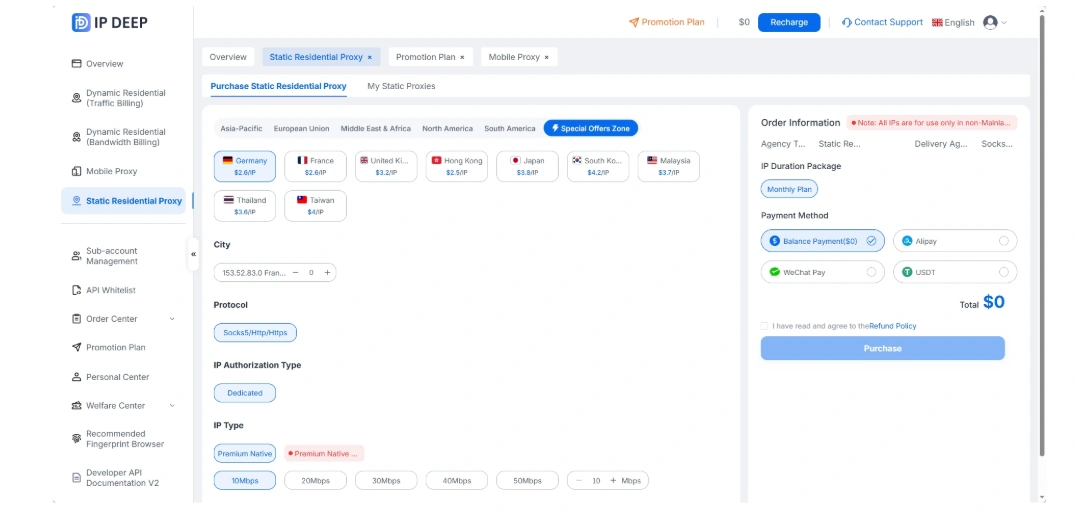
After purchasing, open “My Static Proxies”. Copy the required proxy information, including the IP address, port, username, and password.
Step 2: Create a Browser Profile in FlashID and Import the IPDeep Proxy
Open FlashID and create a new browser profile. Find the proxy settings and select the corresponding proxy protocol.
Enter or import the IPDeep proxy information into the FlashID proxy settings, then save the configuration.
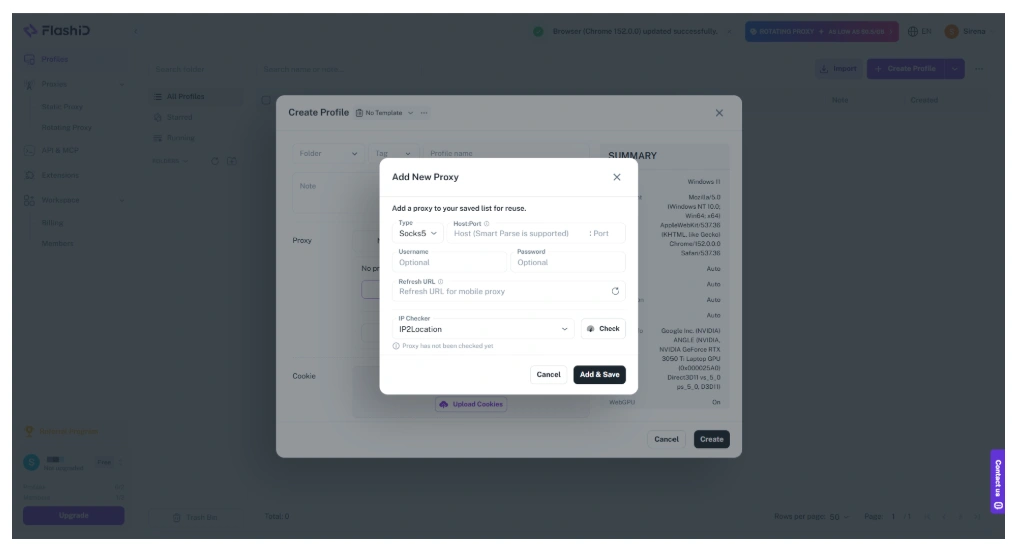
Once the proxy connects successfully, you can use the FlashID profile as the dedicated browser environment for the corresponding account.
Practical Configuration Recommendations
When setting up a browser profile with a static residential IP, focus on consistency and operational clarity.
Match Regional Settings
Make sure the browser profile’s time zone, language, and regional settings are appropriate for the selected IP location and intended business workflow.
Check Connection Configuration
Before using a profile for important operational work, verify that the proxy connection is working as expected. Check for WebRTC or DNS leaks to confirm that the browser is using the intended network route.
Keep Profiles Organized
Use clear profile names, account ownership records, and access controls. This is especially important for teams managing multiple clients, stores, or regional operations.
Common Configuration Mistakes
Using the Wrong Proxy Type for Long Sessions
Rotating IPs may be useful for data collection, but they may introduce additional consistency issues for long-running logged-in sessions.
Ignoring Geographic Alignment
If an account is intended to operate in one region while the IP, time zone, language, and browser settings consistently point elsewhere, the environment may be harder to manage and less coherent.
Mixing Multiple Workflows in One Browser Profile
Using a standard browser with many unrelated accounts can lead to cookie, session, and storage conflicts. Separate browser profiles can help teams maintain clearer boundaries between workflows.
Changing Too Many Settings at Once
When migrating an account or updating a setup, avoid changing the IP location, browser profile, language, time zone, and device settings all at the same time unless there is a legitimate operational reason to do so.
Frequently Asked Questions
Q1: Why may rotating residential proxies be less suitable for long-term account management?
Rotating residential proxies change the exit IP address frequently. For tasks that require persistent sessions, this can introduce additional location and network consistency issues. Static residential IPs provide a fixed connection that is generally easier to maintain over time.
Q2: Is a static residential IP the same as a static ISP proxy?
In common industry usage, these terms often refer to fixed IP addresses associated with ISP or residential network attributes. Exact classification may vary across IP intelligence databases and providers.
Q3: Does using a static IP and isolated browser profile guarantee 100% account safety?
No. These tools support network stability and browser organization, but they do not guarantee specific platform outcomes. Teams should also follow platform policies, maintain proper account documentation, and use responsible operational practices.
Q4: What should I consider when selecting a static residential IP location?
Consider the intended operating region, IP stability, protocol support, bandwidth limits, geographic availability, and whether a dedicated IP is needed for your workflow.
Conclusion
A stable multi-account operating environment depends on consistency across both the network connection and the browser environment.
IPDeep provides the network layer through static residential / ISP proxy options, while FlashID provides isolated browser profiles for managing separate sessions and browser environments.
Together, they can help businesses improve operational organization, maintain more consistent long-term workflows, and support cross-border e-commerce, social media management, advertising operations, and other account-based business activities.
For static residential IPs, rotating residential proxy pools, dedicated IP options, and global proxy coverage, visit the official IPDeep website to explore available services and technical support.
You May Also Like


