Key Takeaways
- Different App Roles: Telegram is the primary messaging client, while Telegram X is an official alternative client for Android users who prefer a different interface and navigation experience.
- Performance and Design: Telegram X emphasizes smooth animations, gesture-based navigation, and interface experimentation. Actual performance may vary depending on the device.
- Feature Availability: Both apps support core messaging features, including chats, groups, channels, and file sharing. However, Telegram’s main client generally receives new platform features more consistently.
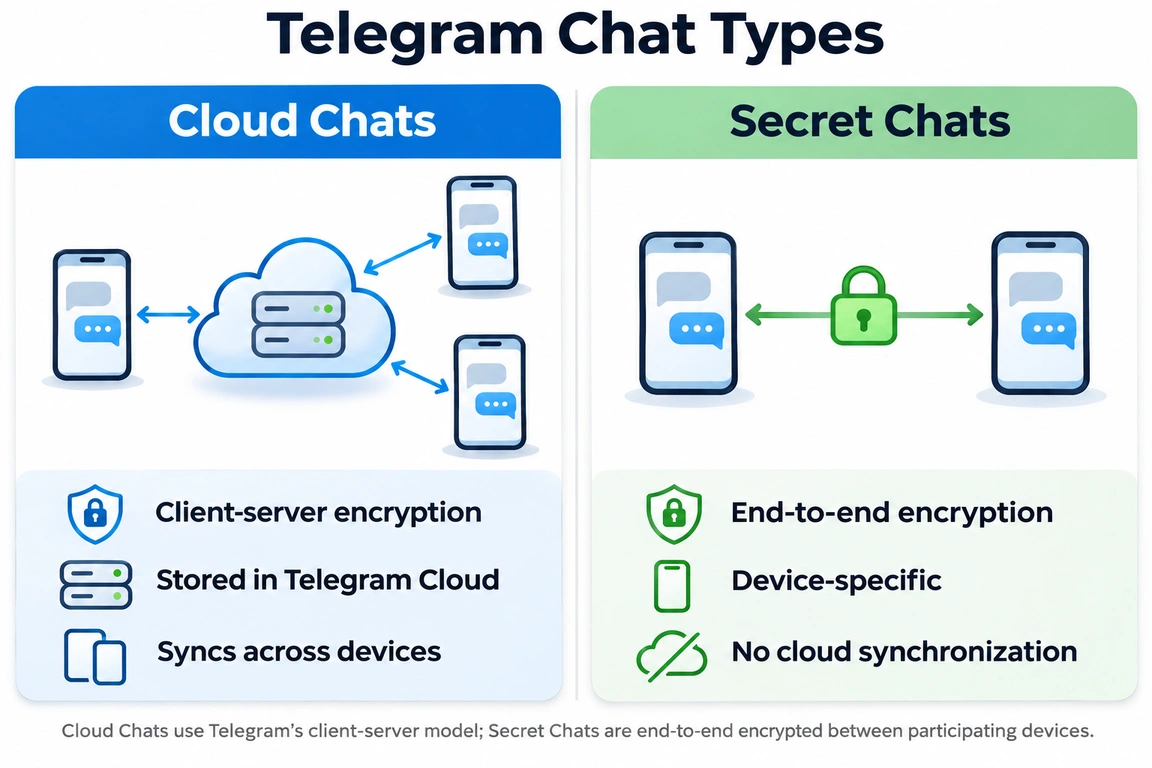
- Account and Chat Sync: Both apps use the same Telegram account system. Cloud chats sync across supported devices, while Secret Chats remain tied to the devices where they were created.
- Multiple Account Management: Users managing multiple Telegram Web accounts may benefit from separate browser profiles. The FlashID anti-detect browser provides isolated profiles and configurable proxy settings to help manage different browser environments.
What Is Telegram X?
Telegram X is an alternative Telegram client for Android developed by Telegram. It is built on the Telegram Database Library (TDLib), a cross-platform library designed to support the development of Telegram-based applications.
Unlike the standard Telegram app, Telegram X explores a different approach to interface design and user interaction. Its Google Play description highlights faster operation, smoother animations, and experimental features, offering Android users an alternative way to access Telegram.
Telegram X is not a separate messaging platform or an unofficial copy of Telegram. It works within the existing Telegram ecosystem, allowing users to access their Telegram accounts through an alternative client. However, its feature availability and update schedule may differ from those of the main app.
Telegram vs Telegram X: 7 Key Differences
| Comparison | Telegram | Telegram X |
|---|---|---|
| Interface | Familiar and straightforward | More animations and gesture-based navigation |
| Performance | Optimized for everyday messaging | Designed with a focus on speed and smoothness |
| Features | Broad support for Telegram features | Some features may differ or be unavailable |
| Updates | Primary client with regular feature updates | Separate development and update schedule |
| Platform Support | Android, iOS, Desktop, Web | Primarily Android |
| Chat Privacy | Supports Cloud Chats and end-to-end encrypted Secret Chats | Uses Telegram’s chat system, with privacy feature availability depending on the app version |
| Account Sync | Supports cloud synchronization across devices | Cloud Chats sync through the same Telegram account |
The comparison above highlights the main differences between the two clients. The following sections take a closer look at some of the areas that may affect your choice.
Speed and Performance
Telegram X was developed with a focus on speed and a smoother interface. Its design emphasizes fluid animations and responsive navigation, which may appeal to users who prefer a more interactive experience.
However, Telegram X is not necessarily faster on every device. Actual performance depends on factors such as hardware, network conditions, and app version. Both apps can handle everyday messaging, so the difference may be more noticeable in interface interactions than in basic chat functions.
Features and Functionality
Telegram’s main app offers a broad range of messaging and community management tools. Beyond private chats, groups, and channels, it supports message formatting, group administration, business tools, and bot automation. These features are useful for managing communities and handling business conversations.
Telegram X supports core Telegram features but includes some different interface options. For example, its full-screen media viewer makes it easier to browse photos and videos, system navigation gestures allow users to move through the app using familiar Android controls, and the “View in Thread” option helps users follow related message replies. Some newer Telegram features may become available in Telegram X later than in the main app.
For a closer look at setting up Telegram, using groups and channels, and managing conversations, see our Complete Guide to Using Telegram.
Account Login and Data Synchronization
Telegram and Telegram X use the same Telegram account system, so users do not need separate accounts for each app. You can sign in to both clients using the same phone number and access your regular cloud-based conversations.
When both apps are logged in to the same account, Cloud Chats sync through Telegram’s servers. Messages, groups, and channels are generally available across supported clients. However, Secret Chats remain tied to the devices where they were created and do not transfer between Telegram and Telegram X.
Telegram vs Telegram X: Which One Should You Choose?
The right choice depends on your device and how you use Telegram.
Telegram is more suitable for users who:
- Regularly manage groups, channels, and business conversations.
- Want access to Telegram’s latest features and tools.
- Switch between mobile, desktop, and web platforms.
Telegram X may be a better option for users who:
- Mainly use Android devices.
- Prefer gesture-based navigation and a different interface.
- Enjoy smoother animations and alternative media interactions.
For most users, the standard Telegram app is the more practical choice because of its broader feature support and platform availability. Telegram X is worth trying if you prefer its Android interface and interaction style.
Managing Multiple Telegram Accounts
Telegram allows users to add and switch between multiple accounts within the same app. However, users who manage several accounts through Telegram Web may prefer to keep each account’s browser data and login sessions separate.
The FlashID anti-detect browser helps users manage multiple online accounts through independent browser profiles. Each profile can maintain its own cookies, browser fingerprint settings, and proxy configuration, making it easier to keep different Telegram Web sessions separate and organized.
How to Manage Multiple Telegram Web Accounts with FlashID
Follow these steps to set up separate browser profiles for different Telegram accounts:
- Create a FlashID Profile: Open FlashID and create a separate browser profile for each Telegram account you want to manage.
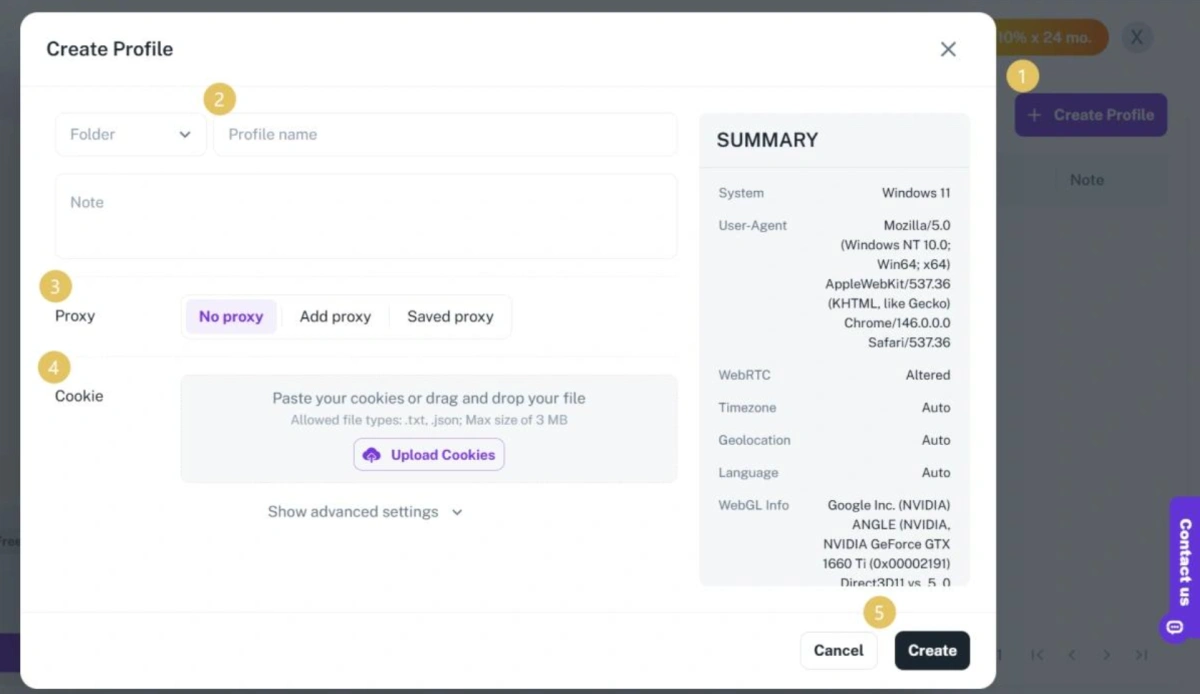
- Configure a Proxy (Optional): Add a suitable residential proxy to the corresponding profile based on your network requirements. FlashIP residential proxies offer geographic targeting options for users who need IP addresses from specific countries or regions. If you manage Telegram accounts for audiences in different markets, you can configure profiles with proxies from the corresponding regions. This can help you access Telegram Web through different regional IP addresses and review location-specific content or services.
- Launch the Profile: Start the profile to open an independent browser session with its saved settings and proxy configuration.
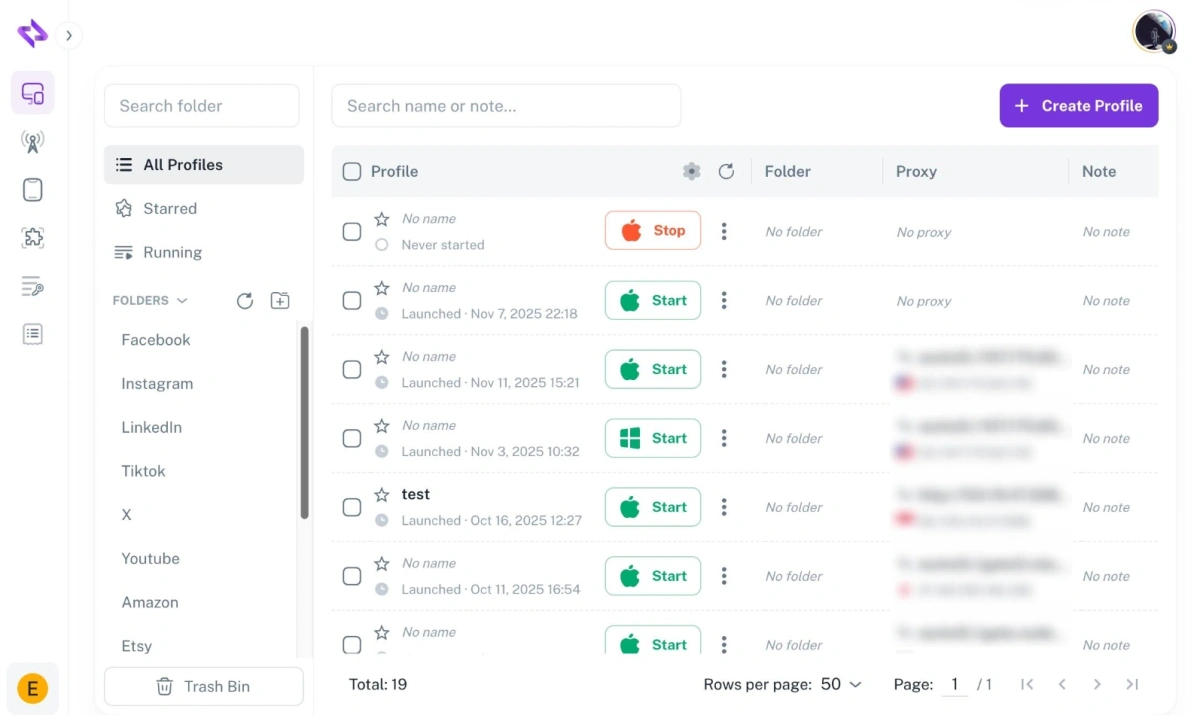
- Log In to Telegram Web: Visit Telegram Web and sign in to the corresponding Telegram account. Repeat the process using other profiles to access additional accounts.
Using separate profiles helps keep Telegram Web sessions organized and makes it easier to manage different account settings and proxy configurations.
Explore FlashID’s Social Media Marketing Solutions
FAQ
Will I lose my chats if I uninstall Telegram X?
Uninstalling Telegram X will not delete your Telegram account or cloud-based chat history. You can reinstall the app and sign in again to access your Cloud Chats. However, Secret Chats are tied to the original device and login session, so they may be lost when you uninstall the app or log out.
Can I create Telegram accounts for different countries using FlashID?
The FlashID anti-detect browser lets you create separate browser profiles and configure proxies from different countries or regions. This can help you manage Telegram Web accounts with different regional IP settings. However, FlashID does not create Telegram accounts or provide phone numbers for registration. You still need to complete Telegram’s official sign-up and verification process.
Can I use Telegram X without a phone number?
Telegram X uses the same account system as Telegram, so it does not offer a separate registration process. Telegram accounts require a supported phone number, including eligible anonymous numbers available through Fragment. An email address alone cannot replace this requirement.
Can I hide my phone number on Telegram X?
Telegram lets users control who can see their phone number through privacy settings. Since Telegram X uses the same account system, your account-level privacy settings generally carry over, although the location of these controls may differ by app version. Note that people who already have your number saved may still be able to see it.
What should I do if my Telegram account gets banned?
If your Telegram account is banned, check the restriction notice and follow Telegram’s official appeal process. You can also use @SpamBot to check spam-related restrictions. Our Telegram Account Banned Guide covers common reasons for bans and possible next steps.