This review explores how FlashID and TWT Chat can work together to support cross-border e-commerce and marketing teams. FlashID provides secure multi-account management, proxy integration, and team collaboration, while TWT Chat complements these capabilities with AI-powered customer support, multilingual communication, and remote assistance. Together, the two tools can help teams manage multiple accounts more efficiently while streamlining customer interactions and daily business operations.

TWT Chat Review: How TWT Chat and FlashID Work Together for Cross-Border Teams
Managing multiple online accounts may seem straightforward at first, but things can get complicated as the number of accounts grows.
For cross-border e-commerce sellers, digital marketing teams, agencies, and social media operators, managing multiple accounts often involves juggling different browser profiles, devices, proxies, login credentials, and team members. As operations expand, keeping everything organized can become a challenge in itself.
This is where anti-detect browsers have become part of the multi-account management toolkit.
FlashID allows users to manage accounts across supported platforms through browser profiles, with additional features for proxy integration, automation, and team collaboration.
Of course, managing account environments is only one part of the workflow. Once these accounts start bringing in leads, customer inquiries, orders, or support requests, teams also need an efficient way to manage customer communication.
That is where a customer support platform such as TWT Chat can fit into the wider workflow.
What Is FlashID?
FlashID positions itself as an anti-detect browser and multi-account management platform for global teams.
FlashID browser profiles allow users to manage accounts across supported platforms, with features including proxy integration, automation, and team collaboration. The platform also supports browser and mobile environments for different account management needs.
Its Account Center provides a centralized way to organize account credentials, 2FA information, browser profiles, and related resources.
For businesses looking for an anti-detect browser for managing multiple accounts, FlashID provides browser profiles and related tools designed to help organize different account environments in one place.Why Does Multi-Account Management Get Complicated?
Running two or three accounts is usually manageable.
The problems tend to show up when a business grows to dozens of accounts across different platforms and markets.
A typical workflow might involve:
· Multiple browser profiles
· Different account credentials
· Separate proxy configurations
· Cloud or mobile device environments
· Different team members handling different accounts
· Repetitive daily operations
· Multiple platforms with different workflows
Without a centralized system, teams can quickly end up switching between several tools just to complete routine tasks.
There is also the operational side of collaboration. When several people work on the same group of accounts, businesses need clear permissions and a way to keep projects, profiles, and resources organized.
FlashID addresses this with features such as Workspace management, role-based permissions, profile templates, Account Center, proxy integration, and Window Sync.
Residential Proxies and Multi-Account Workflows
Proxies are another part of the multi-account setup that businesses often need to think about.
For some teams, a residential proxy for multi-account management can be part of a broader account-environment strategy, particularly when operations involve different geographic markets or multiple working environments.
FlashID supports proxy integration at the profile level, allowing teams to associate proxy configurations with individual browser profiles. This keeps the proxy and browser environment organized rather than treating them as completely separate tools.
For businesses that already use residential proxy services, a provider such as IPFLY can be considered as part of the wider infrastructure.
The important point is that proxy management is only one piece of the workflow. Businesses still need to manage account profiles, permissions, team access, customer conversations, and day-to-day support separately.
FlashID for Cross-Border E-Commerce and Digital Marketing
Cross-border businesses are a natural use case for multi-account management tools.
An e-commerce company may operate stores across several markets. A marketing agency may manage accounts for multiple clients. A social media team may need separate working environments for different brands or campaigns.
In these situations, the challenge isn’t simply logging into an account. It’s keeping the whole working environment consistent and easy for the team to manage.
FlashID supports browser and mobile environments, while its cloud phone functionality gives teams another option when mobile-based workflows are part of their operations. The platform also supports proxy integration and profile-level environment management.
Its Window Sync feature is another practical addition. It allows actions such as clicks, typing, scrolling, and navigation to be synchronized across selected browser profiles, which can reduce repetitive manual work when the same operation needs to be performed across multiple environments.
For larger teams, Workspace and permission controls can also help separate projects, clients, or business units without putting everything into one shared environment.
FlashID Handles the Account Side — But What About Customers?
This is where the workflow becomes more interesting.
Managing accounts is only one part of running a digital business.
Once those accounts start bringing in traffic, leads, customers, and orders, another challenge appears: customer communication.
A customer might ask about a product, request technical help, need assistance with an order, or simply want to know what happens next. These conversations can happen across websites, email, social channels, and other communication touchpoints.
If account management and customer support are handled as completely separate processes, information can easily become scattered.
This is why it makes sense to look at FlashID and TWT Chat as two different layers of the same broader workflow rather than as competing products.
FlashID focuses on the account and operating environment.
TWT Chat focuses on the customer communication and support experience.
Where TWT Chat Fits Into the Workflow
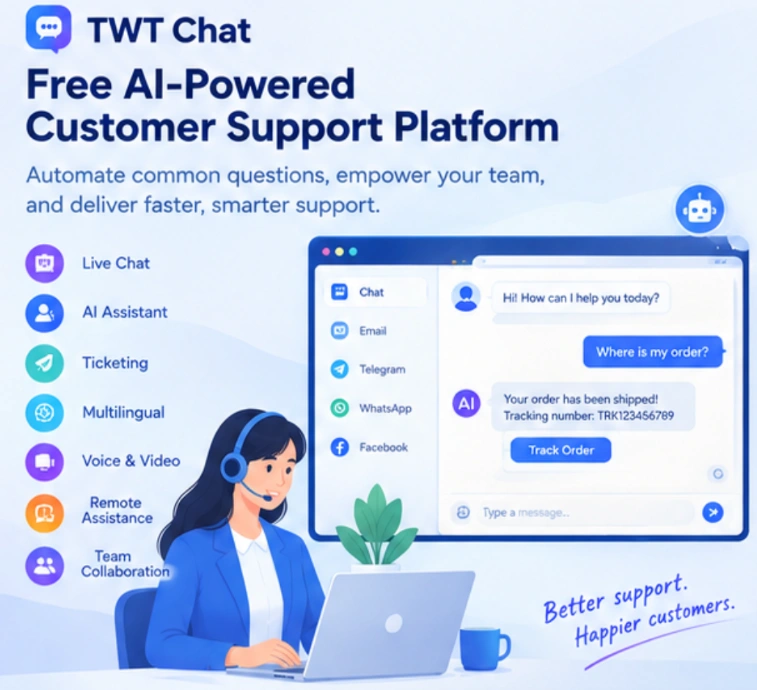
TWT Chat is an all-in-one customer service platform that brings live chat, ticketing, group chat, remote assistance, audio/video, AI capabilities, and team collaboration into one workspace.
For a growing cross-border business, this can be useful after the account management side has done its job.
Instead of asking the team to manage customer conversations through a collection of unrelated tools, TWT Chat gives them a shared workspace for handling inquiries and follow-ups.
It supports website chat, standalone chat pages, email, and Telegram, while customer information, conversation history, and support activity can be managed from the same platform.
That becomes particularly relevant for businesses that operate across different markets and time zones.
Looking for a Free AI-Powered Customer Support Platform?
The phrase “free AI-powered customer support platform” can mean different things depending on what a business actually needs.
Some platforms offer a permanent free plan with limited features, while others offer a free trial before moving to a paid plan. For businesses comparing customer support software, it’s worth looking beyond the word “free” and checking what is actually included.
TWT Chat offers a 14-day free trial without requiring a credit card, giving teams an opportunity to test its customer service, AI, translation, and collaboration features before making a longer-term decision.
Its AI capabilities are designed for practical support workflows rather than simply adding an AI chatbot to a website.
Customer support teams can use AI to handle common questions, assist agents with replies, improve written communication, and help with multilingual conversations.
AI Can Take Care of the Repetitive Questions
Customer support teams don’t need to manually answer the same basic questions all day.
Shipping times, pricing, product details, account questions, onboarding steps, and other FAQs often follow predictable patterns.
TWT Chat includes AI capabilities designed for these situations. Its Autopilot can handle common questions using a knowledge base, while Copilot can help human agents generate replies, polish wording, translate messages, and summarize conversations.
The idea isn’t to replace the support team.
It’s to let automation handle straightforward conversations while human agents spend more time on cases that actually need judgment or hands-on assistance.
That distinction matters as support volume grows.
Multilingual Support for Global Teams
Language can quickly become a bottleneck for international businesses.
A team may be comfortable communicating in English internally while customers are contacting them in Japanese, Spanish, Chinese, or other languages.
TWT Chat includes two-way real-time translation, allowing agents to communicate with customers in different languages without having to switch between separate translation tools.
For businesses selling across multiple regions, this can make customer support more practical without requiring every team member to be fluent in every target language.
It also makes TWT Chat relevant for companies that need to support customers across several markets from a relatively small team.
When Text Chat Isn’t Enough
Some customer problems are difficult to explain through text alone.
A customer may be stuck during setup, unable to find a particular feature, or dealing with a technical issue that is much easier to demonstrate visually.
In those situations, TWT Chat supports screen sharing, real-time annotations, remote assistance, audio calls, and video calls.
Instead of sending a long series of instructions, an agent can guide the customer through the problem directly.
For SaaS companies, technical support teams, online education providers, and cross-border businesses, this can shorten the back-and-forth that often happens when a problem is difficult to describe.
Team Collaboration Matters as Operations Grow
Both account management and customer support become harder when more people get involved.
A small team might be able to keep everything in their heads.
A larger team can’t.
FlashID provides Workspace, role management, permissions, and account-related organization features for teams working with multiple environments.
TWT Chat approaches collaboration from the customer service side. Teams can share customer information, conversation records, tickets, and internal communication within the same workspace.
This creates a fairly straightforward division of responsibilities:
| Business Layer | FlashID | TWT Chat |
|---|---|---|
| Account environments | ✓ | |
| Browser profiles | ✓ | |
| Proxy management | ✓ | |
| Multi-account workflows | ✓ | |
| Customer conversations | ✓ | |
| Ticket management | ✓ | |
| AI-assisted support | ✓ | |
| Real-time translation | ✓ | |
| Screen sharing & remote help | ✓ | |
| Customer follow-up | ✓ | |
| Support team collaboration | ✓ |
The two platforms are therefore complementary rather than direct substitutes. There is no need to assume a technical integration between them to see the value of the combination.
One manages the operational environment behind the accounts.
The other manages what happens when customers interact with the business.
Who Can Benefit From This Combination?
This type of workflow can make sense for several types of businesses.
Cross-Border E-Commerce Teams
Teams managing multiple stores or brands can use FlashID to organize account environments while using TWT Chat to centralize customer inquiries, after-sales support, and follow-up.
Digital Marketing Agencies
Agencies managing multiple clients often need clear separation between account environments and client-facing communication. FlashID can help organize the former, while TWT Chat can provide a shared support workspace for the latter.
SaaS Companies
SaaS businesses may have customers coming from multiple countries and time zones. TWT Chat’s live chat, AI assistance, translation, ticketing, and remote support features can help teams handle those conversations from one place.
Global Service Teams
For companies with distributed support teams, having a structured environment for both account operations and customer communication can reduce the number of disconnected tools employees need to switch between every day.
Final Thoughts
Managing multiple accounts at scale is rarely just a browser problem.
As businesses expand into new markets, the operational workflow becomes more complicated: accounts need to be organized, teams need appropriate access, repetitive work needs to be streamlined, and customers need timely support.
FlashID focuses on the first part of that equation, bringing browser profiles, cloud phones, proxies, automation, and workspace management into a unified environment.
TWT Chat covers the customer-facing side, combining live chat, ticketing, AI assistance, multilingual communication, remote support, and team collaboration in one platform.
For businesses operating across borders, the bigger opportunity is not simply choosing one tool over another. It’s building a workflow where account operations and customer service can keep pace with growth.
That is where tools such as FlashID and TWT Chat can play different — but complementary roles.
You May Also Like


