A proxy browser is a browser environment that lets each browser profile use its own proxy, identity settings, cookies, and session data. For multi-account teams, it matters because it helps separate accounts, reduce cross-profile overlap, and manage different online workspaces more consistently than a regular browser with shared settings.
Quick Answer
- A proxy browser connects each browser profile with its own proxy, cookies, login session, and environment settings.
- Profile-level isolation helps multi-account teams reduce account overlap and keep different online workspaces separate.
- Compared with proxy extensions, proxy browsers provide better account organization, proxy consistency, team collaboration, and workflow control.
- Common use cases include e-commerce, social media management, ad testing, affiliate workflows, market research, and client support.
- FlashID Antidetect Browser combines browser profiles, built-in or custom proxies, and profile parameters in one workspace for easier multi-account management.
How a Proxy Browser Works
A proxy browser works by combining two important layers: browser profile isolation and proxy routing.
The first layer is the browser profile. A browser profile stores browsing data such as cookies, cache, local storage, login sessions, browser settings, and sometimes fingerprint-related parameters. In a normal browser, multiple accounts may share the same browser environment unless the user manually separates them. This can create overlap between accounts, especially if the same cookies, device signals, or browser settings are reused across different logins.
A proxy browser is built to make this separation easier. Instead of using one browser environment for everything, users can create different profiles for different accounts, clients, markets, or projects. Each profile can have its own browsing data and settings. When the user opens a profile, it behaves like a separate browser workspace.
The second layer is the proxy. A proxy acts as a network route between the browser and the website. Instead of the website seeing the user’s original network directly, it sees the proxy IP address. Depending on the proxy type and configuration, this IP may come from a specific country, region, city, ISP, or mobile network.
In a proxy browser, the proxy is usually assigned directly to a browser profile. For example, Profile A may use a US residential proxy, Profile B may use a UK ISP proxy, and Profile C may use a Singapore mobile proxy. When the team member opens Profile A, all traffic from that profile goes through its assigned proxy. When they open Profile B, the traffic uses a different proxy.
This profile-level proxy setup is the core difference. The proxy is not just a temporary add-on. It becomes part of the profile’s operating environment. That means the account, cookies, session data, and proxy can stay together over time.
Proxy Browser vs Regular Browser + Proxy Extension
Many beginners start with a normal browser and a proxy extension. This can work for basic browsing, but it often becomes difficult to manage when the number of accounts increases. A proxy extension mainly changes the network route. It does not always create a fully separated browser environment for every account.
A proxy browser is different because it is designed for profile-based account management from the beginning. Instead of asking users to manually combine extensions, browser users, private windows, and spreadsheets, it brings profile data and proxy settings into one system.
| Feature | Proxy Browser | Regular Browser + Proxy Extension |
|---|---|---|
| Proxy setup | Usually assigned per browser profile | Usually controlled by the extension or browser-level setting |
| Cookie separation | Each profile can keep separate cookies and sessions | Cookies may still overlap unless manually separated |
| Account organization | Built for managing many profiles and accounts | Becomes messy as account numbers grow |
| Fingerprint control | Often includes profile-level fingerprint settings | Usually limited or not included |
| Team collaboration | May support profile sharing, permissions, and notes | Usually difficult to share safely with teammates |
| Proxy consistency | Easier to keep one account tied to one proxy | Easier to accidentally switch or reuse proxies |
| Scaling | Better for teams and repeated workflows | Better for simple personal browsing |
| Risk control | Helps reduce operational mistakes | Depends heavily on manual discipline |
| Best use case | Multi-account work, client operations, market testing, e-commerce, social media teams | Occasional proxy browsing or simple location testing |
A proxy browser is not just a browser with a changed IP. It is a profile-based system for keeping account environments separate, repeatable, and easier for teams to manage.
By contrast, a regular browser is usually designed for general browsing rather than structured account management. Even when a proxy extension is added, the workflow often still depends on manual switching, shared browser data, and separate records for proxies, accounts, and sessions. This makes the setup easier to confuse, especially when multiple accounts or team members are involved.
Why Multi-Account Teams Need a Proxy Browser
Multi-account teams do not only need proxies. They need structure.
A team may manage accounts for different brands, stores, regions, ad campaigns, affiliate projects, research tasks, or client accounts. Each account may have its own login history, location pattern, cookies, recovery information, and platform behavior. When all of this is handled casually, the team can quickly lose control.
The first benefit is identity separation. In multi-account work, accounts should not accidentally share the same browser data. If two accounts are supposed to represent different users, brands, or regions, mixing their cookies or sessions can create confusion. A proxy browser helps keep those environments apart.
The second benefit is location consistency. Many teams work across markets. For example, a marketing team may need to check search results, ads, landing pages, or platform content from different countries. An e-commerce team may manage stores or buyer accounts in different regions. A proxy browser lets each profile use a proxy that matches the intended market.
The third benefit is workflow control. In a team, not every member should have access to every account. Some users may only need to operate specific profiles. Some may need view-only information. Some managers may need to review profile assignments. A proxy browser with team features can make this easier than sharing passwords, proxies, and browser settings manually.
The fourth benefit is repeatability. Multi-account work is not a one-time action. Teams often need to log in, check messages, update listings, test pages, verify ads, collect information, or manage accounts every day. A proxy browser lets the same profile be reopened with the same environment, reducing setup time and repeated mistakes.
The fifth benefit is cleaner troubleshooting. When something goes wrong, teams need to know what changed. Was the proxy replaced? Did someone log in from a different location? Did a cookie reset? Did another team member use the wrong profile? With profile-based management, it is easier to isolate the problem.
Common Use Cases
Proxy browsers are useful when teams need to separate accounts, access region-specific content, or manage repeated online workflows in a more organized way. Common use cases include:
1.Why E-commerce operations require proxy browser?
Sellers and operation teams may manage multiple store accounts, buyer accounts, supplier accounts, or regional storefronts. A proxy browser helps keep each account in a separate profile with its own cookies, login state, and proxy location.
2.Why Social media, advertising, and marketing require proxy browser?
Agencies and marketing teams often manage accounts for different brands, clients, or campaigns. Separate browser profiles make it easier to review ads by region, test localized content, monitor competitors, and reduce the risk of opening the wrong account in the wrong environment.
3.Why Affiliate and market research workflows require proxy browser?
Affiliate teams can use proxy browsers to separate projects, traffic sources, partner accounts, or regional campaigns. Research teams can also view websites, prices, search results, and platform content from different locations for market comparison and quality checks.
4.Why Client support and web testing require proxy browser?
Customer support teams, virtual assistants, and QA teams may need controlled access to multiple client accounts or test how websites behave from different regions and IP types. A proxy browser keeps these tasks organized by placing each client, test case, or region in its own profile.
In all of these cases, the goal is not simply to use many accounts. The goal is to keep each account environment clear, stable, and easier to manage.
What a Proxy Browser Cannot Solve Alone
A proxy browser is useful, but it is not a magic solution. Teams should understand what it can and cannot do.
- A proxy browser cannot fix poor proxy quality.
If the proxy IP is unstable, overused, blacklisted, or inconsistent, the browser profile cannot fully compensate for it. The profile may be well organized, but the network signal may still create problems.
- A proxy browser cannot guarantee that accounts will never be restricted, verified, or reviewed.
Platforms use many signals, including login behavior, account history, content quality, payment information, device patterns, and user activity. A proxy browser helps with environment separation, but it does not remove all platform risk.
- A proxy browser cannot replace responsible account behavior.
If a team logs in too aggressively, changes locations too often, automates actions carelessly, or violates platform rules, the account may still face issues.
- A proxy browser cannot solve weak internal processes.
If team members share passwords randomly, forget which profile belongs to which account, ignore notes, or use the wrong profile, problems can still happen. A proxy browser provides structure, but the team still needs clear rules.
- A proxy browser cannot make every account look completely unrelated in every possible way.
Browser profiles and proxies are only part of the overall account identity. Account behavior, content, timing, payment methods, recovery details, and platform interactions also matter.
- A proxy browser cannot replace compliance.
Some platforms have strict rules about account creation, account management, scraping, automation, or regional access. Teams should understand and follow the rules of the platforms they use.
How FlashID Antidetect Browser Combines Browser Profiles and Proxy Setup
FlashID Antidetect Browser gives users flexibility when setting up proxies. When creating a new profile, users can choose FlashID built-in proxies or add their own custom proxies.
FlashID built-in proxies include residential, datacenter, ISP, and mobile proxies. They support 190+ countries, city-level targeting, static IP options, 4G/5G rotation, and high-concurrency tasks. Users can select proxies directly when creating a new environment, reducing manual setup errors and improving stability and efficiency for multi-account operations.
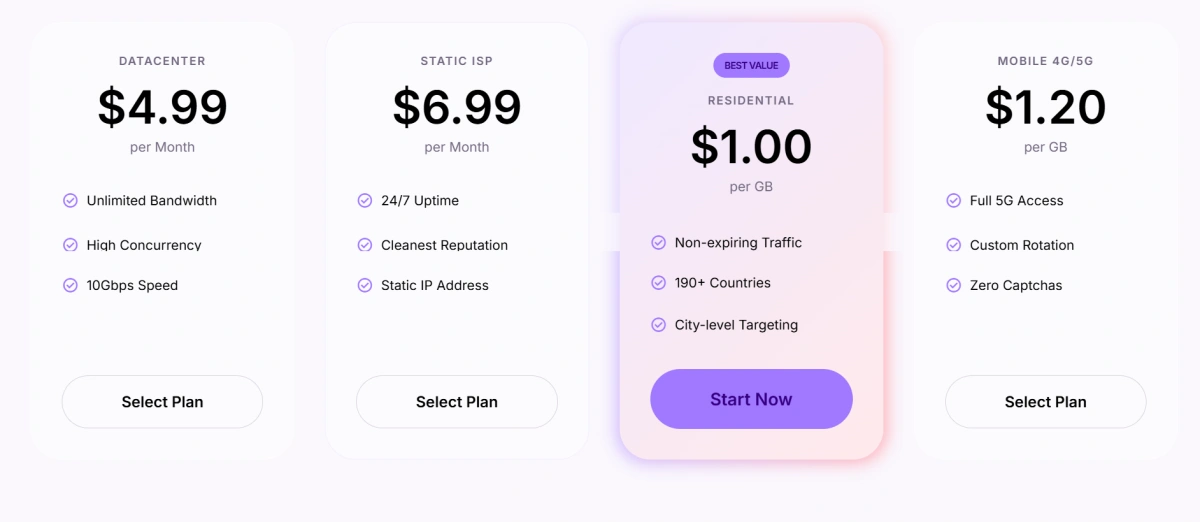
FlashID’s advantage is not only proxy access, but keeping browser profiles, proxy settings, session data, and environment parameters in one workflow. This helps users save setup time, reduce manual errors, and manage multiple accounts with greater consistency and efficiency.
How Teams Can Start with FlashID in 3 Simple Steps
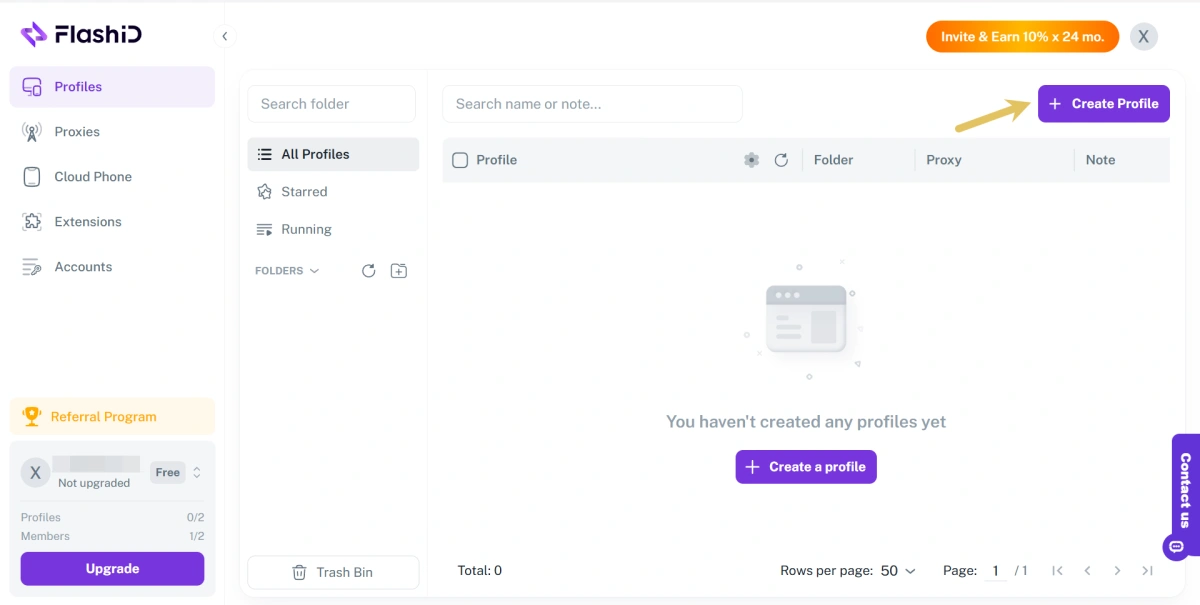
Step 1: Create a profile Create a new browser environment for the account, client, project, or platform you want to manage.
Step 2: Add a proxy Choose either a FlashID built-in proxy or a custom proxy. If you use a built-in proxy, you can complete the setup more quickly inside FlashID. If you use a custom proxy, enter the proxy details and test the connection before saving.
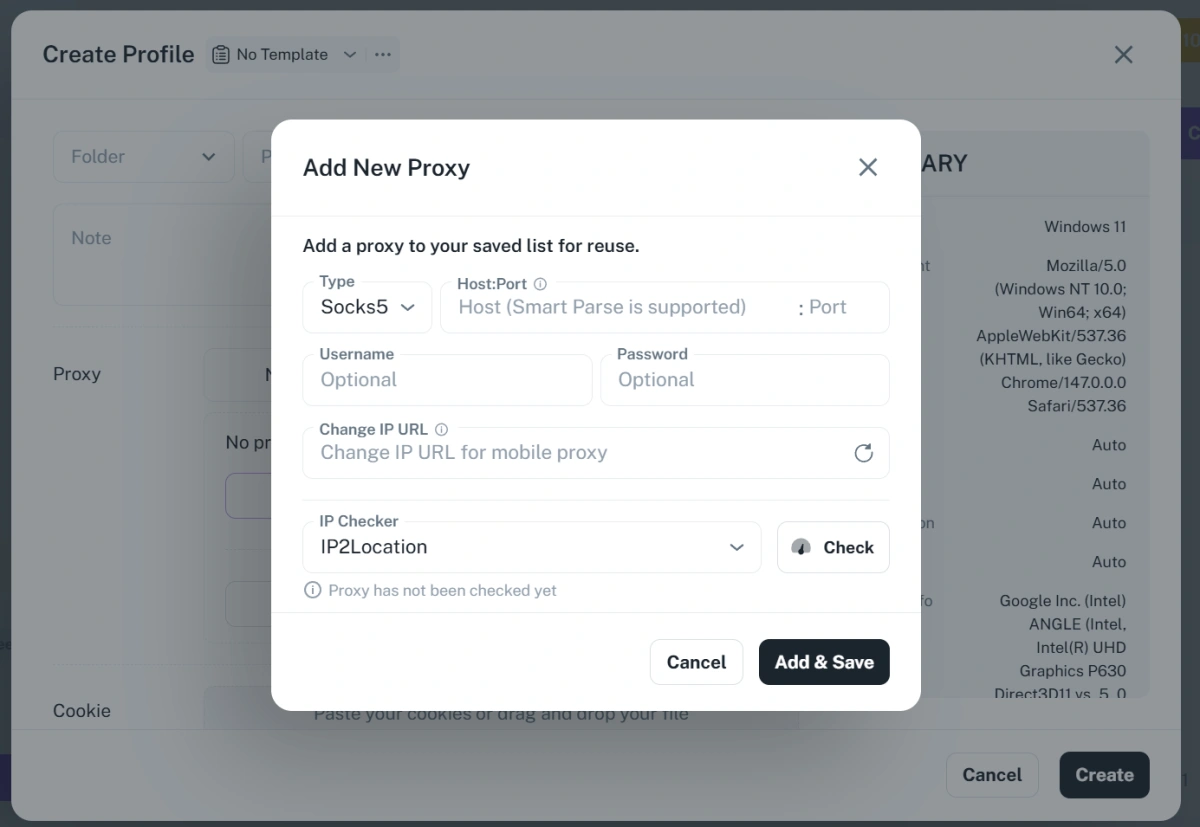
Then configure the profile settings based on your workflow, such as WebRTC, User-Agent, WebGL Info, language, time zone, and other profile parameters.
Step 3: Launch and start working Once the environment is ready, click Start to open it. The account will run inside its own browser profile with the selected proxy and environment settings, making it easier for teams to manage multiple accounts without mixing sessions or switching tools manually.
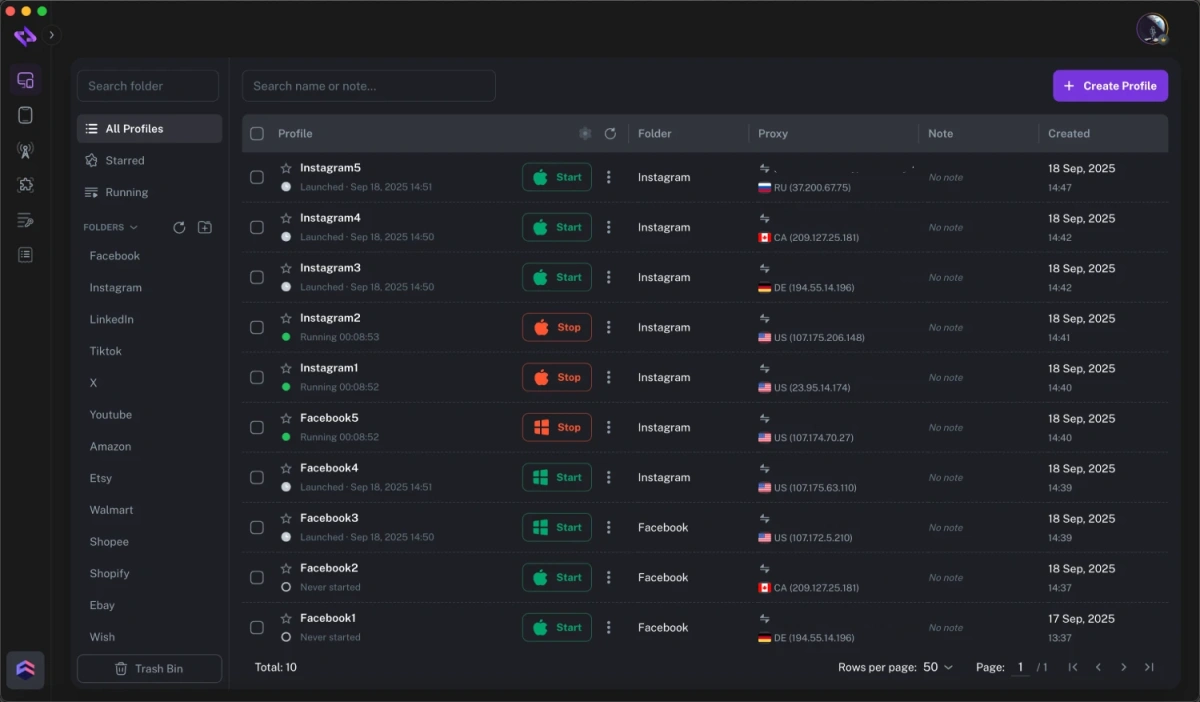
By combining browser profiles and proxy setup in one place, FlashID helps multi-account teams turn a complicated technical process into a repeatable workflow. Teams can create, organize, and launch separate account environments more efficiently, while reducing the common mistakes that happen when proxies and browser profiles are managed separately.
Conclusion
A proxy browser matters because multi-account work requires more than a changed IP address. Teams need separated profiles, consistent proxies, organized sessions, and repeatable workflows. A regular browser with a proxy extension may be enough for simple browsing, but it often becomes unreliable at scale. With FlashID, teams can combine browser profiles and proxy setup in one workspace, making multi-account operations easier to manage with clearer structure and fewer manual mistakes.
If you’d like to stay updated with practical insights and industry trends, feel free to join our community.
FAQ
1. What is a proxy browser?
A proxy browser is a browser tool that lets users connect browser profiles to proxies. Each profile can keep its own cookies, sessions, and settings, while traffic from that profile goes through a selected proxy. This helps users separate different online environments more clearly.
2. Is a proxy browser the same as a VPN?
No. A VPN usually routes the entire device or network connection through one VPN server. A proxy browser can route different browser profiles through different proxies, which is more flexible for multi-account workflows. Teams often prefer proxy browsers when they need profile-level control.
3. Why not just use a proxy extension?
A proxy extension can change the IP route, but it may not fully separate cookies, sessions, fingerprints, or account data. For one-time browsing, that may be enough. For teams managing many accounts, a proxy browser is usually easier to organize and safer from an operational standpoint.
4. Can a proxy browser prevent account bans?
No tool can guarantee that accounts will never be restricted or banned. A proxy browser can help reduce mistakes related to shared environments, wrong proxies, and messy workflows. However, proxy quality, account behavior, platform rules, and team discipline still matter.
5. Who should use a proxy browser?
A proxy browser is useful for teams that manage multiple accounts, markets, clients, or regions. Common users include e-commerce teams, social media managers, affiliate teams, ad testers, market researchers, and virtual assistant teams. It is especially helpful when account separation and repeatable workflows are important.
You May Also Like


