Awesome Screen Recorder & Screenshot
Record your screen and capture high-quality screenshots with Awesome Screen Recorder. The ultimate tool for tutorials, demos, and collaboration via FlashID.
Professional Screen Recording & Capture
Join over 4 million users with the most reliable tool for recording your desktop, browser tabs, or webcam. Capture, annotate, and share your work instantly.
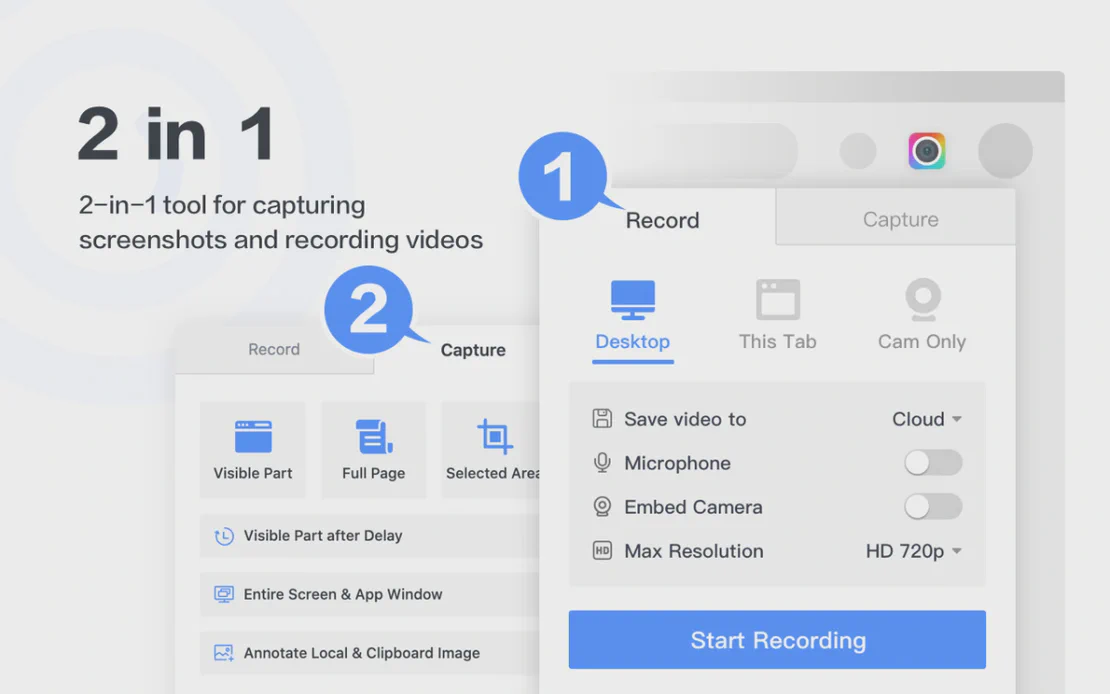
Awesome Screen Recorder & Screenshot is a top-tier tool for screen recording and page capturing. Integrated with FlashID’s secure browser environment, it allows users to create professional demos, tutorials, and bug reports with powerful annotation features.
Powerful Screen Recording
Record your entire desktop, specific windows, or browser tabs in up to 4K resolution. Include your webcam and microphone for professional video tutorials.
Get Started
High-Quality Screenshots
Capture visible parts, selected areas, or full-page screenshots. Save them as PNG, JPG, or PDF, or copy directly to your clipboard for instant sharing.
Get Started
Annotate & Share Instantly
Edit your captures with arrows, text, and blurs. Sync directly to Jira, Slack, Trello, and GitHub to streamline your team's communication and workflow.
Get Started

Unlimited Multiplicity
Multiple devices, no limits
No purchase limit, no multiplicity limit, no opening limit

Multi-Platform Control
Anytime, anywhere, just click
No client download required, accessible via PC and mobile browsers

Application Management
Application management so easy
Bulk install, uninstall, and launch applications

RPA
Leverage FlashID’s pre-built RPA templates for fast automation or custom workflows in secure cloud.

API
FlashID API handles account lifecycles and automates browser actions: batch social logins.

One-Click Sharing
Efficient management
Join a team with one click, share cloud devices among multiple users
Capture and Share Your Vision
Stop wasting time with complex editing software. Record, capture, and annotate everything on your screen with one powerful extension.
Frequently Asked Questions
Can I record my screen in 4K?
Is my privacy protected while using this extension?
What formats can I save my screen recordings in?
Can I annotate my screenshots and videos?
Is this extension compatible with Google Chrome?
How do I share my captures with my team?
Does it support full-page screenshots?
Can I use it for free?
Does it record both audio and webcam?
How do I install the extension?
More Recommended Platforms



















Connect all your platform accounts
Thanks to our fingerprint technology, you no longer need to worry about your account being at risk, you just need to focus on your business.
Trusted by Millions of Professionals
Operations Manager, Efficiency Experts
Digital Marketing Manager, Tech Innovations
Customer Support Lead, Service Plus