Browser History Plus
Enhance your history management with Browser History Plus. Feature-rich extension with calendar view, advanced search, and one-click data cleaning.
Upgrade Your History Experience
Tired of the cluttered default history page? Browser History Plus provides a clean calendar view and advanced tools to manage your digital footprint effortlessly.
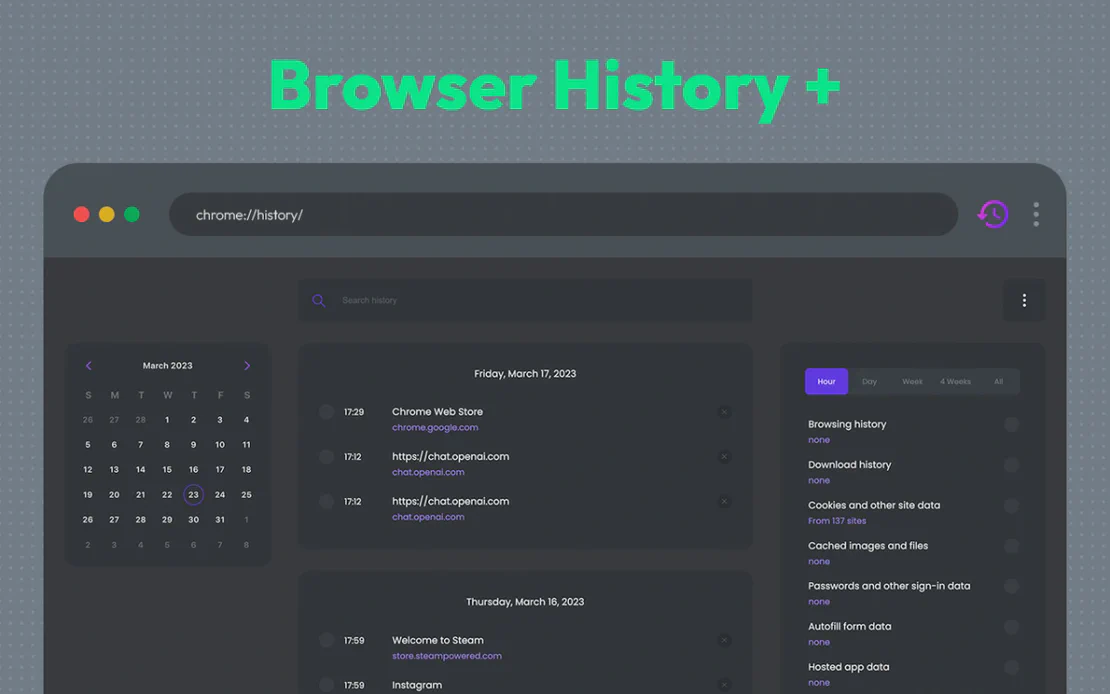
Browser History Plus replaces the default browser history with a powerful management suite. Integrated with FlashID’s technology, it allows users to navigate, search, and clean their browsing data with unparalleled ease and efficiency.
Intuitive Calendar View
Navigate your past browsing activity visually. Select specific dates to instantly see exactly which websites you visited, making recall faster than ever.
Get Started
One-Click Privacy Cleaning
Protect your privacy and free up disk space by easily clearing cache, history, downloads, and cookies with customizable cleaning options.
Get Started
Advanced Keyword Search
Quickly find long-forgotten websites using powerful keyword filtering. Efficiently search through thousands of entries in seconds.
Get Started

Unlimited Multiplicity
Multiple devices, no limits
No purchase limit, no multiplicity limit, no opening limit

Multi-Platform Control
Anytime, anywhere, just click
No client download required, accessible via PC and mobile browsers

Application Management
Application management so easy
Bulk install, uninstall, and launch applications

RPA
Leverage FlashID’s pre-built RPA templates for fast automation or custom workflows in secure cloud.

API
FlashID API handles account lifecycles and automates browser actions: batch social logins.

One-Click Sharing
Efficient management
Join a team with one click, share cloud devices among multiple users
Master Your Browsing Data
Browser History Plus provides the controls you need to browse smarter, clean faster, and manage your history with precision.
Frequently Asked Questions
What is Browser History Plus?
Is my browsing history safe with FlashID?
How does the calendar view help?
Can I delete specific types of data?
Is it compatible with all browsers?
How do I install the extension?
Does it help with browser performance?
Will it help me find old websites?
Does it store my personal data on external servers?
Does it support clearing malware signatures?
More Recommended Platforms




















Connect all your platform accounts
Thanks to our fingerprint technology, you no longer need to worry about your account being at risk, you just need to focus on your business.
User Success Stories
Operations Manager, Efficiency Experts
Digital Marketing Manager, Tech Innovations
Customer Support Lead, Service Plus