ColorZilla
ColorZilla is the ultimate Chrome extension for advanced color picking, eyedropper functionality, gradient generation, and color analysis. Boost your design workflow with over 10 million downloads worldwide.
Advanced Color Tools at Your Fingertips
Unlock powerful color selection with ColorZilla’s eyedropper, picker, and gradient generator. Perfect for designers streamlining workflows in FlashID.
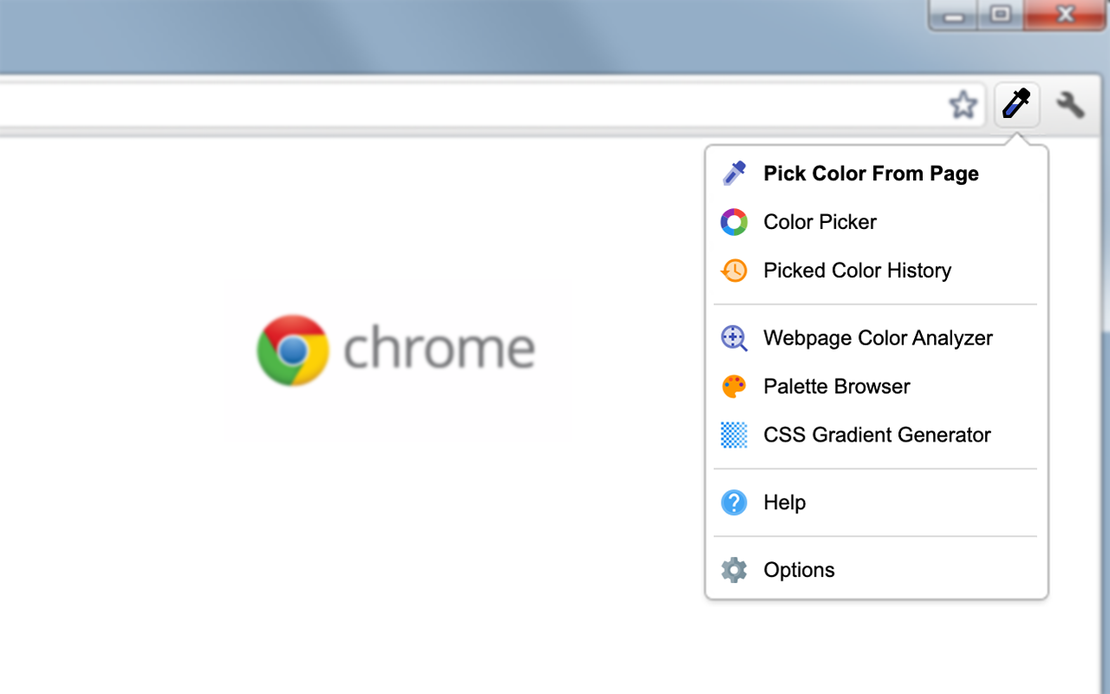
ColorZilla is the most user-friendly, full-featured color picker and suite of color tools for Chrome. With eyedropper, gradient generator, and palette analyzer, it empowers designers and developers using FlashID’s fingerprint browser to capture and manipulate colors effortlessly from any webpage.
Advanced Eyedropper & Color Picker
Capture exact colors from any pixel on webpages with various sample sizes, CSS gradient support, and instant clipboard copy.
Get Started
Ultimate CSS Gradient Generator
Generate professional CSS gradients quickly with an intuitive interface similar to Photoshop, saving time in your design process.
Get Started
Webpage Color Palette Analyzer
Analyze any site's color palette, view history of picked colors, and access preloaded palettes for seamless color workflow integration.
Get Started

Unlimited Multiplicity
Multiple devices, no limits
No purchase limit, no multiplicity limit, no opening limit

Multi-Platform Control
Anytime, anywhere, just click
No client download required, accessible via PC and mobile browsers

Application Management
Application management so easy
Bulk install, uninstall, and launch applications

RPA
Leverage FlashID’s pre-built RPA templates for fast automation or custom workflows in secure cloud.

API
FlashID API handles account lifecycles and automates browser actions: batch social logins.

One-Click Sharing
Efficient management
Join a team with one click, share cloud devices among multiple users
Elevate Your Color Workflow
ColorZilla’s eyedropper, color picker, and gradient generator automate color selection, making it ideal for designers using FlashID’s secure browsing.
Frequently Asked Questions
What is ColorZilla?
Is ColorZilla safe to use with FlashID?
How does the eyedropper work?
Can ColorZilla generate CSS gradients?
Is ColorZilla compatible with all browsers?
How do I install ColorZilla?
Why does ColorZilla need access to all websites?
What if ColorZilla doesn't work?
Does ColorZilla store my data?
Can I customize ColorZilla settings?
More Recommended Platforms




















Connect all your platform accounts
Thanks to our fingerprint technology, you no longer need to worry about your account being at risk, you just need to focus on your business.
Designer Success Stories Trusted Worldwide
UI/UX Designer, Creative Studio
Front-End Developer, Tech Innovations
Graphic Designer, Design Hub