HTTP Tracker
Use HTTP Tracker's advanced features to inspect and modify HTTP request headers, cookies, and network traffic, enhancing your web browsing and data management.
Effortless HTTP Traffic Monitoring
Say goodbye to chaotic network analysis! With this tool, you can inspect and modify HTTP requests, allowing for streamlined data management.
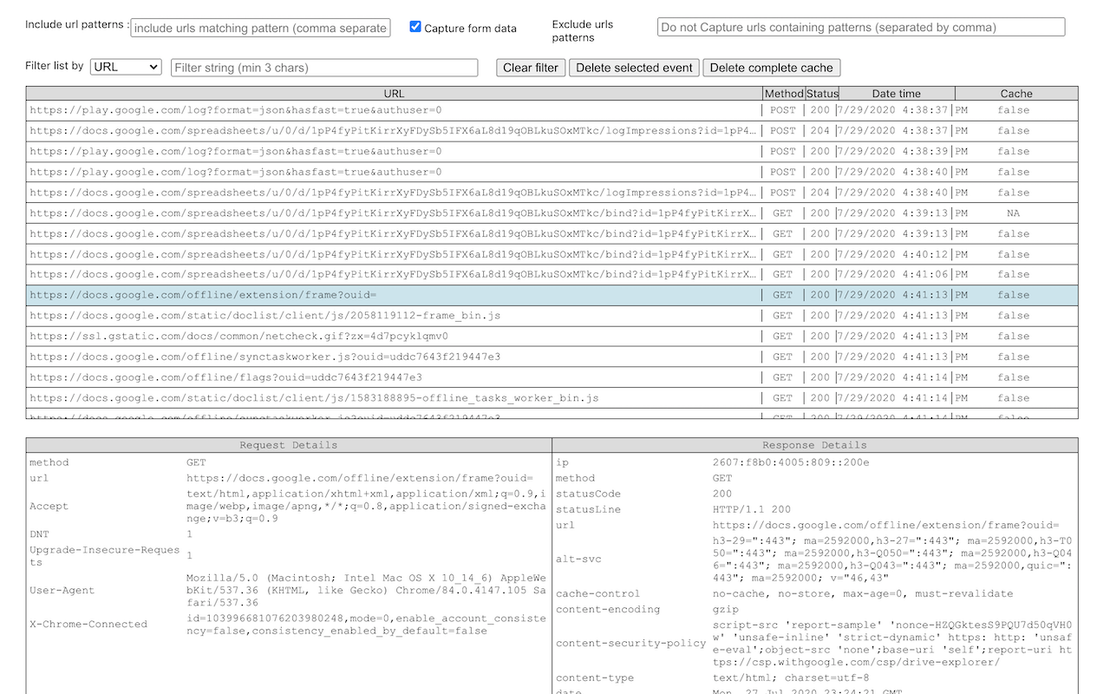
HTTP Tracker is a powerful tool designed to automate the inspection and management of HTTP requests and responses. With its comprehensive features, users can effectively monitor and manipulate network traffic across various web platforms.
Monitor Network Traffic
Effortlessly track HTTP request headers, cookies, and response data across all tabs in a single extension window.
Get Started Now
Filter and Capture Requests
Filter requests based on various attributes, allowing you to view and manage network interactions effectively.
Get Started Now
Edit Request Headers
Modify request headers before sending to effectively manage how your browser interacts with various servers.
Get Started Now

Unlimited Multiplicity
Multiple devices, no limits
No purchase limit, no multiplicity limit, no opening limit

Multi-Platform Control
Anytime, anywhere, just click
No client download required, accessible via PC and mobile browsers

Application Management
Application management so easy
Bulk install, uninstall, and launch applications

RPA
Leverage FlashID’s pre-built RPA templates for fast automation or custom workflows in secure cloud.

API
FlashID API handles account lifecycles and automates browser actions: batch social logins.

One-Click Sharing
Efficient management
Join a team with one click, share cloud devices among multiple users
Say Goodbye to Network Monitoring Frustrations
HTTP Tracker simplifies the process of monitoring and modifying HTTP requests, enabling a more productive online experience.

Common related content QA
Can HTTP Tracker monitor network traffic?
Is it safe to use HTTP Tracker?
How does request modification work?
Can I view filtered requests with HTTP Tracker?
Is HTTP Tracker compatible with all browsers?
How do I install the HTTP Tracker extension?
Does the HTTP Tracker store my data?
Can I customize settings for HTTP Tracker?
More Recommended Platforms




















Connect all your platform accounts
Thanks to our fingerprint technology, you no longer need to worry about your account being at risk, you just need to focus on your business.
Client Success Stories Trusted Worldwide
Web Developer, Code Masters
Data Analyst, Insight Solutions
QA Lead, Testing Pros