Lightshot
Master your screen captures with Lightshot. The fastest way to take customizable screenshots, edit instantly, and share images across any platform.
Fast & Customizable Screen Captures
Capture anything on your screen with just two clicks! Lightshot provides a simple interface for selecting areas, editing on the fly, and sharing links instantly.
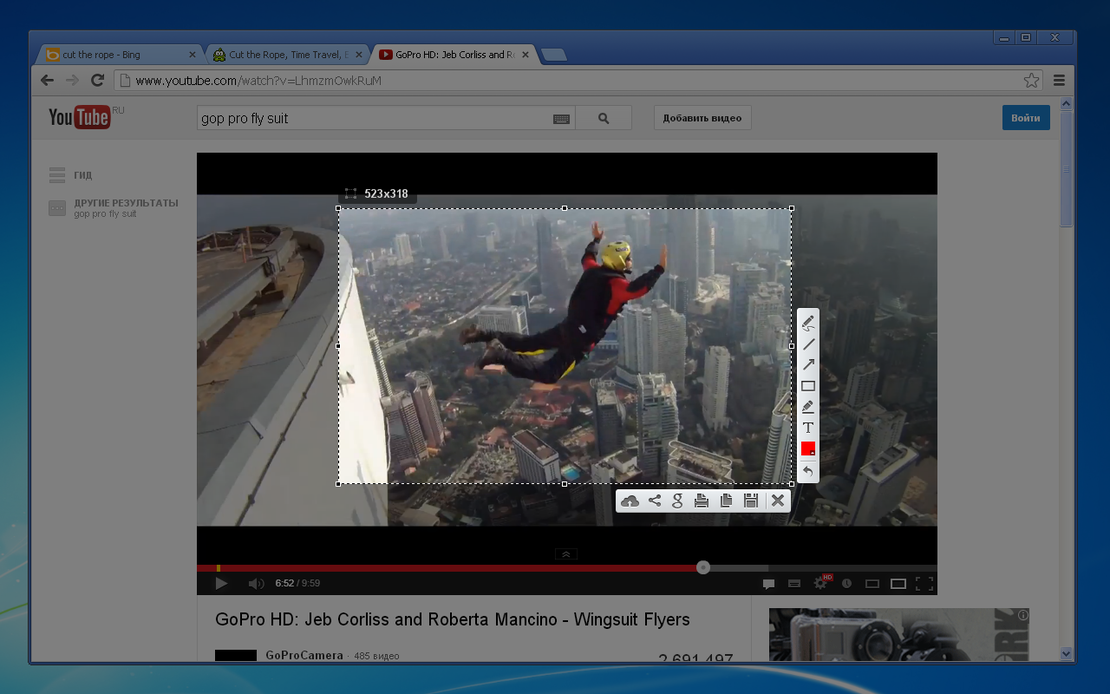
Lightshot is the most convenient tool for quick and easy screen captures. Integrated with FlashID’s workflow, it allows users to select any area on their screen, edit screenshots in real-time, and upload them instantly for seamless collaboration.
Select Any Area
Our application allows you to select any area on your desktop and take its screenshot with two button clicks.
Get Started
Powerful In-Browser Editor
You can edit screenshots instantly when taking them or later using a powerful online editor with markers and text tools.
Get Started
Share via Web
Upload your screenshots to the server and get a short link right away. It's the fastest way to share visual data securely.
Get Started

Unlimited Multiplicity
Multiple devices, no limits
No purchase limit, no multiplicity limit, no opening limit

Multi-Platform Control
Anytime, anywhere, just click
No client download required, accessible via PC and mobile browsers

Application Management
Application management so easy
Bulk install, uninstall, and launch applications

RPA
Leverage FlashID’s pre-built RPA templates for fast automation or custom workflows in secure cloud.

API
FlashID API handles account lifecycles and automates browser actions: batch social logins.

One-Click Sharing
Efficient management
Join a team with one click, share cloud devices among multiple users
Capture Your Vision with Lightshot
Stop wasting time with complicated shortcuts. Use Lightshot to capture, edit, and share screenshots effortlessly within your FlashID browser.
Lightshot FAQ
How do I take a screenshot with Lightshot?
Is Lightshot safe to use with FlashID?
Can I edit screenshots before saving them?
Does Lightshot support cloud uploading?
Is Lightshot available for Google Chrome?
Can I search for similar images using Lightshot?
Is there a limit to how many screenshots I can take?
What should I do if the extension isn't responding?
Does it store my screenshot history?
Can I change the file format of the saved image?
More Recommended Platforms




















Connect all your platform accounts
Thanks to our fingerprint technology, you no longer need to worry about your account being at risk, you just need to focus on your business.
User Experiences from Around the Globe
Operations Manager, Efficiency Experts
Digital Marketing Manager, Tech Innovations
Customer Support Lead, Service Plus