SingleFile
Use SingleFile to save complete web pages with CSS, images, and fonts into a single HTML file. Enhance your web archiving and data management with FlashID.
Complete Web Page Archiving
Capture everything on a page instantly! Save CSS, images, and fonts into one manageable file to ensure your web references never expire or break.
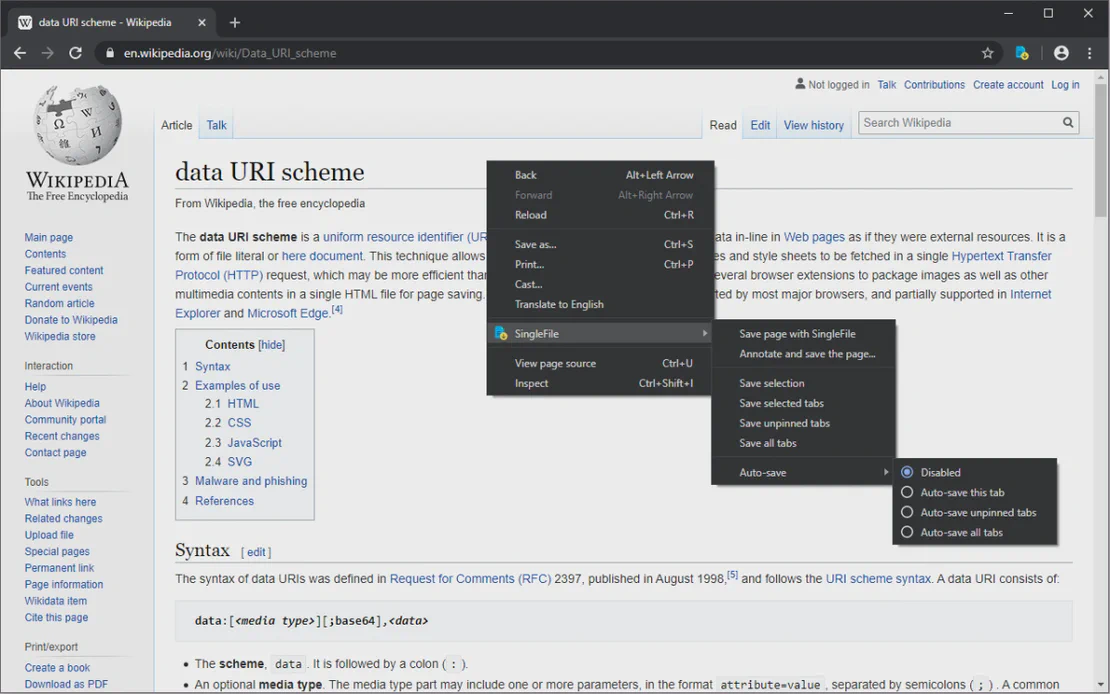
SingleFile is a robust browser extension designed to archive web content effortlessly. By integrating with FlashID’s environment, it allows users to save entire web pages—including images and styling—into a single, portable HTML file for offline viewing and organized documentation.
Comprehensive Page Saving
Convert any complex website into a single HTML file with all assets embedded, ensuring identical rendering even when offline.
Get Started
Batch & Partial Capture
Save multiple tabs at once, or focus on specific selections and frames. Use auto-save features to build your library automatically.
Get Started
Annotation & Cloud Sync
Highlight text and add notes before saving. Directly upload your snapshots to Google Drive, Dropbox, or GitHub via built-in integrations.
Get Started

Unlimited Multiplicity
Multiple devices, no limits
No purchase limit, no multiplicity limit, no opening limit

Multi-Platform Control
Anytime, anywhere, just click
No client download required, accessible via PC and mobile browsers

Application Management
Application management so easy
Bulk install, uninstall, and launch applications

RPA
Leverage FlashID’s pre-built RPA templates for fast automation or custom workflows in secure cloud.

API
FlashID API handles account lifecycles and automates browser actions: batch social logins.

One-Click Sharing
Efficient management
Join a team with one click, share cloud devices among multiple users
Never Lose Web Content Again
SingleFile simplifies web archiving by condensing complex pages into a single, easy-to-manage HTML document.
SingleFile Frequently Asked Questions
What exactly does SingleFile save?
Is SingleFile compatible with FlashID?
How do I save a page using SingleFile?
Can I save multiple tabs at once?
Does SingleFile support cloud storage?
Can I edit the page before saving?
Is there an auto-save feature?
What is 'Proof of Existence'?
Are my saved files private?
Is SingleFile free to use?
More Recommended Platforms




















Connect all your platform accounts
Thanks to our fingerprint technology, you no longer need to worry about your account being at risk, you just need to focus on your business.
Trusted by Web Researchers Worldwide
Operations Manager, Efficiency Experts
Digital Marketing Manager, Tech Innovations
Customer Support Lead, Service Plus